Avamar: Unable to Launch Avamar Administrator JNLP with Java 1.8.0_481
Summary: This article outlines a known issue that occurs in Avamar Administrator (JNLP) following an update to Java version 1.8.0_481.
This article applies to
This article does not apply to
This article is not tied to any specific product.
Not all product versions are identified in this article.
Symptoms
After updating Java to version 1.8.0_481 on the user’s Windows machine, it is no longer possible to launch Avamar Administrator using the JNLP file.
- On the Windows machine, confirm that the installed Java version is 1.8.0_481.
java -version
C:\>java -version
java version "1.8.0_481"
Java(TM) SE Runtime Environment (build 1.8.0_481-b10)
Java HotSpot(TM) 64-Bit Server VM (build 25.481-b10, mixed mode)
C:\>
- Access the Avamar webpage:
https://<Avamar_IP_Address>/dtlt/home.html - Click the Administrator hyperlink to download the
administrator.jnlpfile. - Open the
JNLPfile and confirm that it is being launched using Java. - Attempt to log in.
- The error described in the screenshot appears.
"Invalid Certificate. Install a valid certificate and try again. You can use the Java Control Panel to import certificate"
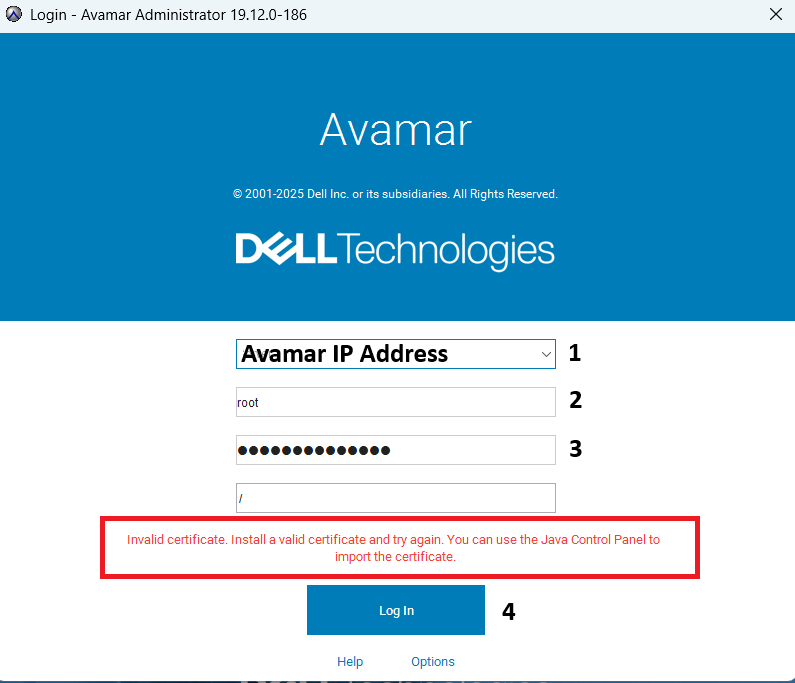
- The log file
/usr/local/avamar/var/mc/server_log/mcserver.log.0shows:
FINE: RMI TCP Connection(1982584)-192.168.1.110: terminated with exception:
javax.net.ssl.SSLException: Fatal Alert received: Certificate Unknown
        at com.rsa.sslj.x.aI.a(Unknown Source)
        at com.rsa.sslj.x.aI.a(Unknown Source)
        at com.rsa.sslj.x.aI.a(Unknown Source)
        at com.rsa.sslj.x.ap.c(Unknown Source)
        at com.rsa.sslj.x.ap.b(Unknown Source)
        at com.rsa.sslj.x.ap.b(Unknown Source)
        at com.rsa.sslj.x.al.read(Unknown Source)
        at java.io.BufferedInputStream.fill(BufferedInputStream.java:246)
        at java.io.BufferedInputStream.read(BufferedInputStream.java:265)
        at java.io.DataInputStream.readInt(DataInputStream.java:387)
        at sun.rmi.transport.tcp.TCPTransport$ConnectionHandler.run0(TCPTransport.java:727)
        at sun.rmi.transport.tcp.TCPTransport$ConnectionHandler.lambda$run$0(TCPTransport.java:688)
        at java.security.AccessController.doPrivileged(Native Method)
        at sun.rmi.transport.tcp.TCPTransport$ConnectionHandler.run(TCPTransport.java:687)
        at java.util.concurrent.ThreadPoolExecutor.runWorker(ThreadPoolExecutor.java:1149)
        at java.util.concurrent.ThreadPoolExecutor$Worker.run(ThreadPoolExecutor.java:624)
        at java.lang.Thread.run(Thread.java:750)03/09-10:21:09.00246 [RMI TCP Connection(1982585)-192.168.1.110#1343977] sun.rmi.transport.tcp.TCPTransport$ConnectionHandler.run0
FINE: RMI TCP Connection(1982585)-10.16.107.15: terminated with exception:
javax.net.ssl.SSLException: Ciphertext is too large in received TLS record
        at com.rsa.sslj.x.aI.b(Unknown Source)
        at com.rsa.sslj.x.aI.a(Unknown Source)
        at com.rsa.sslj.x.aI.a(Unknown Source)
        at com.rsa.sslj.x.ap.c(Unknown Source)
        at com.rsa.sslj.x.ap.b(Unknown Source)
        at com.rsa.sslj.x.ap.b(Unknown Source)
        at com.rsa.sslj.x.al.read(Unknown Source)
        at java.io.BufferedInputStream.fill(BufferedInputStream.java:246)
        at java.io.BufferedInputStream.read(BufferedInputStream.java:265)
        at java.io.DataInputStream.readInt(DataInputStream.java:387)
        at sun.rmi.transport.tcp.TCPTransport$ConnectionHandler.run0(TCPTransport.java:727)
        at sun.rmi.transport.tcp.TCPTransport$ConnectionHandler.lambda$run$0(TCPTransport.java:688)
        at java.security.AccessController.doPrivileged(Native Method)
        at sun.rmi.transport.tcp.TCPTransport$ConnectionHandler.run(TCPTransport.java:687)
        at java.util.concurrent.ThreadPoolExecutor.runWorker(ThreadPoolExecutor.java:1149)
        at java.util.concurrent.ThreadPoolExecutor$Worker.run(ThreadPoolExecutor.java:624)
        at java.lang.Thread.run(Thread.java:750)
Caused by: com.rsa.sslj.x.aL: Ciphertext is too large in received TLS record
Cause
This issue occurs for any Avamar version. Engineering is investigating this behavior.
Resolution
Alternatives
- Use the installable version of Avamar Administrator, which includes an embedded Java version (1.8.0_202).
- Use the Avamar User Interface (AUI).
Workarounds
- Set the parameter
rmi_over_sslto false in the file/usr/local/avamar/var/mc/server_data/mcserver.xmland then restart theManagement Console Service (MCS). - If modifying the parameter is not possible, use OpenWebStart (External Link) to open the JNLP file.
Affected Products
AvamarArticle Properties
Article Number: 000437907
Article Type: Solution
Last Modified: 27 آذار 2026
Version: 3
Find answers to your questions from other Dell users
Support Services
Check if your device is covered by Support Services.