Data Protection Central: UI Login Failure with the Error "This field is read-only"
Summary: This article provides a procedure for Data Protection Central (DPC) when the User Interface (UI) fails to log in with the error "This field is read-only."
Symptoms
Logging in to the DPC UI fails with the error message "This field is read only. You can't update your username as it is read-only."
For example:
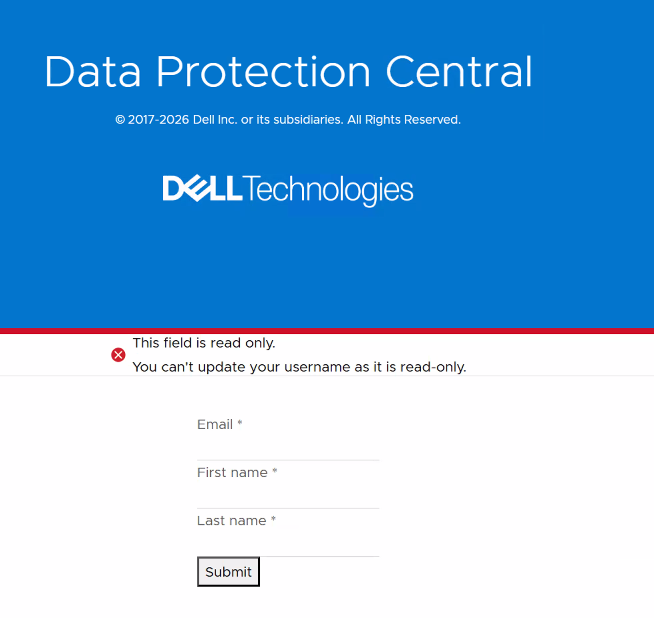
In the keycloak.log, it fails with an error message similar to:
2026-03-31 04:16:59,814 INFO  [com.dellemc.dpkeycloak.eventlistenerprovider.DPEventListener] (executor-thread-72) EVENT RECEIVED: EVENT TYPE IS VERIFY_PROFILE
2026-03-31 04:16:59,814 INFO  [com.dellemc.dpkeycloak.eventlistenerprovider.DPEventListener] (executor-thread-72) default noop for event: VERIFY_PROFILE
Cause
In DPC version 19.12 or later, the Identity and Access Management (IAM) provider, Keycloak, was upgraded to version 25.0.6. The Keycloak VERIFY_PROFILE action is enabled by default.
Dell PowerProtect Data Protection Series Appliance (IDPA) 2.7.9 includes DPC version 19.12.1.0.
Resolution
To remediate the issue, run the following command with the IAM (kcadmin) password that was set up in the deployment. For IDPA DPC, it should be the same as the common password:
/usr/local/dpc/lib/iam/bin/disable_verify_profile.sh "IAM (kcadmin) password"
An example output when running the command (in this example, the IAM password is Idpa_2345):
admin@idpa-dpc:~> /usr/local/dpc/lib/iam/bin/disable_verify_profile.sh Idpa_12345
Verify Profile action has been disabled.
admin@idpa-dpc:~>
Open a new browser session and log in to the DPC UI again.