iDRAC: Video resolution 1920x1200 is not available using iDRAC9
Summary: This article provides the solution when the virtual console video resolution 1920x1200 is not available within the operating system in the iDRAC9.
Symptoms
Video resolution of 1920x1200 is not available within the operating system (OS) in the iDRAC9 virtual console.
Cause
The virtual console of the Integrated Dell Remote Access Controller 9 (iDRAC9) supports a maximum video resolution of 1920x1200 at 60 Hz refresh rate. In order to achieve this video resolution, several dependencies must be met:
- Keyboard, video, and mouse switch (KVM) or monitor attached to VGA connector that supports 1920x1200 resolution
- Latest Matrox video driver (for Windows)
When a local KVM or monitor with maximum resolution below 1920x1200 is connected to either VGA connector, it reduces the maximum resolution of the virtual console.
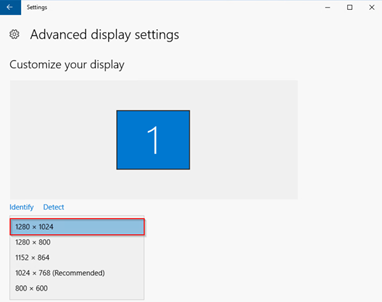
Figure 1: Display settings showing a max video resolution less than 1920x1200
Resolution
The iDRAC virtual console leverages the onboard Matrox G200 graphics controller to determine the maximum resolution of the attached monitor when a physical display is present. When the monitor supports 1920x1200 or greater resolution, the virtual console's max resolution is 1920x1200. If the monitor attached supports lower max resolution (like many KVMs), the virtual console max resolution is limited.
Maximum virtual console resolutions based on monitor display ratio:
- 16:10 monitor: 1920x1200 is the max resolution.
- 16:9 monitor: 1920x1080 is the max resolution.
When a monitor is not connected to either VGA port on the server, the installed OS dictates the available resolutions for the virtual console.
Maximum virtual console resolutions based on host OS without physical monitor:
- Windows: 1600x1200 (1600x1200, 1280x1024, 1152x864, 1024x768, 800x600)
- Linux: 1024x768 (1024x768, 800x600, 848x480, 640x480)
Dell Technologies iDRAC Engineering continues to look into methods to improve upon this OS/driver limitation when a physical monitor is absent. If a higher resolution through the virtual console is required when a physical KVM or monitor is not present, a VGA Display Emulator dongle can be leveraged to mimic an external monitor connected with a resolution up to 1920x1080.
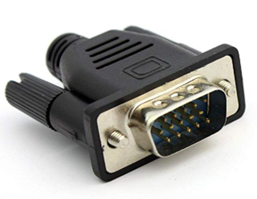
Figure 2: A VGA display emulator dongle