NetWorker Virtual Edition: Upgrade or Install Failure Log Locations and Collection
Summary: This KB provides a general log location for NetWorker Virtual Edition (NVE) upgrade or install failures.
Instructions
This article can be broken up into the following sections:
- Networker Installation Manager troubleshooting: This is specific to the NVE web UI used to manage NetWorker and system packaging. See this section when the Web UI is not accessible or behaving abnormally.
- NetWorker Upgrades and Installation: Logs specific to NVE initial deployment, configuration, and NetWorker software upgrades.
- OsRollup: Logs specific to applying the NVE OS security rollup packaging.
- General OS and NetWorker logging: System level and NetWorker service logging.
- Log Bundling: to be used when engaging with NetWorker support on a NVE upgrade or rollup issue.
Expand each of the below sections for detailed instructions on each area of troubleshooting:
NetWorker Installation Manager (Avinstaller) Web UI Logs
avinstaller is the NetWorker Installation Manager web-UI, accessed through: https://NVE_ADDRESS:7543
The following logs pertain to the
avinstaller web user interface used to deploy and manage the NVE software packages. The following logs should be reviewed if issues are observed when attempting to access the avinstaller web-UI during NVE deployment/upgrades. These logs may also be reviewed when the web UI is accessible but a deployment/initial configuration of the NVE fails:
-
/space/avamar/var/avi/server_log/avinstaller.log./space/avamar/var/avi/server_log/aviserver.log./space/avamar/var/avi/server_log/avitask.log.0/usr/local/avamar/lib/jetty/logs/jetty.log
The avinstaller service has the following command options:
nve:~ # avinstaller.pl
Usage: avinstaller.pl [options]
avinstaller.pl performs AvInstaller tasks. For internal use only.
options:
--help                    Display this help message
--start                   Start AvInstaller
--stop                    Stop AvInstaller
--restart                 Restart AvInstaller
--test                    Test the AvInstaller status
--debug                   Launch AvInstaller in debug mode
--testconfigured          Test if AvInstller is configured
--update_passcode         Update the support passcode
--reset_passcode          Reset the support passcode to default value
--version                 Display version information
NetWorker Upgrade and NVE Installation Logs
During NVE upgrades, a temporary folder is created using the name of the upgrade package being installed. You can see the temp upgrade directory by running: NetWorker Upgrade and NVE Installation Logs
ls -l /data01/avamar/repo/temp/
This folder is removed post upgrade and may be deleted if the upgrade fails and the workflow is closed. To collect these logs, initiate the upgrade and before closing out the failure collect the logs.
-
/data01/avamar/repo/temp/*/tmp/workflow.log/data01/avamar/repo/temp/*/tmp/err.log
Once an upgrade has been completed, you can find the workflow.log and err.log in the upgrade package directory under:
/usr/local/avamar/var/avi/server_data/package_data/
Or:
/space/debugging/usr/local/avamar/var/avi/server_data/package_data
Each upgrade applied to the NVE has a corresponding folder, indicating the installation date, and containing files specific to the completed upgrade jobs.
For example:
nve:~ # ls -ltr /usr/local/avamar/var/avi/server_data/package_data/
total 4
drwxr-xr-x 2 avi avi  335 May 31 21:55 NveInstall-19.11.0-12.avp_1717206867725
drwxr-xr-x 3 avi avi 4096 Jun 28 17:16 NveConfig-19.11.0-12.avp_1719608972274
drwxr-xr-x 2 avi avi  328 Aug 14 09:58 NvePlatformOsRollup_2024-R2-v3.avp_1723643818123

nve:~ # ls -ltr /usr/local/avamar/var/avi/server_data/package_data/NvePlatformOsRollup_2024-R2-v3.avp_1723643818123
total 368
-rw-r--r-- 1 avi avi   1243 Jul 15 07:24 pkgdef.xml
-rw-r--r-- 1 avi avi    282 Jul 15 07:24 callabledef.xml
-rw-r--r-- 1 avi avi  27043 Jul 15 07:24 process.jpdl.xml
-rw-r--r-- 1 avi avi   1034 Jul 15 07:24 process.flowchart.txt
-rw-r--r-- 1 avi avi    541 Jul 15 07:28 userinput.xml
-rw-r--r-- 1 avi avi    541 Jul 15 07:28 ui_library.xml
-rw-r--r-- 1 avi avi   1305 Aug 14 09:57 inventory.log
-rw-r--r-- 1 avi avi      0 Aug 14 09:57 err.log
-rw-r--r-- 1 avi avi      5 Aug 14 09:57 port-cache.txt
-rw-r--r-- 1 avi avi    784 Aug 14 09:58 workflow_xml_val.xml
-rw-r--r-- 1 avi avi    312 Aug 14 09:58 main-cache.yaml
-rw-r--r-- 1 avi avi    588 Aug 14 10:00 workflow-reports.yaml
-rw-r--r-- 1 avi avi    311 Aug 14 10:00 internal_config.xml
-rw-r--r-- 1 avi avi 300053 Aug 14 10:00 workflow.log
Security OsRollup Logs
Security OsRollup Logs
The current rollup version can be identified using: avosrollup -V
admin@nve:~> sudo su -
nve:~ # avosrollup -V
Avamar Platform OS Security Rollup:
OS[SLES12.5] Version[2025-R4-v3] Installation Time[2026-02-06-16-13-19]
nve:~ #
When installing an NVE OsRollup package, the sec_install_os_errata_sles.pl process creates a temporary log /tmp/sec_install_os_errata_sles.pl.log. This file will be deleted after a system reboot.
The OS rollup creates post_errata_installation XML files after completion. The XML files detail OS packages that were updated in the rollup. These files are in the following location: /usr/local/avamar/var/
nve:/space/home/labadmin # grep package-survey /usr/local/avamar/var/*post_errata_installation*.xml
/usr/local/avamar/var/package-survey-SLES12.5-post_errata_installation-2025-08-06-16-33-34.xml:<package-survey version="2025-R2-v3"/>
/usr/local/avamar/var/package-survey-SLES12.5-post_errata_installation-2025-08-06-16-33-34.xml:<package-survey>
/usr/local/avamar/var/package-survey-SLES12.5-post_errata_installation-2025-08-06-16-33-34.xml:</package-survey>
/usr/local/avamar/var/package-survey-SLES12.5-post_errata_installation-2025-11-11-17-39-30.xml:<package-survey version="2025-R3-v3"/>
/usr/local/avamar/var/package-survey-SLES12.5-post_errata_installation-2025-11-11-17-39-30.xml:<package-survey>
/usr/local/avamar/var/package-survey-SLES12.5-post_errata_installation-2025-11-11-17-39-30.xml:</package-survey>
/usr/local/avamar/var/package-survey-SLES12.5-post_errata_installation-2026-02-06-16-13-19.xml:<package-survey version="2025-R4-v3"/>
/usr/local/avamar/var/package-survey-SLES12.5-post_errata_installation-2026-02-06-16-13-19.xml:<package-survey>
/usr/local/avamar/var/package-survey-SLES12.5-post_errata_installation-2026-02-06-16-13-19.xml:</package-survey>
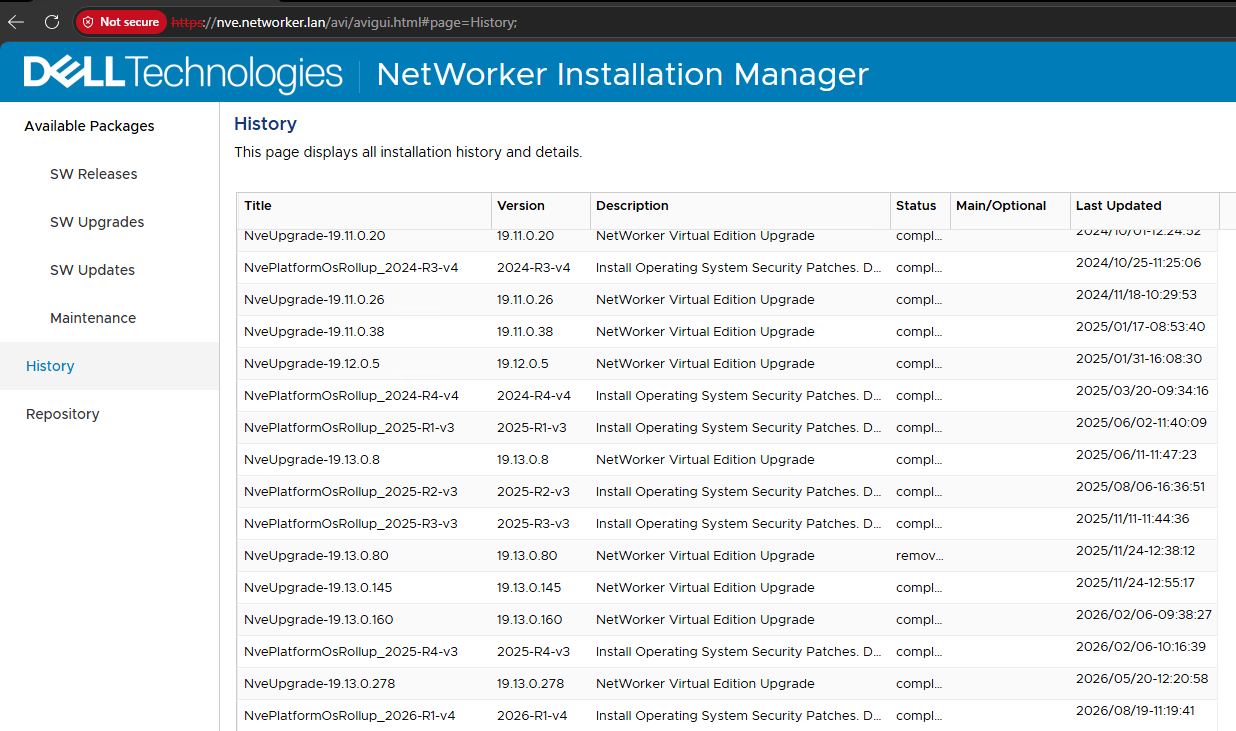
Upgrade History Details
Command Line:
- Get output showing install and upgrade history:
avi-cli --verbose localhost --password ROOT-PASSWORD --listhistory
- List packages available in the repository:
avi-cli --verbose localhost --password ROOT-PASSWORD --listrepository
NetWorker Installation Manager:
- From a web browser, go to
https://NVE-HOSTNAME-OR-IP - Log in as root.
- Go to the History tab:
General OS and NetWorker Service Logs
General OS and NetWorker Service Logs
| Log Location | Purpose |
/var/log/messages |
Logs various system messages, including information about system events, errors, startups, shutdowns, and changes in the configuration. |
/var/log/zypp/history |
Logs important events related to package management on systems using the ZYpp package manager. |
/var/log/zypper.log |
Logs Zypper command-line package manager. |
/var/log/warn |
Logs system warnings and errors. |
NetWorker service logs are detailed in: NetWorker: Log Files and Locations
Log Collection - NetWorker Support Engagement
Use one of the following methods to collect logs from the NVE.
nsrget version 1.8.2 (and later) includes functions to automatically collect NVE install and upgrade logs. nsrget.tar can be downloaded from:
/home/admin.
sudo su -
nsrget executable:
chmod +x /home/admin/nsrget.sh
4. Run nsrget with the following options:
/home/admin/nsrget.sh -o:e -p:/space
nsrget collection, the output reports that the system is an NVE and additional logs are collected:
HH:MM:SS - Detected system is a NetWorker Virtual Edition (NVE)
HH:MM:SS - Collecting avinstaller server database and upgrade history
Additional messages may appear if an ongoing upgrade/installation has not yet completed.
Once the nsrget has been completed, you should see the nsrget bundle under /space/nsrget.
The nsrget bundle name includes the NVE hostname and timestamp from when the bundle was created.
5. Modify the permissions on the nsrget bundle.
chmod -R 777 /space/nsrget/
6. Using an SCP agent, collect the nsrget tar.gz from the /space/nsrget directory on the NVE.
For additional info on retrieving files from a Linux server, see:
NetWorker (Linux): How to copy files to/from a Linux NetWorker server.
tar command:
sudo tar cvzfP /space/$(hostname)_$(date -I).tgz \
--ignore-failed-read \
/space/avamar/var/avi/server_log \
/space/avamar/var/avi/webserv_log \
/space/avamar/var/avi/server_data/package_data \
/space/debugging/usr/local/avamar/var/avi/server_data/package_data \
/data01/avamar/repo/temp/*/tmp \
/tmp/sec_install_os_errata_sles.pl.log \
/usr/local/avamar/var/*post_errata_installation* \
/var/log/zypp/history \
/var/log/messages \
/var/log/warn \
&& sudo chmod 777 /space/$(hostname)_$(date -I).tgz \
&& sudo ls -lh /space/$(hostname)_$(date -I).tgz
.tgz bundle with the NVE's hostname and date on which the bundle was generated under the /space directory. You can specify another location; however, /space typically has the most disk space available. Copy the command into a plain‑text editor such as Notepad++, then copy it from the editor into the NVE shell. Depending on the issue faced, some of the directories listed may not exist and reports an error when zipping. This is expected behavior and in such scenarios the skipped directories can be ignored.
/var/log/messages and /var/log/warn copies, the following command can be used to collect the logs from within the last year:
sudo tar cvzfP /space/$(hostname)_$(date -I).tgz \
--ignore-failed-read \
/space/avamar/var/avi/server_log \
/space/avamar/var/avi/webserv_log \
/space/avamar/var/avi/server_data/package_data \
/space/debugging/usr/local/avamar/var/avi/server_data/package_data \
/data01/avamar/repo/temp/*/tmp \
/tmp/sec_install_os_errata_sles.pl.log \
/usr/local/avamar/var/*post_errata_installation* \
/var/log/zypp/history \
$(find /var/log -maxdepth 1 -type f -name 'messages*' -newermt "$(date +%Y)-01-01") \
$(find /var/log -maxdepth 1 -type f -name 'warn*' -newermt "$(date +%Y)-01-01") \
&& sudo chmod 777 /space/$(hostname)_$(date -I).tgz \
&& sudo ls -lh /space/$(hostname)_$(date -I).tgz
NetWorker: How to Use the NSRGet NetWorker Data Collection Tool
For additional info on retrieving files from a Linux server, see:
NetWorker (Linux): How to copy files to/from a Linux NetWorker server.
Additional Information
- Dell Avamar and NetWorker Operating System (OS) Rollup Security Update Cadence
- NetWorker Virtual Edition (NVE): How to Install the Platform Security Rollup
- NetWorker Virtual Edition: How To Upgrade NetWorker Software and NVE System
- NetWorker Virtual Edition: How to increase /data01 partition size (XFS)
- NVE: How to Allow root SSH Access On a NetWorker Virtual Edition