Avamar: How to Set up On-Demand Email Event Code Alerts for an Avamar Server
Summary: This article describes the methods used to configure an Avamar Profile to send On-Demand email alerts for events that occur on the Avamar Server.
Instructions
Follow the steps below to configure an active Profile to send an email to one of more recipients.
1. Log in to the Avamar Java UI.
2. In the toolbar of the Avamar Administrator, select "Tools" -> "Manage Profiles".
A new window "Manage All Profiles" opens.
3. Click the New button in the upper left corner of the "Manage All Profiles" window to bring up the "New Profile" window:
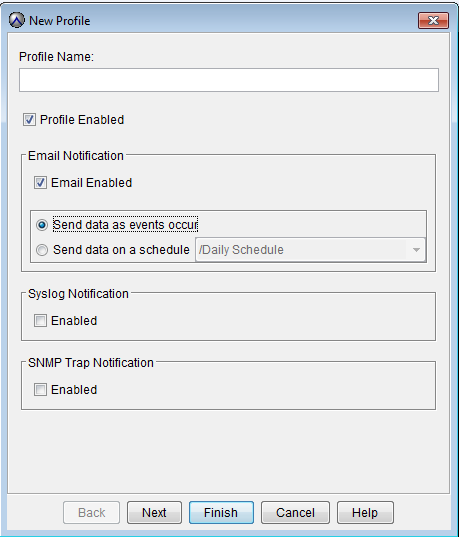
4. Enter a Profile Name.
(For Example: Avamar Alert Notifications)
5. Ensure the Profile checkboxes for 'Enabled' and 'Email Enabled' are both checked.
6. Ensure that the option "Send data as events occur" is selected.
7. Clear the check boxes for "Syslog Notification" and "SNMP Trap Notification".
8. Click Next to go to the "Event Codes" window:
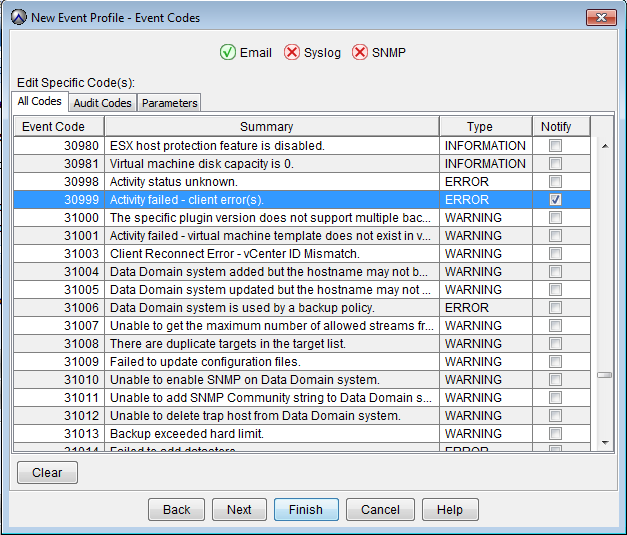
9. Click "Clear" to remove all default codes.
10. Select the codes for which notifications should be received.
See Avamar: How to get a list of Avamar audit code events or Appendix in the section below.
11. Click Next.
12. Ensure that both the "Attach Server status in email (XML)" and "Attach Server log(s) in email" check boxes are not checked.
13. Click Next to go to the "Email Notification" window:
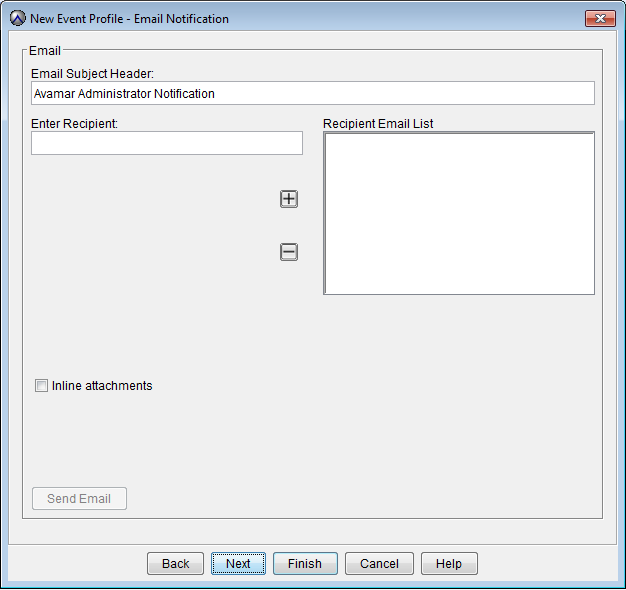
14. Update the Email Subject Header to reflect the purpose of the email (For example "Avamar Notifications").
15. In the "Enter Recipient:" Text box, enter the email address to send the email notifications to (for example first.last@company.com) and click the + button. If required, multiple email addresses may be entered.
16. Click Finish.
17. Select the new Profile and review the settings to ensure they are correct.
18. Monitor email to ensure receipt of selected events.
Additional Information
APPENDIX: Example Event Codes:
- Event Codes 392 and 393.
These two codes notify over email that the Avamar dispatchers were suspended or resumed. When the dispatchers are suspended, they do not allow new replications, backups, or restores to occur on the Avamar grid.
Currently running replications, backups, or restores are not affected by the dispatchers being suspended.
- Event Codes 22308 and 22309.
These two codes notify over email that the backup scheduler was suspended or resumed.
- Event Codes 22405 and 22406.
These two codes notify over email that the Management Console Server (MCS) service was suspended or resumed.
- Event Codes 22637 and 22639.
These two codes notify over email that the maintenance schedule was suspended or resumed.
- Event Codes 30000 to 30933.
These event codes notify over email various backup or replication result codes.
Depending on the environment and codes selected, this may generate many email alerts. Review each code inpidually to determine if it is required to be enabled.