Avamar - Integration Data Protection Appliance: Replica at Source feature not showing remote backups on source Avamar server
Summary: Checking the source Avamar server MCGUI or AUI we can see "Local" backups but not the "Remote" backups under the "Backup Restore and Manage" page.
This article applies to
This article does not apply to
This article is not tied to any specific product.
Not all product versions are identified in this article.
Symptoms
Remote backups are missing from the "Backup Restore and Manage" page of the MCGUI or AUI.
An example of missing + sign with "Remote" backups in the MCGUI is shown below
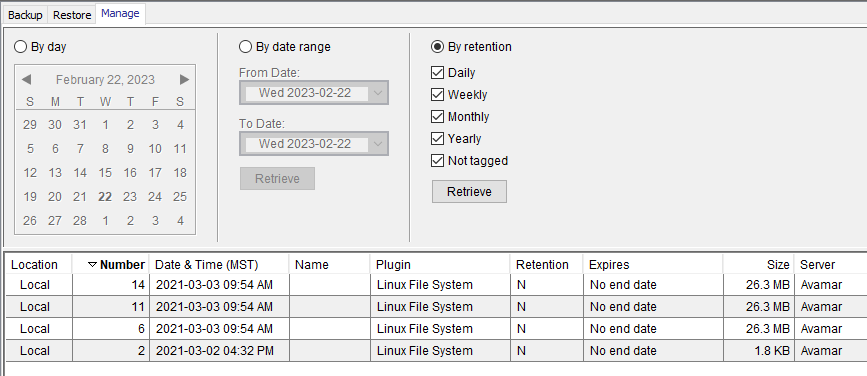
An example of missing + sign with "Remote" backups in the MCGUI is shown below
Cause
This is due to either;
- A security enhancement made in Avamar version 19.x
- A required port is blocked on the Avamar server
Resolution
Steps in this resolution help address where a blocked port is the root cause of the issue.
Log in to the source Avamar server as admin user.
Check to see if port 9443 is open between the source and destination Avamar servers:
telnet <destination Avamar> 9443
If the port is already open, engage Support and reference this article. Request help with the other known root cause which relates to the security certificate.
Support can find fix in the internal notes section of the article.
Affected Products
Avamar Server, Integrated Data Protection Appliance FamilyArticle Properties
Article Number: 000209857
Article Type: Solution
Last Modified: 21 يوليو 2026
Version: 5
Find answers to your questions from other Dell users
Support Services
Check if your device is covered by Support Services.