PowerFlex 4.X: Configuring SNMP on the resources for webhook
Summary: For the SNMP alerts to be forwarded to a site like BigPanda, the load balancer IP address of the management virtual machine is configured on each of the resources individually.
This article applies to
This article does not apply to
This article is not tied to any specific product.
Not all product versions are identified in this article.
Instructions
Configuring SNMP on the resources for webhook
For the SNMP alerts to be forwarded to a site like BigPanda, the load balancer IP address of the management virtual machine is configured on each of the resources individually.
The resources like CloudLink, IDRAC, and the switches should be discovered and managed in PowerFlex Manager.
Note: For a webhook destination, SNMPv3 is supported for iDRAC.
SNMPv2c is supported for all resource types like CloudLink, iDRAC, and switches.
Identify the SNMP load balancer IP address.
Use this procedure to identify the SNMP load balancer IP address on the management virtual machines.
Steps
To identify the load balancer IP address on the management virtual machine, type:
#kubectl get svc -A |grep -i LoadBalancerExample output:
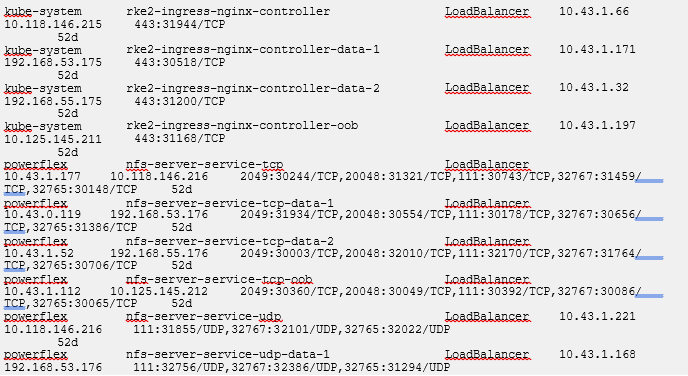
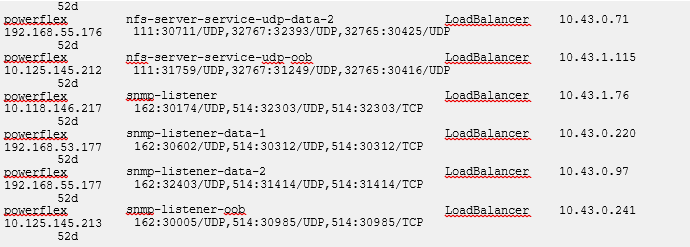
If an OOB SNMP load balancer IP address is not listed, see article PowerFlex 4.0.1 SNMP or syslog alerts not working due to missing OOB load balancer IP
Additional Information
Affected Products
ScaleIOArticle Properties
Article Number: 000324459
Article Type: How To
Last Modified: 28 يوليو 2026
Version: 5
Find answers to your questions from other Dell users
Support Services
Check if your device is covered by Support Services.