NetWorker: ddboost device mount fails with Error 5044 Read-only file system
Summary: NetWorker fails to mount ddboost device with error 5044 read-only file system.
This article applies to
This article does not apply to
This article is not tied to any specific product.
Not all product versions are identified in this article.
Symptoms
The NetWorker server fails to mount a ddboost device after Orchestrated Replication on the Destination NetWorker Server. The NetWorker Management Console (NMC) shows the following error:
ddp_utime() failed path_name=/nwservername/devicename/volhdr Err 5044 Read-only file system
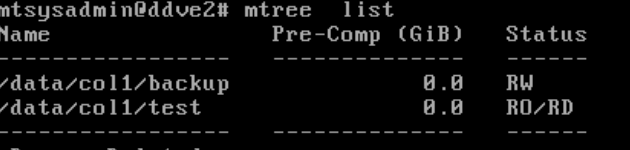
The Data Domain mtree list shows:
Cause
If the MTree is RO/RD, it cannot accept writes because it is a replication target. The NetWorker Storage Node expects a ddboost device to be writable when mounting.
- RW = Read Write → The MTree is read writable.
- RO = Read Only → The MTree cannot accept any write operations.
- RD = Replication Destination → The MTree is the target of replication and is locked for writes
Resolution
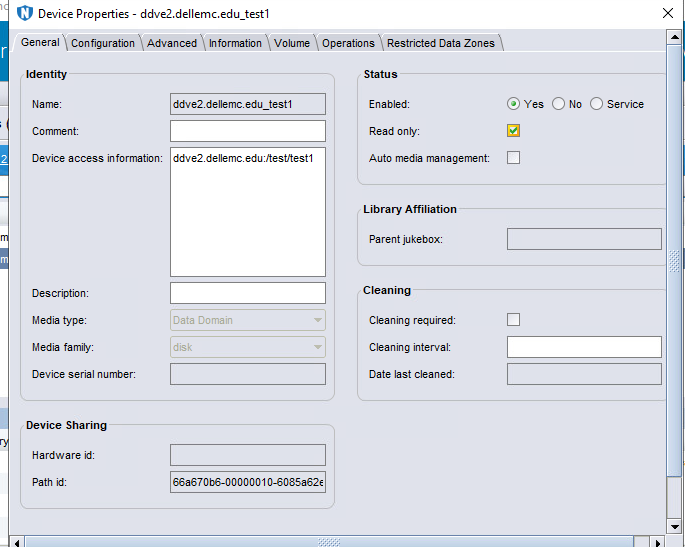
The NetWorker configuration should reflect that this Data Domain ddboost device in read-only. This option skips write-related operations (like labeling or updating media) and allows the mount to succeed.
- In the NMC, right-click replicated device and device properties -> enable the Read-only checkbox.
- Mount the replicated device.
Affected Products
NetWorker Family, Data DomainArticle Properties
Article Number: 000406826
Article Type: Solution
Last Modified: 15 يناير 2026
Version: 1
Find answers to your questions from other Dell users
Support Services
Check if your device is covered by Support Services.