Data Domain: How to delete an mtree
Summary: This article explains how to delete Data Domain mtrees.
This article applies to
This article does not apply to
This article is not tied to any specific product.
Not all product versions are identified in this article.
Instructions
Data Domain mtrees can be deleted from either the command line (CLI) or the web interface (GUI). A user account with the "admin" role is required for this.
Deleting an mtree from the CLI:
- List the mtrees present on the Data Domain using the command '
mtree list':sysadmin@datadomain# mtree list Name Pre-Comp (GiB) Status Tenant-Unit ------------------ -------------- ------ ----------- /data/col1/backup 0.0 RW - /data/col1/Default 0.0 RW - /data/col1/test 0.0 RW - ------------------ -------------- ------ ----------- D : Deleted Q : Quota Defined RO : Read Only RW : Read Write RD : Replication Destination RLGE : Retention-Lock Governance Enabled RLGD : Retention-Lock Governance Disabled RLCE : Retention-Lock Compliance Enabled - Delete the mtree using command '
mtree delete /data/col1/<mtree_name>':sysadmin@datadomain# mtree delete /data/col1/test Deleting an MTree will destroy all data in the MTree. If there are any NFS exports, CIFS shares, VTL tapes, DDBOOST storage-units, Replication Contexts or Physical Capacity Measurements configured for this MTree, they need to be manually removed/edited. Do you wish to continue? Are you sure? (yes|no) [no]: yes ok, proceeding. MTree "/data/col1/test" deleted successfully.
Deleting an mtree from the GUI:
- Go to Data Management > MTree.
- Select the mtree to delete.
- Click the 'Delete' button.
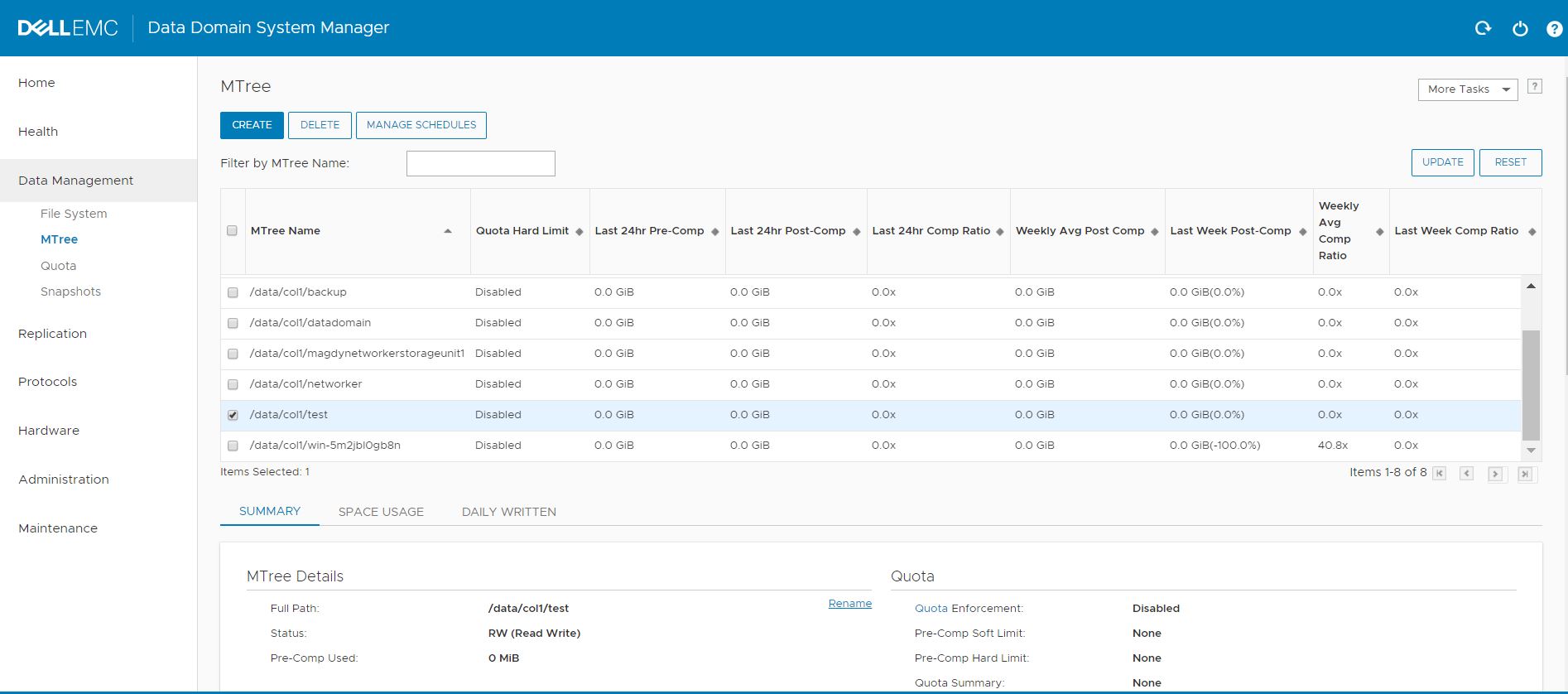
Note: The below error may occur when trying to delete certain mtrees:
**** MTree "/data/col1/stu_test" contains ddboost storage unit, cannot be deleted.This error means that the mtree is associated with a DD Boost storage unit. If this occurs, delete the corresponding storage unit instead of the mtree.
Deleting a storage unit from the CLI:
- List DD Boost storage units using the command '
ddboost storage-unit show':sysadmin@datadomain# ddboost storage-unit show Name Pre-Comp (GiB) Status User Report Physical Tenant-Unit Size (MiB) -------------------------- -------------- ------ ------------- --------------- ----------- networker 0.0 RW ddboostxxxxxx - - stu_test 0.0 RW ddboostxxxxxx - - -------------------------- -------------- ------ ------------- --------------- ----------- D : Deleted Q : Quota Defined RO : Read Only RW : Read Write RD : Replication Destination - Delete the storage unit using the command '
ddboost storage-unit delete <storage-unit_name>':sysadmin@datadomain# ddboost storage-unit delete stu_test The 'ddboost storage-unit delete' command will delete all files in the storage-unit. Are you sure? (yes|no) [no]: yes ok, proceeding. Storage-unit "stu_test" deleted. sysadmin@datadomain# mtree list Name Pre-Comp (GiB) Status Tenant-Unit ------------------------------------- -------------- ------ ----------- /data/col1/backup 0.0 RW - /data/col1/Default 0.0 RW - /data/col1/networker 0.0 RW - /data/col1/stu_test 0.0 D - ------------------------------------- -------------- ------ -----------
Deleting a storage unit from the GUI:
- Go to Protocols > DD Boost > STORAGE UNITS.
- Select the storage unit to delete.
- Click Delete (the Trash icon).
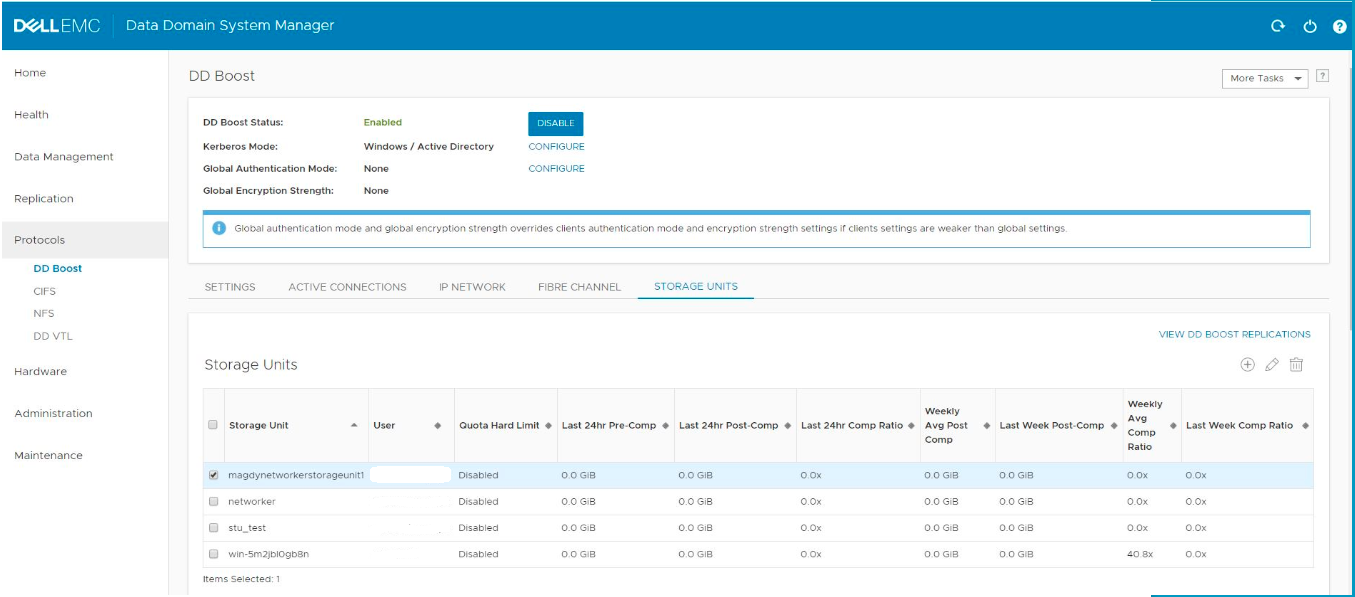
This deletes a specified storage unit, its contents, and any DD Boost associations. The deleted storage unit retains its old name and is shown as deleted in the mtree list.
Note: Manually remove (expire) corresponding catalog entries from the backup application.
All mtrees marked for deletion remain on the Data Domain until a file system cleaning is run.
Additional Information
- The '
mtree delete' command cannot be run on Retention Lock Governance or Retention Lock Compliance mtrees unless they are empty. - Mtrees can be reverted from a marked-for-deletion state by running the '
mtree undelete' command, but only if cleaning has not yet been run. - When an mtree is removed from the file system, snapshots associated with that mtree are also deleted from the
/data/col1/<mtree-name>/.snapshot/directory.
Related Articles:
Affected Products
Data DomainProducts
Data DomainArticle Properties
Article Number: 000020666
Article Type: How To
Last Modified: 23 نيسان 2026
Version: 5
Find answers to your questions from other Dell users
Support Services
Check if your device is covered by Support Services.