Dell Data Security Server/Dell Data Protection Server Front Endのバージョンを確認する方法
Summary: Dell Data Security(旧Dell Data Protection)サーバーのフロントエンドのバージョンを特定する手順について説明します。
This article applies to
This article does not apply to
This article is not tied to any specific product.
Not all product versions are identified in this article.
Instructions
次の場合に、Dell Data Security(旧Dell Data Protection)Server Front Endのバージョンを把握しておくことが重要です。
- 既知の問題の確認
- ワークフローの変更の理解
- システム要件の確認
対象製品:
- Dell Security Management Server
- Dell Data Protection | Enterprise Edition Server
対象オペレーティング システム:
- Windows
この記事では、Dell Security Management ServerまたはDell Security Management Server Virtualのフロント エンド サーバーのバージョンを確認する方法について説明します。バックエンドのバージョンを確認するには、「Dell Data Security/Dell Data Protection Serverのバージョンを確認する方法」を参照してください。
バージョンは、次の方法で確認できます。
- インストーラ
- ユーザー インターフェイス(UI)の再設計
詳細については、適切なプロセスをクリックしてください。
インストーラ
- Security Management Server .zipを抽出します。
- 参照:
[LOCATION]\Security Management Server\x64。注:[LOCATION]= 抽出された.zipファイルの場所 - 右クリック
setup.exeをクリックし、[ プロパティ] を選択します。

- 詳細タブをクリックします。
![[Details(詳細)]タブ](https://supportkb.dell.com/img/ka0Do0000005xetIAA/ka0Do0000005xetIAA_ja_2.jpeg)
- 製品のバージョンを記録します。この例では、製品のバージョンは9.9.2です。
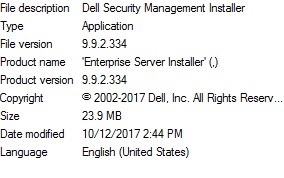 ファイルのバージョンは、上記のスクリーンショットとは異なる場合があります。
Windows
- 管理者としてWindowsのスタート メニューを右クリックし、[Run(実行)]をクリックします。

- [ファイル名を指定して実行]のUIで、
appwiz.cplと入力して[OK]を押します。
![[ファイル名を指定して実行]UI](https://supportkb.dell.com/img/ka0Do0000005xetIAA/ka0Do0000005xetIAA_ja_5.jpeg)
- [プログラムと機能]で、Dell Security Management Server x64を探します。
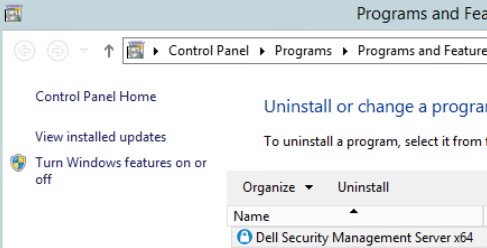 サーバーの一部のバージョンでは、Dell Security Management ServerではなくDell Enterprise Serverと表示される場合があります。
 - バージョンを記録します。この例では、製品のバージョンは10.2.3です。
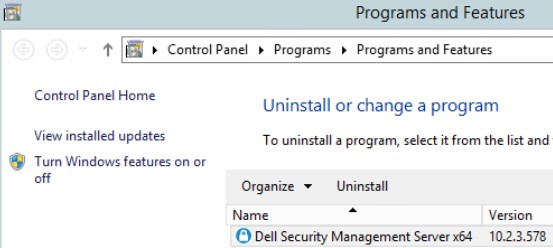 バージョンは、上記のスクリーンショットと異なる場合があります。
Additional Information
Videos
Affected Products
Dell EncryptionArticle Properties
Article Number: 000130588
Article Type: How To
Last Modified: 10 آب 2026
Version: 12
Find answers to your questions from other Dell users
Support Services
Check if your device is covered by Support Services.