PowerProtect Data Manager: Error when viewing assets for Protection Policy
Summary: This covers a scenario within PowerProtect Data Manager [PPDM] where a Protection Policy assets cannot be viewed, nor can the Protection Policy configuration be modified due to an error displayed in the UI. ...
This article applies to
This article does not apply to
This article is not tied to any specific product.
Not all product versions are identified in this article.
Symptoms
When navigating to Assets when viewing or editing a Protection Policy, the following error can be seen:
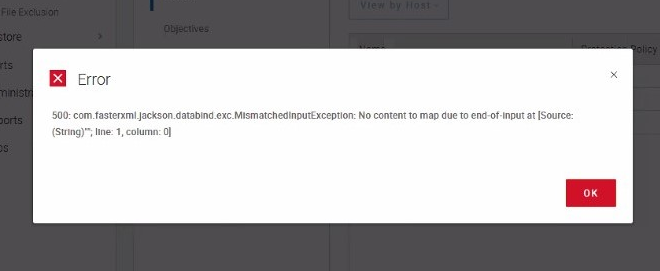
Additionally, the following can be seen in /var/log/nginx/access.log
Additionally, the following can be seen in /var/log/nginx/access.log
192.168.1.100 - - [17/Jun/2022:13:30:35 -0400] "GET /passthrough/api/v2/vm-containers?filterType=vCenterInventory&filter=viewType%20eq%20%22HOST%22%20and%20vcId%20eq%20%xxxxxxxx-xxxx-xxxx-xxxx-xxxxxxxxxxxxxxxx%22%20and%20moref%20eq%20%22vm-xxxx%22&self=true HTTP/1.1" 500 227 "https://<fqdn>/" "Mozilla/5.0 (Windows NT 10.0; Win64; x64; rv:91.0) Gecko/20100101 Firefox/91.0" "-"Cause
The vmdm-discovery service has returned an HTTP 500 error code due to a non-existant resource_pool object.
Resolution
Will be fixed in PPDM 19.12.
Workaround for earlier PPDM versions:
Workaround for earlier PPDM versions:
- Navigate to /usr/local/brs/libs/discover-service/data/
- Execute the following:
mv discovery.db discovery.db.bak
- Run a full discovery of the vCenter asset source(s) in the PPDM UI.
Products
PowerProtect SoftwareArticle Properties
Article Number: 000202431
Article Type: Solution
Last Modified: 15 أيار 2026
Version: 4
Find answers to your questions from other Dell users
Support Services
Check if your device is covered by Support Services.