PowerFlex: False Alerts for Spare Capacity Storage Pool Unbalanced SPARE_CAPACITY_SMALLER_THAN_LARGEST_FAULT_UNIT
Summary: PowerFlex Manager 4.x may show false alerts—CONFIGURED_SPARE_CAPACITY_SMALLER_THAN_LARGEST_FAULT_UNIT, STORAGE_POOL_UNBALANCED, NOT_ENOUGH_FAULT_UNITS_IN_SP due to a known software issue pending fix. ...
Symptoms
The PowerFlex cluster dials home with the alerts, or the alerts code can be seen in the PowerFlex Manager under the Monitoring tab:
SymptomCode: SIO02.04.0000008
Event Code: 20300017 /SymptomCode: SIO02.04.0000010
Event Name: CONFIGURED_SPARE_CAPACITY_SMALLER_THAN_LARGEST_FAULT_UNIT
Description: Configured spare capacity is smaller than the size of the largest Fault Set.
Severity: Critical
SymptomCode: SIO02.04.0000009
Event Code: 20300018
Event Name: STORAGE_POOL_UNBALANCED
Description: The Storage Pool relies too heavily (over 50%) on capacity from a single SDS or Fault Set.
Balance capacity over other SDSs or Fault Sets
Severity: MAJOR
SymptomCode: SIO02.04.0000010
Event Code: 20300019
Event Name: NOT_ENOUGH_FAULT_UNITS_IN_SP
Description: The storage Pool does not meet the minimum requirement of three fault units
Severity: Major
Cause
There is a false spare capacity alert in PowerFlex Manager 4.x that is related to the alerts:
CONFIGURED_SPARE_CAPACITY_SMALLER_THAN_LARGEST_FAULT_UNIT
STORAGE_POOL_UNBALANCED
NOT_ENOUGH_FAULT_UNITS_IN_SP
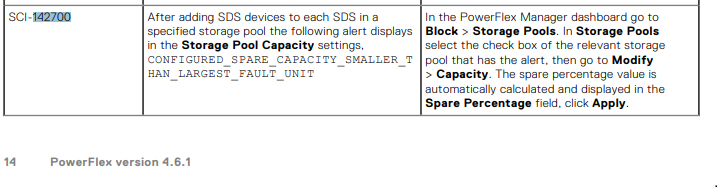
This is a known software issue, and it is planned to be addressed in a future release. This issue is mentioned in the PowerFlex 4.6.x Release Notes. See SCI-142700:
Resolution
This issue is planned to be addressed in a future release.
Workaround:
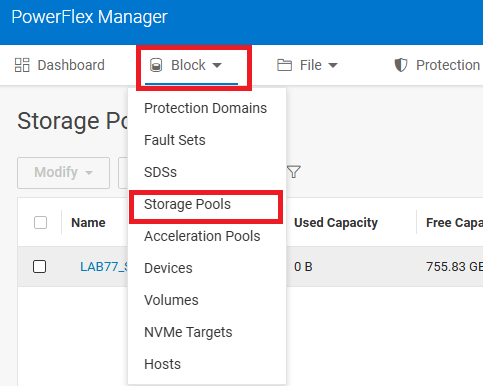
- Reset the Storage Pool Spare Percentage Policy from PowerFlex Manager UI. In the PowerFlex Manager dashboard, go to Block > Storage Pools.
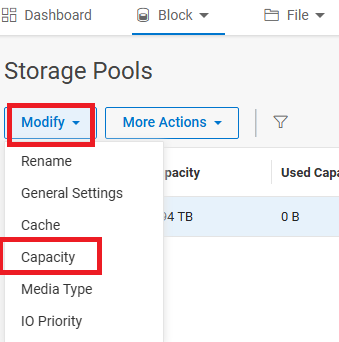
- In Storage Pools, select the checkbox for the relevant storage pool that has the alert, then go to Modify > Capacity.
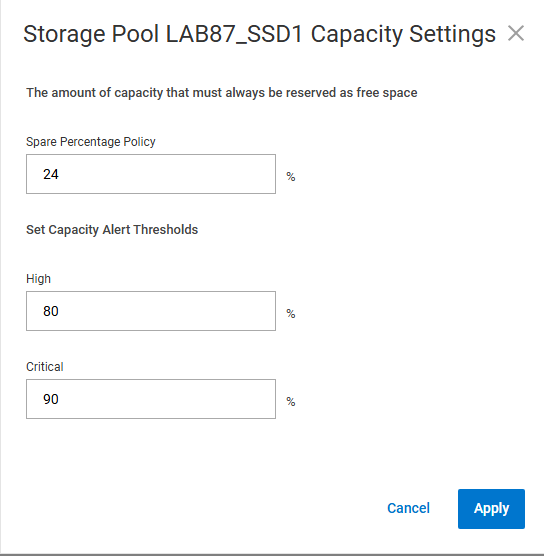
- The spare percentage value is automatically calculated and displayed in the Spare Percentage field.
Alternate Workaround:
- Reset the Storage Pool Spare Percentage Policy from PowerFlex Manager UI from X% to X+1%, then back to X%.
Example:
If the Spare Percentage Policy is 24%, then change it to 25%, click Apply, and then edit it back to 24%.
Clear all the PowerFlex Manager Events. See: PowerFlex Management Platform - How To Manually Clear Alerts From 4.X PowerFlex Manager UI
Additional Information
For PowerFlex 3.x, see PowerFlex 3.X: Configured spare capacity is smaller than the size of the largest Fault Set