Dell NativeEdge:裝置暫存分割區已滿
Summary: 在極少數情況下,裝置的暫存分割區可用空間可能會用完。
This article applies to
This article does not apply to
This article is not tied to any specific product.
Not all product versions are identified in this article.
Symptoms
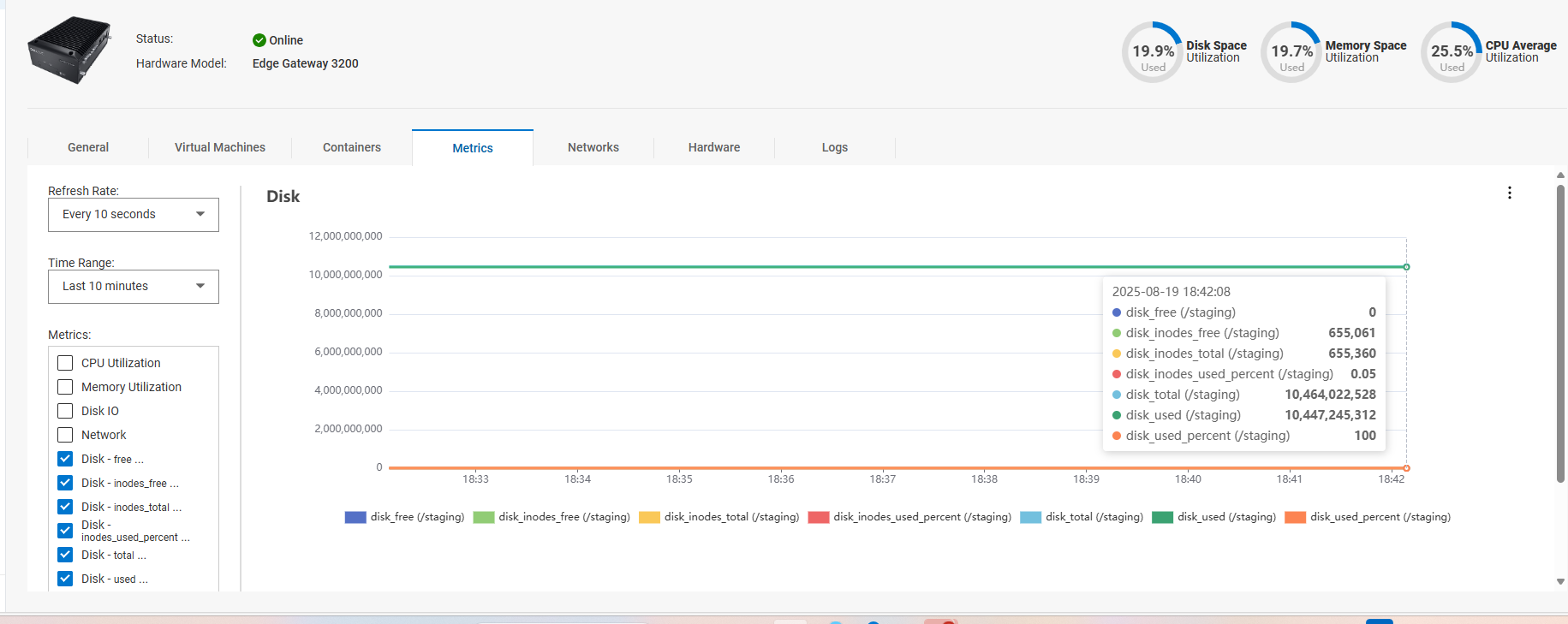
在 NativeEdge 3.1 (及更早版本) 中,暫存分割區 (/staging) 可用空間可能會完全耗用。
NativeEdge 裝置會使用暫存磁碟分割來儲存記錄。
如果分區上沒有可用空間,則可能會影響虛擬機的電源。
此問題可能會影響任何 NativeEdge 裝置。
這可以使用設備的自定義指標選項進行驗證。
Cause
由於內部日誌記錄工具的配置問題,這將在 ece 代理服務重新啟動時生成額外的日誌記錄。
Resolution
修正:
NativeEdge 工程部門已建立專用的 EdgeOS 修正程式來解決此問題 (3.2 修補程式 1)
這是 EdgeOS 套裝,只有在 Orchestrator 升級至 Dell Automation Platform 1.0 後才能部署。
因應措施:
如果這種情況發生在 NativeEdge 3.1 上,NativeEdge 呈報工程部門可以自訂支援套裝選項,以查詢暫存磁碟使用量,並視需要也可以截斷此分割區中的記錄。
Additional Information
Affected Products
NativeEdge Solutions, NativeEdgeProducts
Dell Automation Platform, Dell Automation Platform ComponentsArticle Properties
Article Number: 000379377
Article Type: Solution
Last Modified: 10 تشرين الأول 2025
Version: 1
Find answers to your questions from other Dell users
Support Services
Check if your device is covered by Support Services.