Dell NativeEdge:设备暂存分区已满
Summary: 在极少数情况下,设备的暂存分区可用空间可能会被完全占用。
This article applies to
This article does not apply to
This article is not tied to any specific product.
Not all product versions are identified in this article.
Symptoms
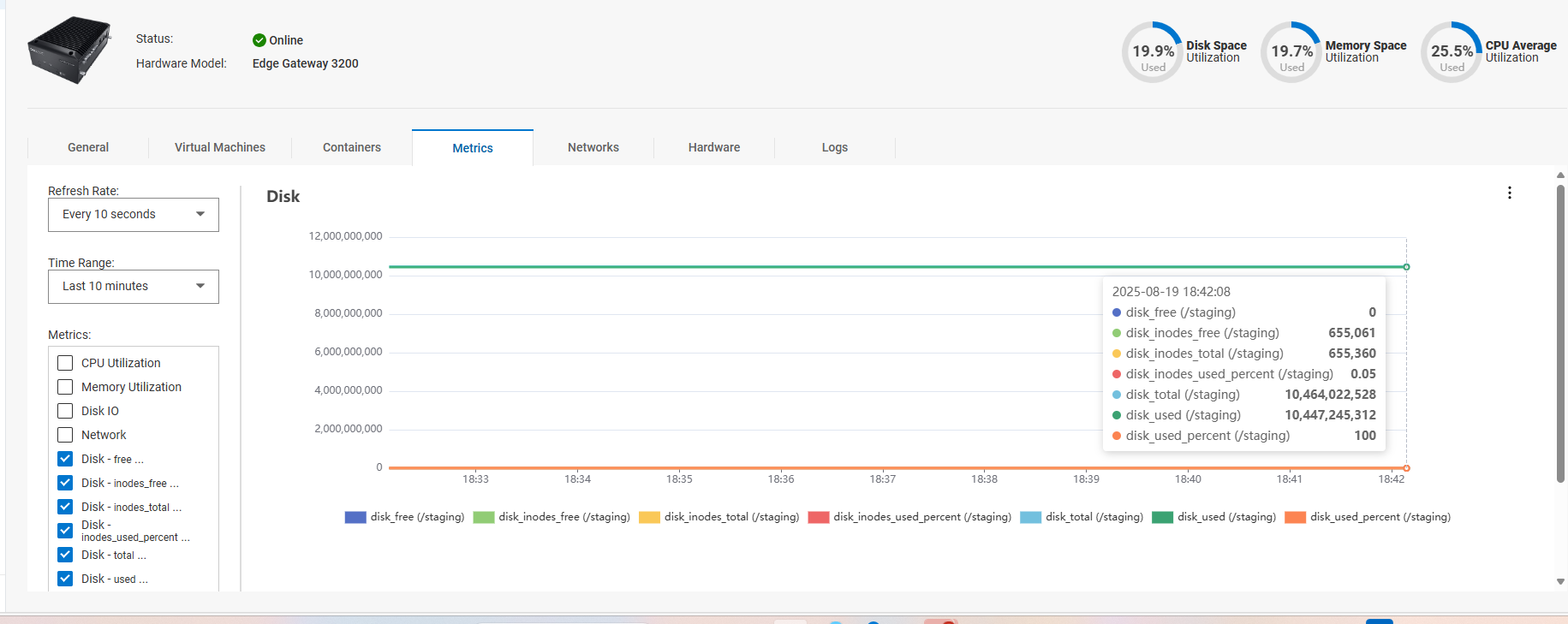
在 NativeEdge 3.1(及更早版本)中,可以充分利用暂存分区 (/staging) 可用空间。
暂存分区由 NativeEdge 设备用于存储日志。
如果分区上没有可用空间,则可能会影响虚拟机的开机。
此问题可能会影响任何 NativeEdge 设备。
这可以通过使用设备的自定义指标选项进行验证。
Cause
由于内部日志记录工具的配置问题,如果 ece-agent 服务重新启动,这将生成其他日志记录。
Resolution
修复:
NativeEdge 工程部门已创建专用 EdgeOS 热修复程序来解决此问题(3.2 热修复程序 1)
这是一个 EdgeOS 捆绑包,仅当 Orchestrator 升级到 Dell Automation Platform 1.0 时才能部署。
解决办法:
如果在 NativeEdge 3.1 上发生这种情况,则 NativeEdge 升级工程部门可以自定义支持捆绑包选项,以查询暂存磁盘使用情况,并且在需要时还可以截断此分区中的日志。
Additional Information
Affected Products
NativeEdge Solutions, NativeEdgeProducts
Dell Automation Platform, Dell Automation Platform ComponentsArticle Properties
Article Number: 000379377
Article Type: Solution
Last Modified: 10 تشرين الأول 2025
Version: 1
Find answers to your questions from other Dell users
Support Services
Check if your device is covered by Support Services.