Dell Automation Platform: Daily Critical Alert-Security Setup Change Detected
Summary: The Dell Automation Platform orchestrator displays a daily critical alert for a Security setup change. Alert code 0x20010002 is shown.
Symptoms
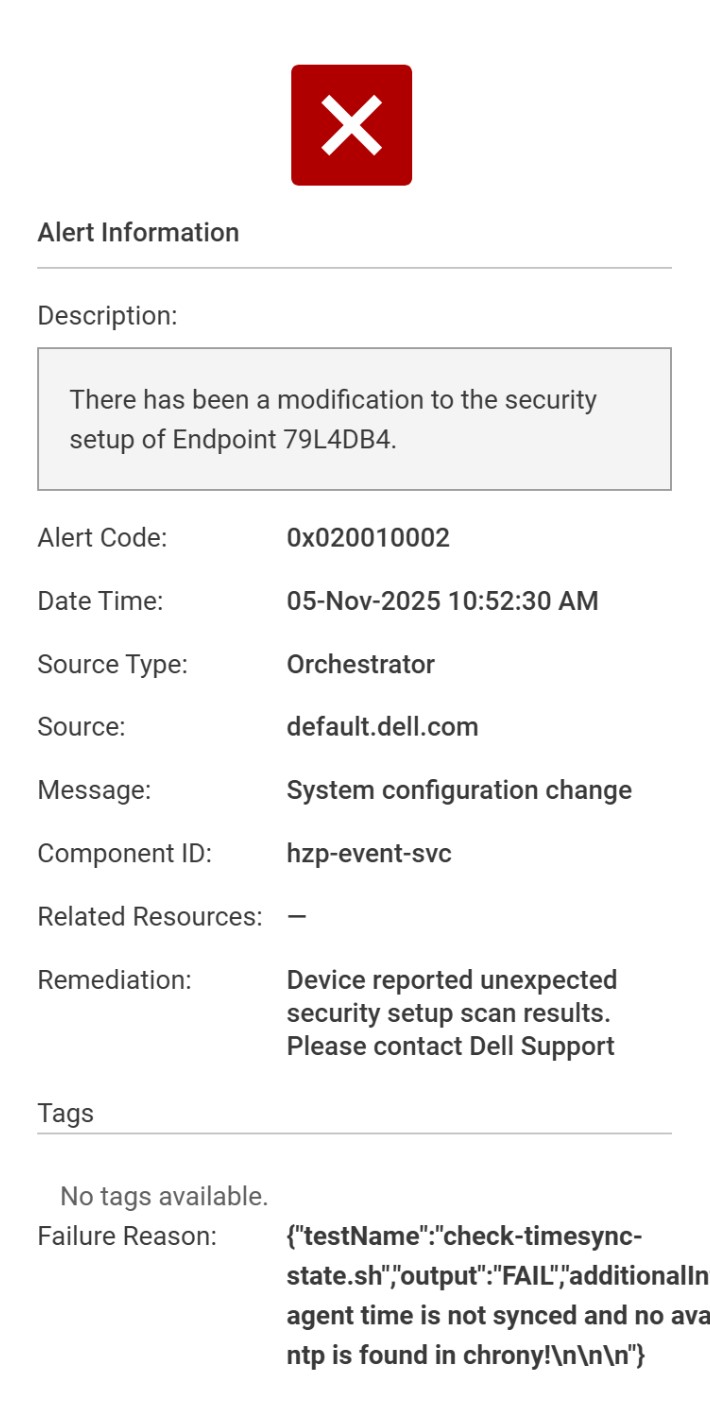
At NativeEdge v4.0.0.0, the Dell Automation Platform orchestrator displays a daily critical alert for a security setup change. The error message is:
There has been a modification to the security setup of Endpoint xxxx.
In the failure reason, notice that the test-name that reports the issue is: check-timesync-state.sh. This check validates that if the endpoint time is synced with the orchestrator.
Cause
ece-agent.log was rotated and the check-timesync-state.sh unable to retrieve time sync log from the log files. Then fall into the backup checking method - using chronyc sources.
Since the time is properly synced, so the chrony daemon is not running, this causes the `chronyc source` command failure then trigger the critical alert to the orchestrator.
Resolution
This critical alert is a false positive alert. Users can safely ignore this alert in the system.
In the next available NativeEdge release, this alert is removed.
Additional Information
0x20010002 is used for multiple different tests so review the failure reason to determine which test is failing. In this scenario, the failing test is check-timesync-state.sh.