Dell Automation Platform: DNS Resolution Lookup failures in Multidomain Environments
Summary: Features of Dell Automation Platform, such as Virtual Machines (VM) import, may fail a Domain Name System (DNS) lookup when working in a multidomain environment.
This article applies to
This article does not apply to
This article is not tied to any specific product.
Not all product versions are identified in this article.
Symptoms
Symptoms include, but may not be limited to:
- VM Import from External Connection
- Import to NativeEdge of a VM from vCenter to Dell Automation Platform fails
- Imports using the vCenter IP address, or its fully qualified domain name (FQDN) into the orchestrator results in a failure
- Orchestrator logs report a DNS lookup failure:
failed to download vm file disk-0 vmdk from vcenter 10.10.10.22:443: Get dial tcp: lookup esx22.domain.lab: no such host
Cause
Multiple Domain environments require additional Domain Search lookup attributes.
- DNS lookups may fail due to the Orchestrator attempting to resolve a host using the DNS suffix (example:
domain.edge), while the DNS records existed under another suffix (example-domain.com) When multiple domain resolutions are required within a network, each domain must be explicitly defined. This can be done client side when static IPs are used, and server side if Dynamic Host Configuration Protocol (DHCP) is in use.
Resolution
When using multidomain lookups, it is recommended to configure a central list of domains to search from the server side. This can be accomplished using DHCP.
Microsoft DHCP environment
 , is not enabled by default.
- Connect to Microsoft DHCP Manager MMC (Add the DHCP server if it not already displayed).
- Right-click IPv4 and select Set Predefined Options.
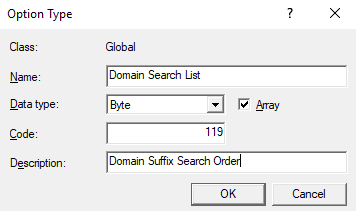
- Click Add to define a new Option Type and define it.
- Name: Domain Search List
- Data type: Byte
- Code: 119
- Description: Domain Suffix Search Order
- Confirm with OK.
- Under the DHCP Scope, Scope Options, Scope Options do not list "119 Domain Search List" as an available option.
- Select Option 119, Data Entry Byte Format should be Hexadecimal, and each domain must be passed in a similar hexadecimal format
- There are free online strings to hexadecimal converts, with Byte Prefix.
- From Linux, Python may be used (Replace "
domain.lab" with the wanted domain):
python3 -c 'd="domain.lab"; print(" ".join(f"{len(x):02x} "+ " ".join(f"{ord(c):02x}" for c in x) for x in d.split(".")) + " 00")'- The DHCP client may require a DHCP renew, or reboot, to acquire the new attributes.
Affected Products
Dell Automation Platform, NativeEdge Solutions, Dell Automation Platform Components, NativeEdgeArticle Properties
Article Number: 000392984
Article Type: Solution
Last Modified: 05 كانون الأول 2025
Version: 2
Find answers to your questions from other Dell users
Support Services
Check if your device is covered by Support Services.