VxRail: VCF - SDDC Managerで管理対象ESXiノードのパスワードが切断されています
Summary: VCFで、rootおよびビルトイン サービス アカウントのESXiノード アカウントからアカウントが切断されました。
This article applies to
This article does not apply to
This article is not tied to any specific product.
Not all product versions are identified in this article.
Symptoms
SDDC Managerパスワード マネージャーから、同じドメインまたはクラスター内の複数のESXiノードが切断されました。
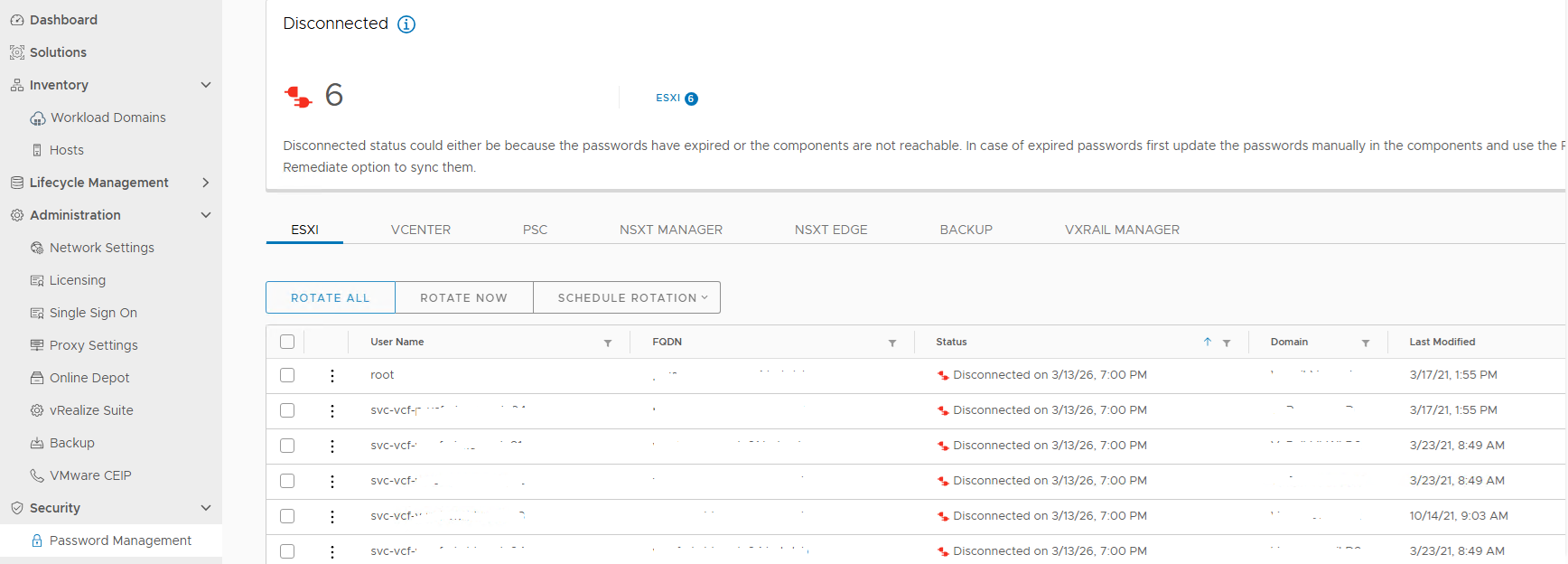
図1.切断されたアカウント
実行しようとしました lookup_password アカウントの認証情報を取得するには、切断されたアカウントをクリックしてワークフローの修復を実行しますが、失敗しました。
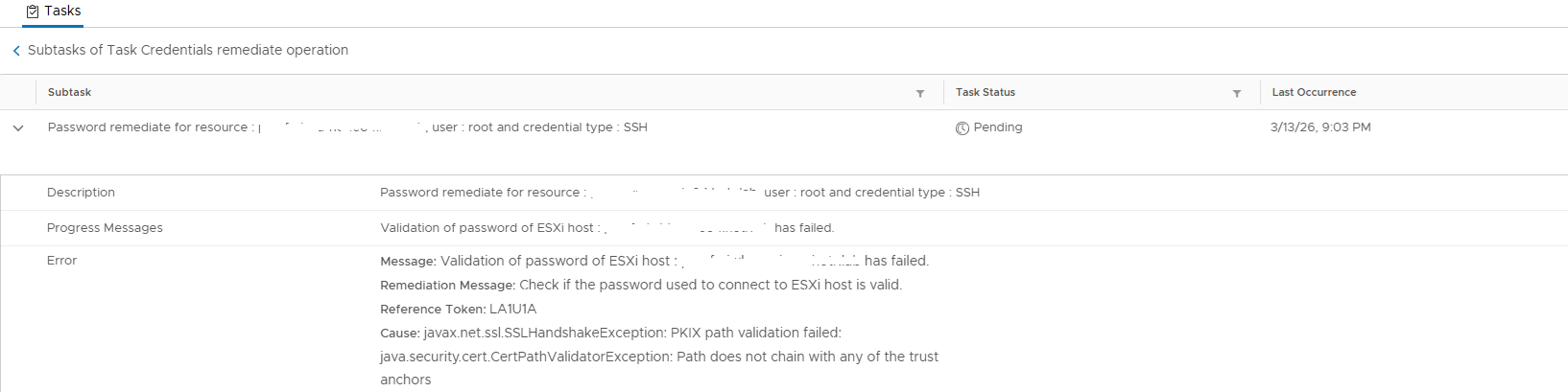
図2.パスワードの検証に失敗しました
サポートされているドライバおよびファームウェアについては /var/log/vmware/vcf/operationsmanager/operationsmanager.log ホスト名を検索すると、次のように出力されます。
2026-03-14T01:00:10.660+0000 DEBUG [vcf_om,30208561d26fe9a5,8e8b] [c.v.v.p.s.PasswordExpirationService,pool-6-thread-1] Expiry retrieval status : UNKNOWN , Diagnostic message : {"errorCode":"PASSWORD_MANAGER_VALIDATE_ESXI_CREDENTIALS_FAILED","arguments":["hostname"],"errorMessage":"javax.net.ssl.SSLHandshakeException: PKIX path validation failed: java.security.cert.CertPathValidatorException: Path does not chain with any of the trust anchors","referenceToken":"1SN3RL","remediationMessage":"Please verify that the account is active and is not locked, you might need to fix the workflow(s) for resources marked in error state. If the password of the account has expired, manually reset the password in the product and then perform a REMEDIATE operation in the SDDC Manager, to update its stored copy of the password."}
関連するESXiノードにログインし、rootアカウントとserviceアカウントをチェックして、ロックアウトされていないかどうかを確認します。また、から取得したパスワードを使用します。 lookup_password サーバーにログインするための出力。
venterの同じクラスター内のすべてのESXiノードに接続ステータスが表示されます。証明書のCA証明書を更新する手順を実行しましたが、問題が解決しません。
Cause
ESXiホスト証明書に署名しているルート証明書がSDDC Managerにありません commonsvcs 、 jre cacerts 保存
SDDC Managerは、ホスト証明書を使用してESXiホストとの接続を試み、信頼できるアンカーを検出します。
Resolution
この問題を解決してアカウントを接続するには、ルート証明書をSDDC Managerにインストールします commonsvcs 、 jre cacerts 認定資格:
変更を加える前に、SDDC Managerのスナップショットを作成します。
- ホストにSSHセッションを記録して、ホスト証明書に署名するためのルート証明書を確認します。
openssl x509 -in /etc/vmware/ssl/rui.crt -fingerprint -noout -text
- で出力を確認します。
Authority Key Identifier:
X509v3 Authority Key Identifier:
                keyid:E9:13:3D:13:2A:3F:0F:7C:EE:DA:5D:BF:C4:0B:D3:AF:E9:E3:67:54
- SSHセッションを使用して、ESXiホストを管理しているvCenter Serverにログオンし、ルート証明書に関連するエントリーを見つけます。
CN(id):         E9133D132A3F0F7CEEDA5DBFC40BD3AFE9E36754
Subject DN:     CN=CA, DC=vsphere, DC=local, C=US, ST=California, O=vcenter, OU=VMware Engineering
CRL present:    yes
- 次のコマンドを実行して、バンドルを検証します。このルート証明書を証明書ファイルに出力してから、ファイル転送ツールを使用して証明書の内容をSDDC Managerにコピーします。
/usr/lib/vmware-vmafd/bin/dir-cli  trustedcert list

/usr/lib/vmware-vmafd/bin/dir-cli trustedcert get  --id E9133D132A3F0F7CEEDA5DBFC40BD3AFE9E36754 --outcert /tmp/rootca.cer
- 証明書ファイルの準備ができたら、次のコマンドを実行して証明書ストアに証明書をインポートします。
cat /etc/vmware/vcf/commonsvcs/trusted_certificates.key

keytool -import -v -alias xxx -file /home/vcf/xxx.cer -keystore /etc/vmware/vcf/commonsvcs/trusted_certificates.store

keytool -import -v -alias v-vcf-vsca-root -file /home/vcf/xxx.cer -keystore /etc/alternatives/jre/lib/security/cacerts --storepass changeit
- 上記のインポートが完了したら、SDDC Managerサービスを再起動し、ワークフローを再実行して、表示されたパスワードで問題のあるアカウント認証情報を修復します。
/opt/vmware/vcf/operationsmanager/scripts/cli/sddcmanager_restart_services.sh
Affected Products
VxRailProducts
VxRail Appliance Series, VxRail G Series Nodes, VxRail E Series Nodes, VxRail E560 VCF, VxRail E560F VCF, VxRail E560N VCF, VxRail G560 VCF, VxRail G560F VCF, VxRail P Series Nodes, VxRail P570 VCF, VxRail P570F VCF, VxRail P580N VCF
, VxRail S Series Nodes, VxRail S570 VCF, VxRail V Series Nodes, VxRail V570 VCF, VxRail V570F VCF
...
Article Properties
Article Number: 000439374
Article Type: Solution
Last Modified: 30 تموز 2026
Version: 2
Find answers to your questions from other Dell users
Support Services
Check if your device is covered by Support Services.