Windows Server Dell OEM: Licensing and Downgrades
Summary: This article provides the information about Dell OEM licenses for Windows Server. How to identify the COA Label and the steps to downgrade the Windows Server edition and the use in a virtual machine. ...
Instructions
OEM licenses are sold bundled with hardware, have limitations that can only be used on the specific hardware. When you purchase a server from Dell, selecting various Windows Server as an operating system or second OS and purchasing it simultaneously will attach the Dell OEM license for Windows Server to the Server chassis. In addition to be available as a host OS, the Dell OEM license for Windows Server can also be available as a virtual machine on a hypervisor, however, it should be used in a server chassis with OEM license attached.
Table of Contents
COA Label
If you purchased the server with the license, the following certificate called Certificate of Authenticity (COA) label is attached directly to the server chassis and shipped.
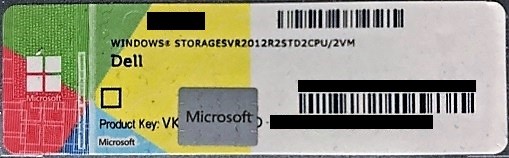
The product key required for license activation is described on the COA label, use this product key to activate the license whether you use this license on a host OS or as a virtual machine on a hypervisor.
Since Windows Server 2012, the product key part is covered with a scratch, so the customer must scratch it with coins. As the COA label is not reissued and other certificates that show a product key are not issued, scratch the label carefully and keep it from being damaged. In case the label is damaged, take a figure of the COA label, prepare a clear image file of it and contact Dell technical support.
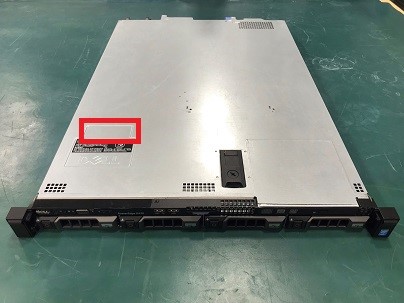
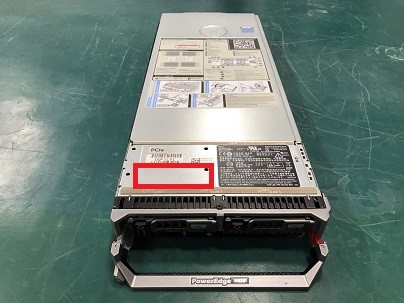
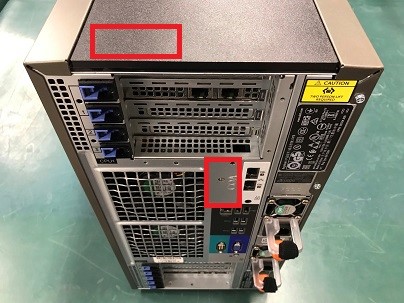
The followings are examples of where the COA label is attached.
Rack Servers (Top-front side)
Blade Servers (Top-front side)
Tower Servers (Rear panel or top-back side)
Downgrade/Down Edition Rights
 for your purchased product.
If the product key fails to activate, such as when a reused key is detected, contact the Microsoft Licensing Activation Centers
If your OEM license was purchased without a downgrade kit, or if the original kit has been lost, contact Dell Sales to discuss purchasing a replacement. A Windows Server downgrade kit includes OS installation media and a product key. These kits can be ordered with the server or purchased separately after the initial sale (APOS). APOS downgrade kits are only available when the server was purchased with an OEM Windows Server license. They must be purchased and cannot be dispatched without an order.
The followings are examples of downgrade/down edition rights:
| Purchased Version | Available Version Example | Available Edition Example |
|---|---|---|
| Windows Server 2016 Datacenter | Windows Server 2016 | Datacenter |
| Standard | ||
| Windows Server 2012 R2 | Datacenter | |
| Standard | ||
| Windows Server 2012 | Datacenter | |
| Standard | ||
| Windows Server 2016 Standard | Windows Server 2016 | Standard |
| Windows Server 2012 R2 | ||
| Windows Server 2012 | ||
| Windows Server 2012 R2 Datacenter | Windows Server 2012 R2 | Datacenter |
| Standard | ||
| Windows Server 2012 | Datacenter | |
| Standard | ||
| Windows Server 2012 R2 Standard | Windows Server 2012 R2 | Standard |
| Windows Server 2012 | ||
| Windows Server 2012 Datacenter | Windows Server 2012 | Datacenter |
| Standard | ||
| Windows Server 2012 Standard | Windows Server 2012 | Standard |
| Windows Server 2022 Datacenter | Windows Server 2019 | Datacenter |
| Standard | ||
| Windows Server 2016 | Datacenter | |
| Standard | ||
| Windows Server 2022 Standard | Windows Server 2019 | Standard |
| Windows Server 2016 | ||
| Windows Server 2022 Essential 10-core | Windows Server 2019 | Essentials |
| Windows Server 2016 | ||
| Windows Server 2019 Datacenter | Windows Server 2016 | Datacenter |
| Standard | ||
| Windows Server 2012 R2 | Datacenter | |
| Standard | ||
| Windows Server 2019 Standard | Windows Server 2016 | Standard |
| Windows Server 2012 R2 | ||
| Windows Server 2019 Essentials | Windows Server 2019 | Essentials |
| Windows Server 2016 |
Use in Virtual Machine
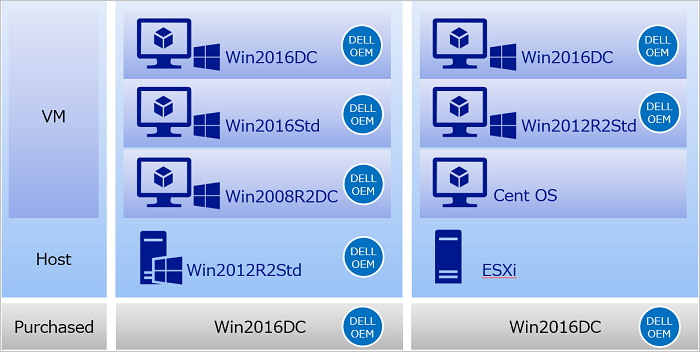
Windows Server using Dell OEM license can be run as a virtual machine on a hypervisor based on the virtual instance execution rights Microsoft defined. Datacenter has unlimited, Standard has up to two virtual instance execution rights.
Since the execution rights the purchased version has been applied, for example, in the environment where Datacenter edition is purchased but down edition to use as Standard, virtual instance execution rights can be used unlimited. Since the Standard edition has only two virtual instance execution rights, report that you have unlimited execution rights by using down edition rights when you contact technical support. Also, there is no hypervisor limitation, even if a hypervisor such as ESXi is prepared separately, the Dell OEM license is valid if Windows Server running as a virtual machine on the same hardware.
Explain the case that Windows Server 2016 Datacenter is purchased as the Dell OEM as an example.
In the following image, objects with "Dell OEM" mark have the valid Dell OEM license and Dell can provide OEM support.