PowerEdge:IDRAC 主機名稱和作業系統版本未自動更新
Summary: 本文提供故障診斷 iDRAC 主機名稱、作業系統版本或作業系統組建欄位未如預期自動填入的情況指南。
This article applies to
This article does not apply to
This article is not tied to any specific product.
Not all product versions are identified in this article.
Symptoms
概述
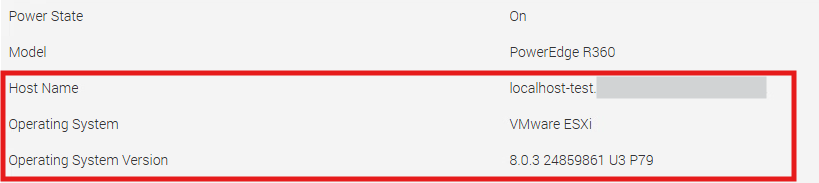
某些客戶可能會回報,在作業系統安裝完成之後,或在安裝程序期間,作業系統並未自動填入 iDRAC 主機名稱欄位。即使已安裝 iDRAC Service Module (iSM),仍可能會發現此行為。
注意: iSM 不是在 iDRAC 層級自動填入主機名稱、作業系統和作業系統版本欄位的必要條件。
Cause
欄位填充的工作原理
iDRAC 以被動聆聽模式運作,不會從作業系統提取資訊。而是仰賴作業系統將相關資料推送至 iDRAC。
安裝 iSM 可讓此資料推送程序自動發生,同時提供 iSM 整合所提供的額外特性與功能。
Resolution
若要確保作業系統自動填入這些欄位,請確認「 停用 iDRAC 本機組態,使用 RACADM」 設定設為 已停用。
停用 iDRAC 本機組態,使用
RACADM:控制 iDRAC 設定是否可透過以下方式修改: RACADM (遠端存取控制器管理員) 命令會從主機作業系統在本機執行。設為 啟用時,任何嘗試透過本機設定 iDRAC 的行為 RACADM 命令 (例如,使用 racadm 作業系統內的 CLI) 遭到封鎖。
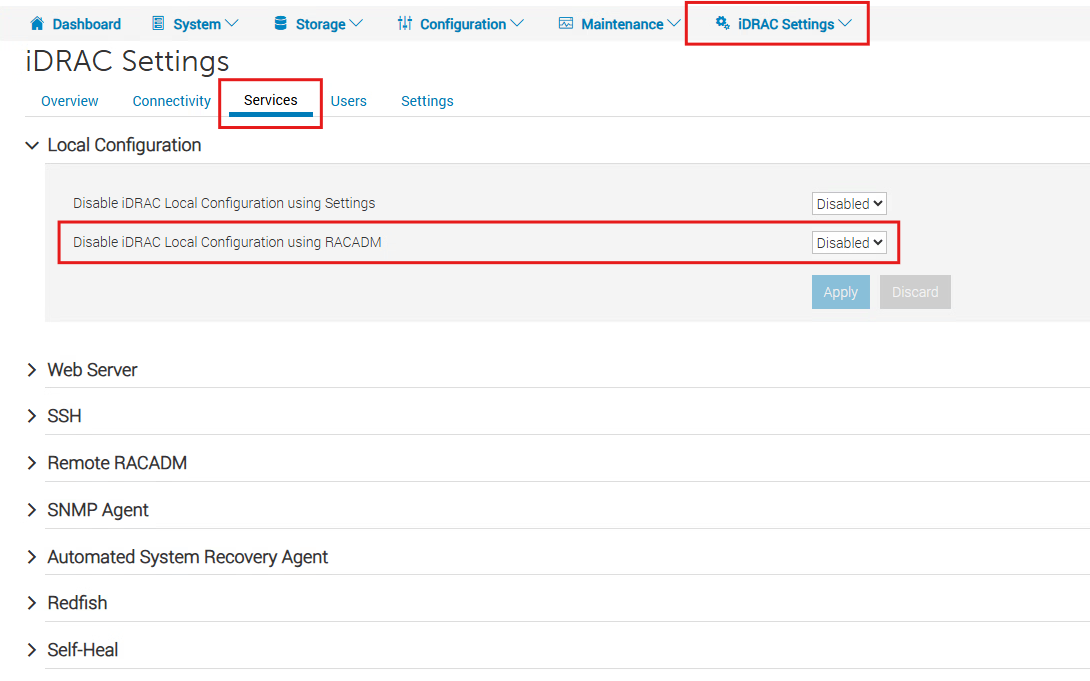
停用此設定後,會在下一次作業系統啟動的資料推送時填入這些欄位。例如,在 ESXi 上,重新啟動管理服務即足以觸發資訊推送至 iDRAC。
Affected Products
iDRAC9 - 7.xx SeriesArticle Properties
Article Number: 000472769
Article Type: Solution
Last Modified: 30 حزيران 2026
Version: 1
Find answers to your questions from other Dell users
Support Services
Check if your device is covered by Support Services.