Data Domain: How to Power Off and Power On a Data Domain
Summary: This article provides best practices for shutting down and rebooting the Data Domain safely using the web interface or command-line interface (CLI).
This article applies to
This article does not apply to
This article is not tied to any specific product.
Not all product versions are identified in this article.
Instructions
Sometimes it is required to shut down or reboot the Data Domain. The purpose can be for a DDOS upgrade, applied workaround, time zone change, disaster situation, or any other. It is important to follow the correct procedure.
Before shutting down or rebooting the system, check the following:
- Verify that I/O on the system is stopped.
sysadmin@datadomain# iostat 5 2019-12-18 18:18:16 INTERVAL: 5 secs "-" indicates that system is busy and unable to get recent data. ------------------------------------------------------------------------------------------------------------------------------------------------------------------------------------------------------------------------------------------------------------------------------------------------ CPU |State |Protocol Aggr |CIFS |Net |Disk |NVRAM |Repl aggr aggr| | | |ethMa eth1a eth1b eth1c eth1d eth3a eth3b eth3c eth3d eth4a eth4b eth4c eth4d ethMa eth1a eth1b eth1c eth1d eth3a eth3b eth3c eth3d eth4a eth4b eth4c eth4d| | aggr aggr| busy max| | ops/s load data in data out|ops/s in out| in in in in in in in in in in in in in out out out out out out out out out out out out out| read write busy| read write| in out % %|CDPVMSFIRL| % MB/s MB/s| MB/s MB/s| MB/s MB/s MB/s MB/s MB/s MB/s MB/s MB/s MB/s MB/s MB/s MB/s MB/s MB/s MB/s MB/s MB/s MB/s MB/s MB/s MB/s MB/s MB/s MB/s MB/s MB/s| KiB/s KiB/s ms| KiB/s KiB/s| KB/s KB/s ---- ---- ---------- ------------- ----- ------- -------- ----- ------- ------- ----- ----- ----- ----- ----- ----- ----- ----- ----- ----- ----- ----- ----- ----- ----- ----- ----- ----- ----- ----- ----- ----- ----- ----- ----- ----- ------- ------- ---- ------- ------- ------- ------- 0 0 0 19 0 0 0 0 0 0 0 0 0 0 0 0 0 0 0 0 0 0 0 0 0 0 0 0 0 0 0 0 0 0 0 0 508 607 - - 0 0 0 0 0 19 0 0 0 0 0 0 0 0 0 0 0 0 0 0 0 0 0 0 0 0 0 0 0 0 0 0 0 0 0 0 0 0 747 758 - - 0 0 0 0 0 19 0 0 0 0 0 0 0 0 0 0 0 0 0 0 0 0 0 0 0 0 0 0 0 0 0 0 0 0 0 0 0 0 576 514 - - 0 0 0 0 0 19 0 0 0 0 0 0 0 0 0 0 0 0 0 0 0 0 0 0 0 0 0 0 0 0 0 0 0 0 0 0 0 0 282 421 - - 0 0 - No backup or DD Boost replication should be running, as the downtime will interrupt it.
sysadmin@datadomain# ddboost file-replication show active File-replication active: There are no file replication operations in progress. - For high availability (HA) systems, verify the health of the HA configuration.
# ha status- Run the command '
ha offline' on the standby node if the system is in a highly available state with both nodes online. Skip this step if the HA status is degraded.
- Run the command '
Once the system state is confirmed:
- Power off Data Domain.
sysadmin@datadomain# system poweroff The system poweroff command shuts down the system and turns off the power. Are you sure? (yes|no) [no]: yes- If needed, power cables can be unplugged from the head unit or expansion shelves once the system is fully powered off.
- Power on the Data Domain.
- Power on all expansion shelves before powering on the Data Domain head unit. Wait approximately three minutes after all expansion shelves are turned on.
- Plug in the power cable for the head unit.
- For HA systems:
- Power on the active node first, and then the standby node.
- Verify the health of the HA configuration with the command '
ha status'. - If one of the nodes displays as offline, run the command '
ha online' on that node to restore the HA configuration.
- Reboot the Data Domain using the user interface.
- Select Maintenance, System, and then Reboot System.
- Click OK to confirm.
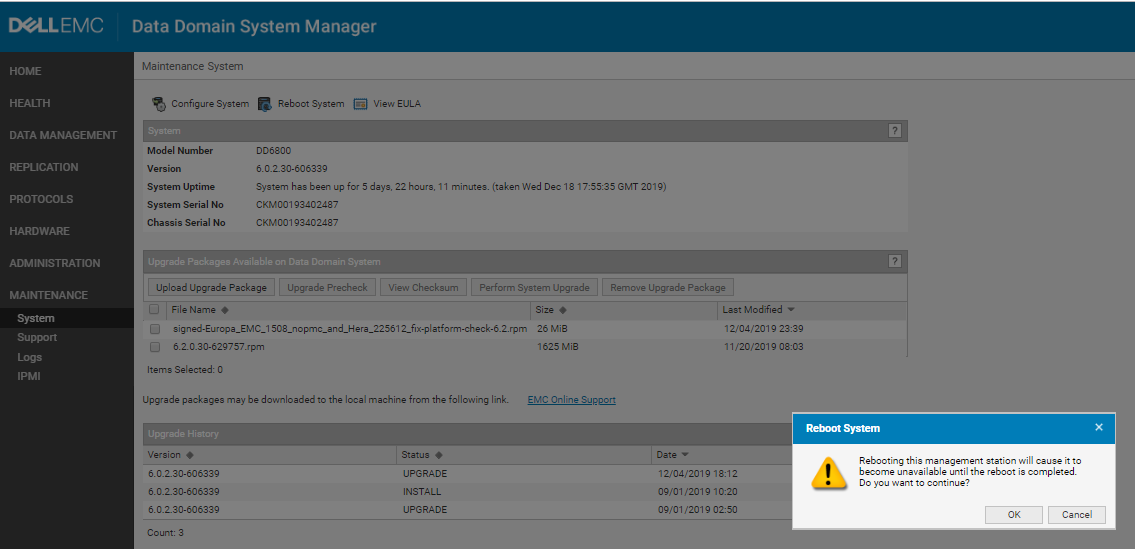
- Power for Data Domain models based on PowerEdge hardware (most current models) can be managed from iDRAC. See this article for more information about configuring iDRAC.
- Note: If the Data Domain GUI or CLI is available, always use one of them to manage power. The power options in iDRAC do not shut the system down cleanly, which can lead to data integrity issues.
- From the iDRAC Dashboard page, click the dropdown arrow next to "Graceful Shutdown." This provides several options:
- Power Off System
- Non-Masking Interrupt
- Warm Reboot
- Cold Reboot
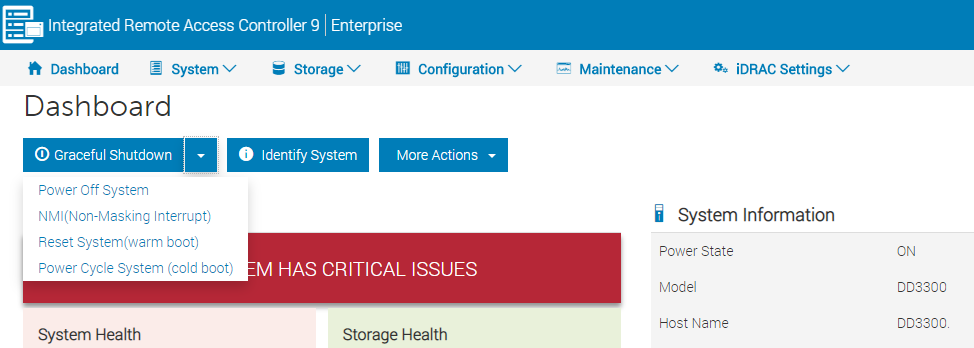
Additional Information
- Do not use the chassis power switch to power off the system. Doing so prevents remote power control using IPMI. Use the '
system poweroff' command instead. This command shuts down the system and turns off the power. - The IMPI Remote System Power Down feature does not perform an orderly shutdown of the DD OS. Use this feature only if the '
system poweroff' command is unsuccessful. - The complete reboot process used for any system generally takes 30 minutes to 1 hour.
- If the system takes more than 1 hour to come back up, contact your support team.
Affected Products
Data DomainArticle Properties
Article Number: 000019772
Article Type: How To
Last Modified: 07 أبريل 2026
Version: 7
Find answers to your questions from other Dell users
Support Services
Check if your device is covered by Support Services.