PowerStore: Deleted/unmapped volume continues to be listed in AIX host operating system, after first deleting the volume in PowerStore Manager.
Summary: Administrator removed/unmapped the volume using PowerStore Manager without first dismounting the associated LUN/disk from the connected AIX host. Follow the AIX system administrator guide and unmount the volumes from the AIX host before deleting unused volumes in PowerStore Manager. ...
This article applies to
This article does not apply to
This article is not tied to any specific product.
Not all product versions are identified in this article.
Symptoms
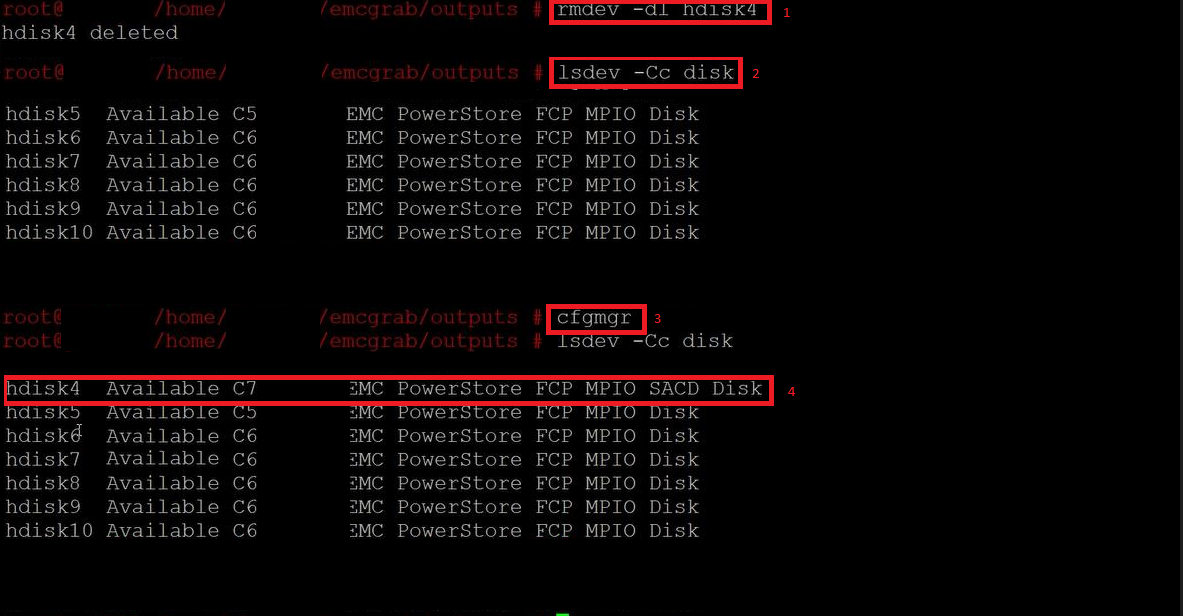
Steps to reproduce:
- Using PowerStore Manager administrator either unmapped the AIX host server or Deleted the volume
- Administrator deletes the volume inside the AIX system rmdev -dl <vol_name>, [1] in the picture
- Check the Volume list to confirm require Volume is gone [2]
- Rescan volumes [3] or reboot the server
- List again volumes, administrators see the hdisk appears to still exist [4]
Cause
The volume have been taken offline on PowerStore, before the AIX root administrator deleted it from AIX. The volume continues to be reported every time a disk rescan or reboot of the AIX host occurs.
Storage Array Controller Device (SACD) devices are configured when there are no PowerStore volumes assigned to an initiator and target port pair, or when LUN 0 is not configured and appears as "PowerStore FCP MPIO SACD Disk" in the command output.
Resolution
Solution 1
Bring volume online in PowerStore Manager if it still exists. On the AIX hosts the system administrator can rescan volumes and then remove the volume from AIX host prior to removing the volume from PowerStore.Solution 2
If the volume no longer exists, create a new volume with the same LUN ID as the previous volume. From the AIX host rescan volumes and follow the AIX system administrator guide to remove the unused volume before removing or unmapping the resource using PowerStore Manager.Affected Products
PowerStore, PowerPath for AIX, PowerStore 1000X, PowerStore 1000T, PowerStore 3000X, PowerStore 3000T, PowerStore 5000TProducts
PowerStore 5000X, PowerStore 500T, PowerStore 7000X, PowerStore 7000T, PowerStore 9000X, PowerStore 9000TArticle Properties
Article Number: 000201654
Article Type: Solution
Last Modified: 03 مارس 2026
Version: 3
Find answers to your questions from other Dell users
Support Services
Check if your device is covered by Support Services.