PowerFlex: False Alerts for Spare Capacity Storage Pool Unbalanced SPARE_CAPACITY_SMALLER_THAN_LARGEST_FAULT_UNIT
Summary: PowerFlex Manager 4.x may show false alerts—CONFIGURED_SPARE_CAPACITY_SMALLER_THAN_LARGEST_FAULT_UNIT, STORAGE_POOL_UNBALANCED, NOT_ENOUGH_FAULT_UNITS_IN_SP due to a known software issue pending fix. ...
This article applies to
This article does not apply to
This article is not tied to any specific product.
Not all product versions are identified in this article.
Symptoms
The PowerFlex cluster dials home with the alerts, or the alerts code can be seen in the PowerFlex Manager under the Monitoring tab:
SymptomCode: SIO02.04.0000008
Event Code: 20300017 /SymptomCode: SIO02.04.0000010
Event Name: CONFIGURED_SPARE_CAPACITY_SMALLER_THAN_LARGEST_FAULT_UNIT
Description: Configured spare capacity is smaller than the size of the largest Fault Set.
Severity: Critical
SymptomCode: SIO02.04.0000009
Event Code: 20300018
Event Name: STORAGE_POOL_UNBALANCED
Description: The Storage Pool relies too heavily (over 50%) on capacity from a single SDS or Fault Set.
Balance capacity over other SDSs or Fault Sets
Severity: MAJOR
See article PowerFlex: STORAGE_POOL_UNBALANCED - SIO02.04.0000009
SymptomCode: SIO02.04.0000010
Event Code: 20300019
Event Name: NOT_ENOUGH_FAULT_UNITS_IN_SP
Description: The storage Pool does not meet the minimum requirement of three fault units
Severity: Major
Cause
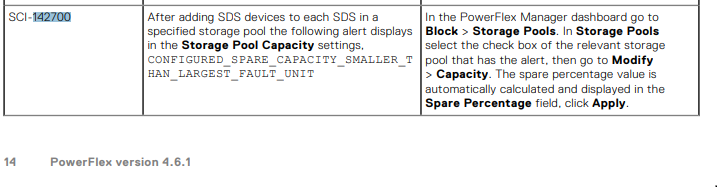
There is a false spare capacity alert in PowerFlex Manager 4.x that is related to the alerts:
CONFIGURED_SPARE_CAPACITY_SMALLER_THAN_LARGEST_FAULT_UNIT
STORAGE_POOL_UNBALANCED
NOT_ENOUGH_FAULT_UNITS_IN_SP
This is a known software issue, and it is planned to be addressed in a future release. This issue is mentioned in the PowerFlex 4.6.x Release Notes. See SCI-142700:
Resolution
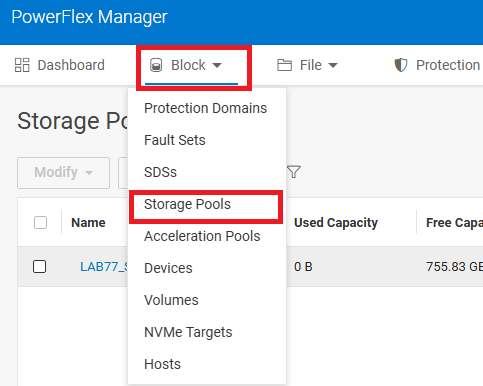
- Reset the Storage Pool Spare Percentage Policy from PowerFlex Manager UI. In the PowerFlex Manager dashboard, go to Block > Storage Pools.
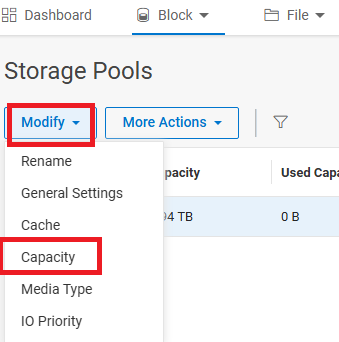
- In Storage Pools, select the checkbox for the relevant storage pool that has the alert, then go to Modify > Capacity.
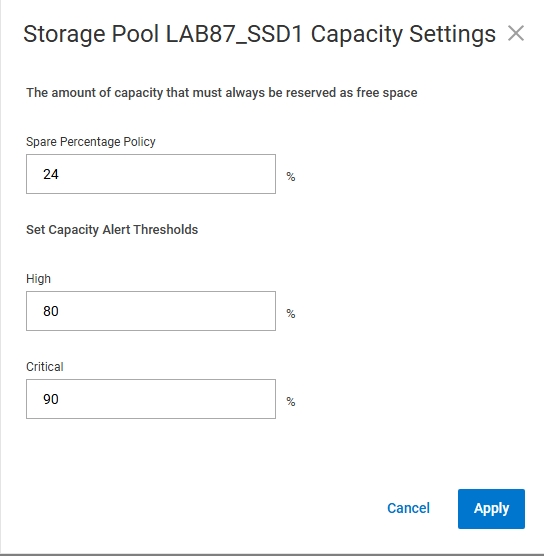
- The spare percentage value is automatically calculated and displayed in the Spare Percentage field.
Alternate Workaround:
- Reset the Storage Pool Spare Percentage Policy from PowerFlex Manager UI from X% to X+1%, then back to X%.
Example:
If the Spare Percentage Policy is 24%, then change it to 25%, click Apply, and then edit it back to 24%.
Impacted Version: 4.6.x
Fixed in Version: 4.8.x. and later
Related articles:
Additional Information
For PowerFlex 3.x, see PowerFlex 3.X: Configured spare capacity is smaller than the size of the largest Fault Set
Affected Products
PowerFlex rack, PowerFlex custom node, ScaleIO, PowerFlex SoftwareArticle Properties
Article Number: 000279687
Article Type: Solution
Last Modified: 20 أغسطس 2026
Version: 7
Find answers to your questions from other Dell users
Support Services
Check if your device is covered by Support Services.