VxRail: VCF- SDDC Manager has disconnected password for managed ESXi node
Summary: VCF has disconnected account from ESXi node account for root and built-in service account.
Symptoms
From the SDDC Manager Password manager, multiple ESXi nodes in the same domain or cluster has disconnected:
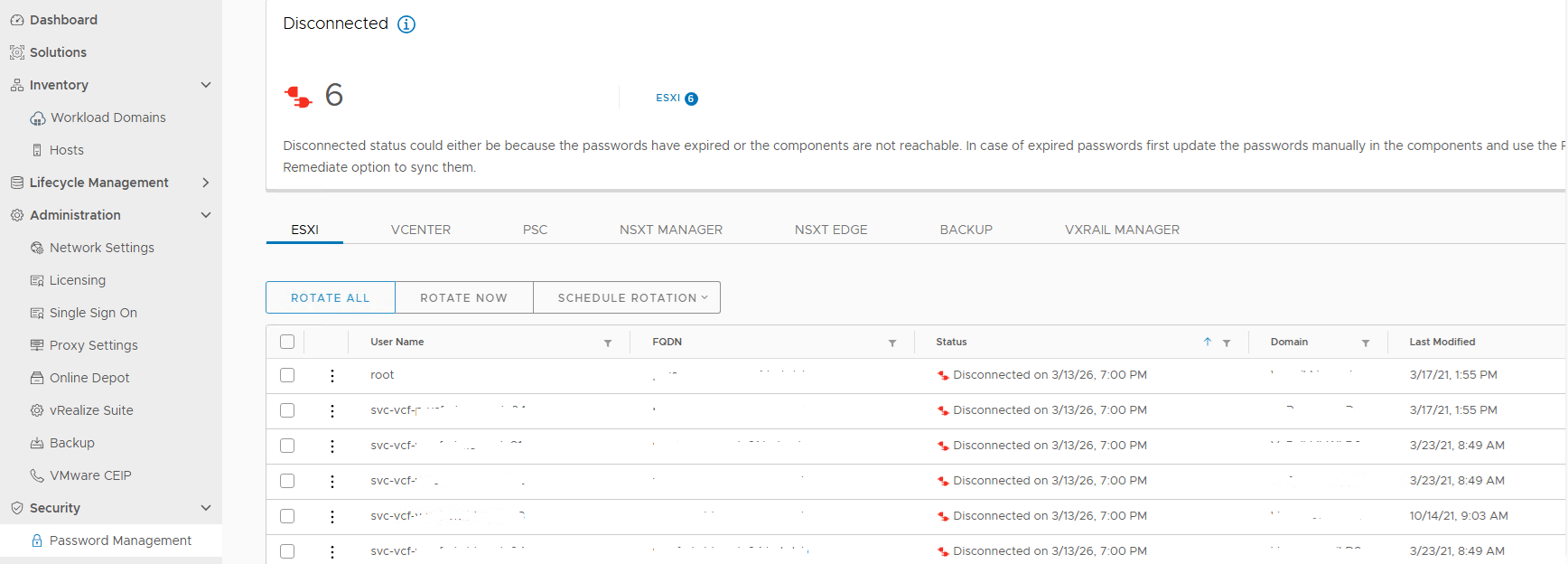
Figure 1. Disconnected Account
Tried to run lookup_password to retrieve the account credential then clicked on the disconnected account to run the remediate workflow but it failed:
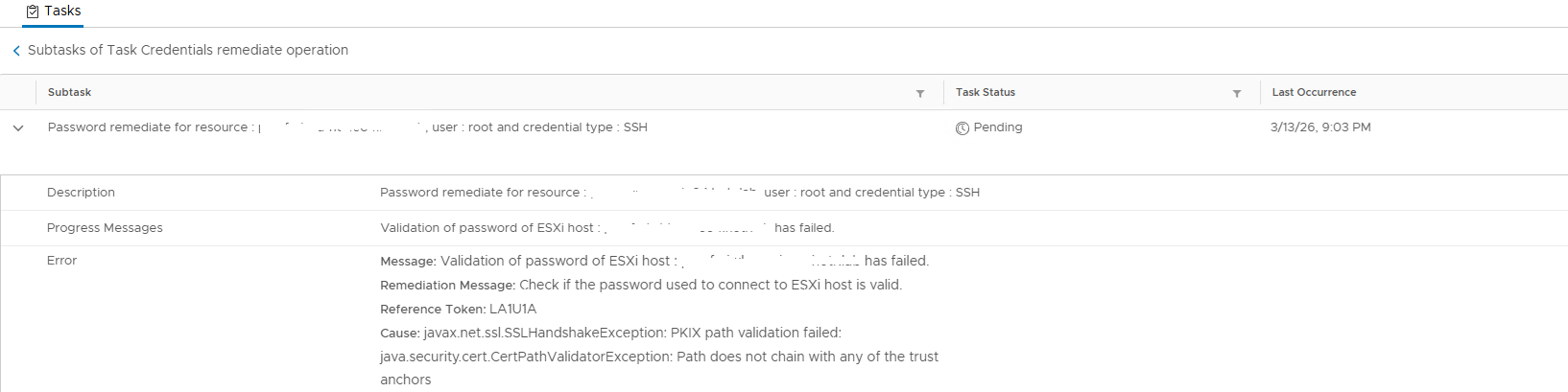
Figure 2. Password Validation Failed
Review the /var/log/vmware/vcf/operationsmanager/operationsmanager.log and search the hostname which would output the same:
2026-03-14T01:00:10.660+0000 DEBUG [vcf_om,30208561d26fe9a5,8e8b] [c.v.v.p.s.PasswordExpirationService,pool-6-thread-1] Expiry retrieval status : UNKNOWN , Diagnostic message : {"errorCode":"PASSWORD_MANAGER_VALIDATE_ESXI_CREDENTIALS_FAILED","arguments":["hostname"],"errorMessage":"javax.net.ssl.SSLHandshakeException: PKIX path validation failed: java.security.cert.CertPathValidatorException: Path does not chain with any of the trust anchors","referenceToken":"1SN3RL","remediationMessage":"Please verify that the account is active and is not locked, you might need to fix the workflow(s) for resources marked in error state. If the password of the account has expired, manually reset the password in the product and then perform a REMEDIATE operation in the SDDC Manager, to update its stored copy of the password."}
Log in to the related ESXi node, check the root and service accounts to see whether they are not locked out. Also, use the password retrieved from the lookup_password output to log in to the server.
All the ESXi nodes in the same cluster in the venter show the connect status. Ran the step to refresh CA certificates on the certificate but the issue still persists.
Cause
The root certificate that is signing the ESXi host certificate is missing on the SDDC Manager commonsvcs and jre cacerts store.
SDDC Manager tries to connect the ESXi host through the host certificate, and it would find the trusted anchors.
Resolution
To fix this problem and connect the account, install the root certificate into the SDDC Manager commonsvcs and jre cacerts certificates.
Before making any changes, take the SDDC Manager snapshot.
- Confirm the root certificate for signing the host certificate by logging an SSH session to the host:
openssl x509 -in /etc/vmware/ssl/rui.crt -fingerprint -noout -text
- Check the output with the
Authority Key Identifier:
X509v3 Authority Key Identifier:
                keyid:E9:13:3D:13:2A:3F:0F:7C:EE:DA:5D:BF:C4:0B:D3:AF:E9:E3:67:54
- Use an SSH session to log on to the vCenter server that is managing the ESXi host and find the related entry for the root certificate:
CN(id):         E9133D132A3F0F7CEEDA5DBFC40BD3AFE9E36754
Subject DN:     CN=CA, DC=vsphere, DC=local, C=US, ST=California, O=vcenter, OU=VMware Engineering
CRL present:    yes
- Run the following command to verify. Output this root certificate to a certificate file and then copy the content of the certificate to SDDC Manager with a file transfer tool:
/usr/lib/vmware-vmafd/bin/dir-cli  trustedcert list

/usr/lib/vmware-vmafd/bin/dir-cli trustedcert get  --id E9133D132A3F0F7CEEDA5DBFC40BD3AFE9E36754 --outcert /tmp/rootca.cer
- Once the certificate file is ready, run the following commands to import the certificate to the certificate store:
cat /etc/vmware/vcf/commonsvcs/trusted_certificates.key

keytool -import -v -alias xxx -file /home/vcf/xxx.cer -keystore /etc/vmware/vcf/commonsvcs/trusted_certificates.store

keytool -import -v -alias v-vcf-vsca-root -file /home/vcf/xxx.cer -keystore /etc/alternatives/jre/lib/security/cacerts --storepass changeit
- Once the above import is complete restart the SDDC Manager service and rerun the workflow to remediate the problem account credential with the shown password.
/opt/vmware/vcf/operationsmanager/scripts/cli/sddcmanager_restart_services.sh