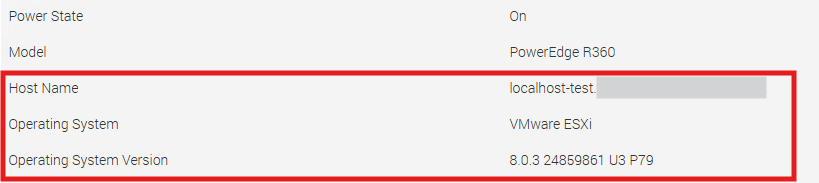
PowerEdge: IDRAC Hostname and Operating System version not updated automatically
Summary: This article provides guidance for troubleshooting scenarios where the iDRAC hostname, OS version, or OS build fields are not being automatically populated as expected.
Symptoms
Overview
Some customers may report that the iDRAC hostname field is not automatically populated by the operating system upon completion of the OS installation, or during the installation process itself. This behavior may also be observed even when iDRAC Service Module (iSM) is installed.
Cause
How Field Population Works
iDRAC operates in a passive listening mode and does not pull information from the operating system. Instead, it relies on the OS to push the relevant data to iDRAC.
Installing iSM enables this data push process to occur automatically, while also providing additional features and capabilities provided by the iSM integration.
Resolution
To ensure that these fields are automatically populated by the operating system, verify that the "Disable iDRAC Local Configuration using RACADM" setting is set to Disabled.
RACADM: Controls whether iDRAC settings can be modified using RACADM (Remote Access Controller Admin) commands executed locally from the host operating system. When set to Enabled, any attempt to configure iDRAC through local RACADM commands (for example, using the racadm CLI from within the OS) is blocked.
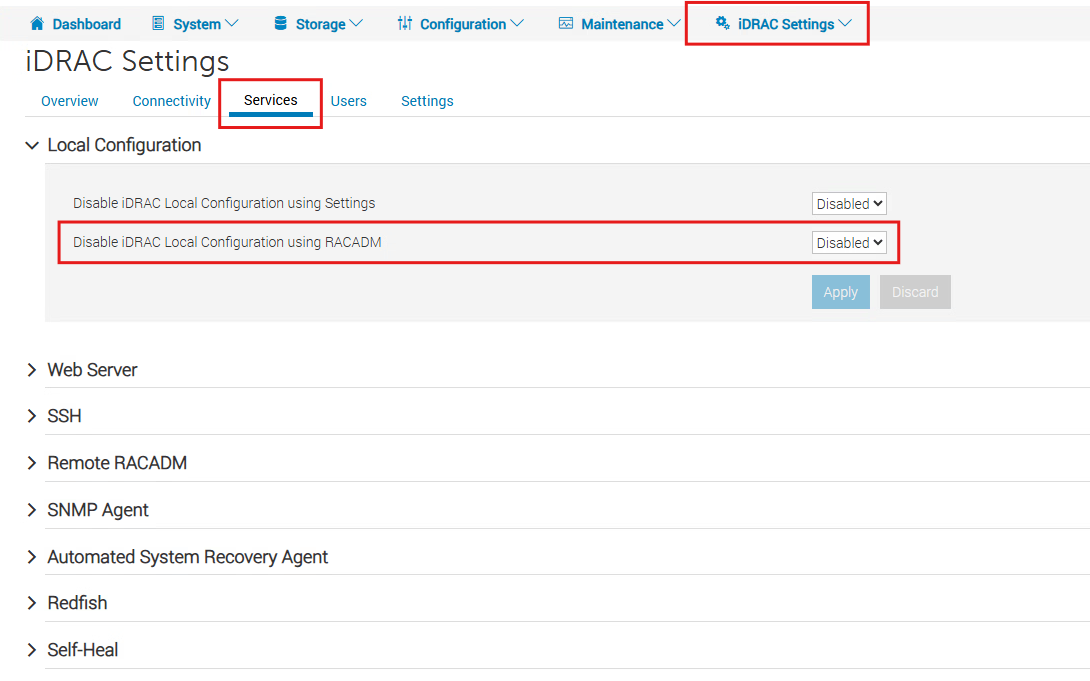
Once this setting has been disabled, the fields are populated on the next OS-initiated data push. As an example, on ESXi, restarting the management services is sufficient to trigger the information push to iDRAC.