NetWorker: Unable to Disable the View Parallel Option in the NMC View Tab
Summary: After enabling View Parallel option in NetWorker Management Console (NMC), the tab has been split and am unable to reset it back.
This article applies to
This article does not apply to
This article is not tied to any specific product.
Not all product versions are identified in this article.
Symptoms
Upon enabling the View Parallel option in the NetWorker Management Console (NMC), the interface displays the below screen with tabs split accordingly.
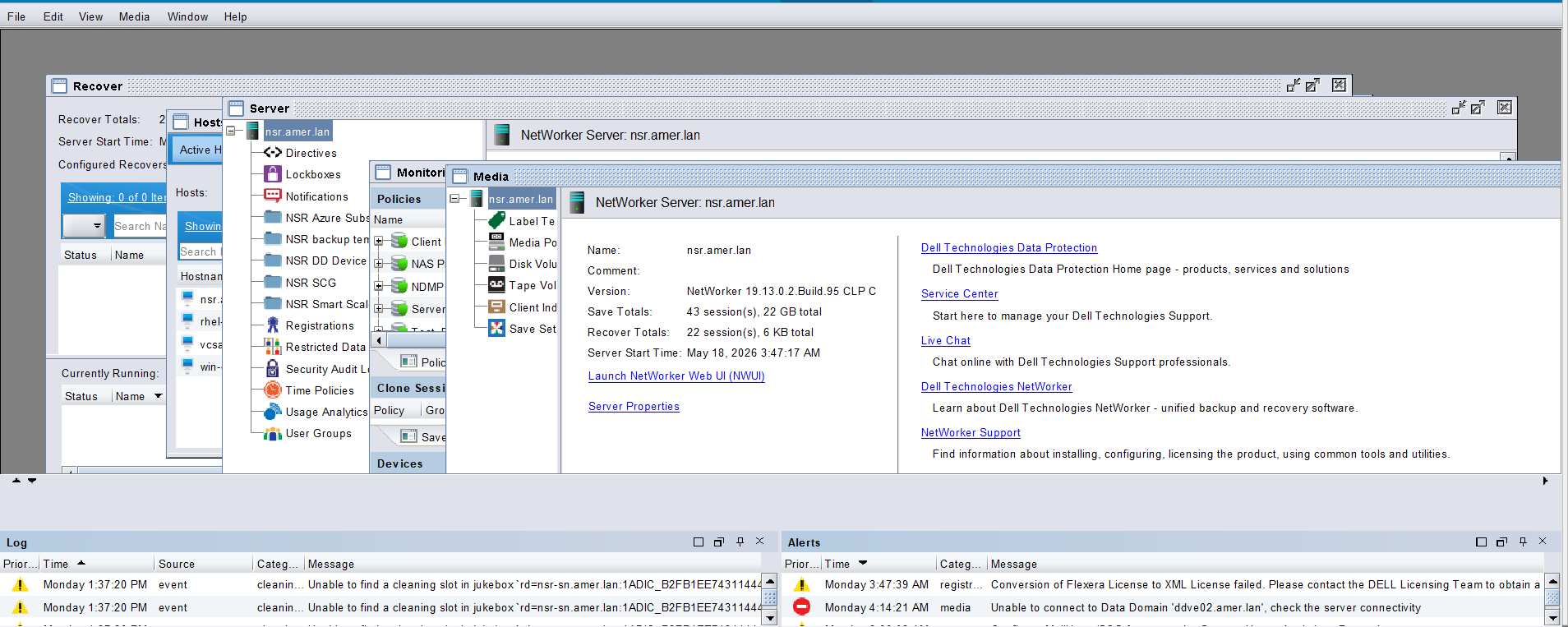
The View Parallel option is missing in the Monitoring tab:

It is not possible to disable Parallel mode from the View menu.
Cause
The issue is not a fault but expected behavior. It occurred due to enabling the View Parallel option, which modifies the NMC to display multiple tabs in a split (Parallel) view.
Resolution
Perform the following actions:
- Close all open tabs using the cancel option.
- Relaunch the NetWorker Management Console (NMC).
- Close all tabs using Windows > Close All to ensure a clean session.
- Reopen the Monitoring tab.
- Access the View menu again, after which the View Parallel option became visible.
- Clear the View Parallel option.

Affected Products
NetWorker Family, NetWorker, NetWorker Management ConsoleArticle Properties
Article Number: 000481218
Article Type: Solution
Last Modified: 10 يوليو 2026
Version: 2
Find answers to your questions from other Dell users
Support Services
Check if your device is covered by Support Services.