Linux:終止 Linux 環境中的殭屍程式
Summary: 什麼是殭屍進程,如何找到它,以及如何殺死或終止它。
This article applies to
This article does not apply to
This article is not tied to any specific product.
Not all product versions are identified in this article.
Instructions
什麼是殭屍進程:
這是一個已結束的進程,但並非所有進程都會立即從記憶體中刪除,因為其進程描述符保留在記憶體中。
程序的正常行為應該是什麼:
當行程結束時,該進程的狀態變為
然後,父進程應運行
如何找到殭屍進程:
執行命令

執行命令
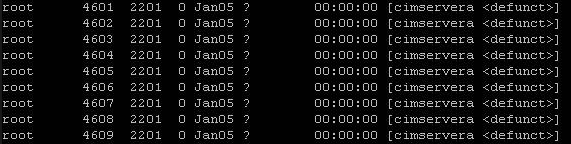
如何終止累積殭屍程序:
大多數情況下,殭屍進程具有相同的父進程ID。
有兩種方法可以刪除該過程:
這是一個已結束的進程,但並非所有進程都會立即從記憶體中刪除,因為其進程描述符保留在記憶體中。
程序的正常行為應該是什麼:
當行程結束時,該進程的狀態變為
EXIT_ZOMBIE 並且通知進程的父進程其子進程已終止,並出現 SIGCHLD 信號。
然後,父進程應運行
wait() 讓系統調用讀取失效進程的退出狀態和其他資訊。之後 wait() 稱為,殭屍進程從記憶體中刪除。此作業會快速發生,因此您不會看到系統上累積的殭屍程序。但是在我們看到幾個殭屍進程累積的情況下,這是程序代碼效率低下的情況。
如何找到殭屍進程:
執行命令
top
執行命令
ps -ef | grep defunct
如何終止累積殭屍程序:
大多數情況下,殭屍進程具有相同的父進程ID。
有兩種方法可以刪除該過程:
- 傳送
SIGCHLD向父進程發出信號。
此訊號告訴父行程執行
wait() 系統調用並清理其殭屍子項:
kill -s SIGCHLD <PPID>
範例:
kill -s SIGCHLD 2201
- 殺死殭屍父進程
kill -9 <PPID>
範例:
kill -9 2201
Affected Products
SUSE Linux Enterprise Server 12, Red Hat Enterprise Linux Version 7, Red Hat Enterprise Linux Version 9, Red Hat Enterprise Linux Version 8, SUSE Linux Enterprise Server 15, Ubuntu Server LTSArticle Properties
Article Number: 000019108
Article Type: How To
Last Modified: 03 فبراير 2026
Version: 5
Find answers to your questions from other Dell users
Support Services
Check if your device is covered by Support Services.