PowerFlex: Slik tilbakestiller du iDRAC 13G og 14G mykt
Summary: PowerFlex: Slik tilbakestiller du iDRAC 13G og 14G mykt
This article applies to
This article does not apply to
This article is not tied to any specific product.
Not all product versions are identified in this article.
Instructions
Tilbakestille ved hjelp av iDRAC-grensesnittet (13G)
I det grafiske brukergrensesnittet (UI) for iDRAC kan du utføre en myk tilbakestilling:
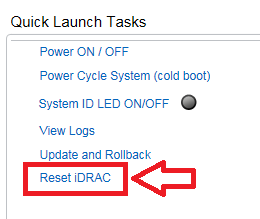
- Koble til iDRAC
- Logg på grensesnittet ved å skrive inn brukernavn og passord
- I nedre høyre hjørne av oversiktsskjermbildet vises Hurtigstartoppgaver:
- Klikk på Tilbakestill iDRAC.
- Bekreft handlingen
- IDRAC kan ikke nås på noen få minutter mens systemytelsen ikke påvirkes
Tilbakestille ved hjelp av iDRAC-grensesnittet (14G)
I det grafiske brukergrensesnittet (UI) for iDRAC kan du utføre en myk tilbakestilling:
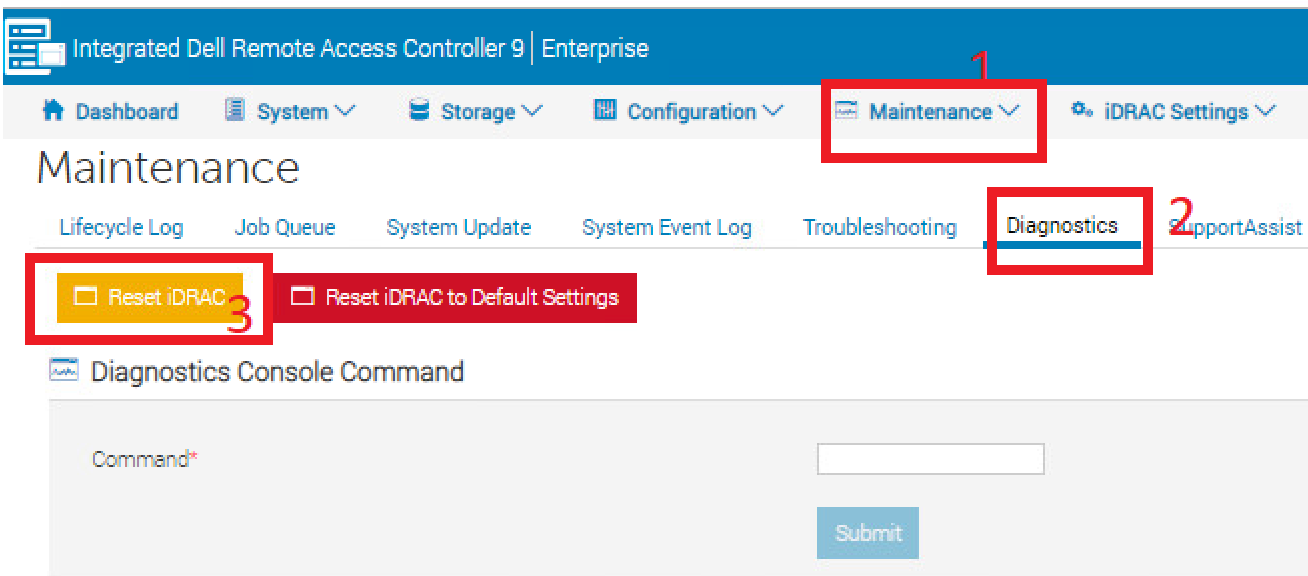
- Koble til iDRAC
- Logg på grensesnittet ved å skrive inn brukernavn og passord
- Klikk på "Vedlikehold" -fanen øverst
- Klikk på underfanen «Diagnostics»
- Klikk på Tilbakestill iDRAC.
- Bekreft handlingen
- IDRAC kan ikke nås på noen få minutter mens systemytelsen ikke påvirkes
Affected Products
PowerFlex rack, VxFlex Ready Nodes, PowerFlex appliance Intelligent Catalog Software, PowerFlex Software, PowerFlex appliance R640, PowerFlex appliance R740XD, PowerFlex appliance R840Article Properties
Article Number: 000019789
Article Type: How To
Last Modified: 09 يناير 2026
Version: 5
Find answers to your questions from other Dell users
Support Services
Check if your device is covered by Support Services.