PowerFlex:如何軟重設 iDRAC 13G 和 14G
Summary: PowerFlex:如何軟重設 iDRAC 13G 和 14G
This article applies to
This article does not apply to
This article is not tied to any specific product.
Not all product versions are identified in this article.
Instructions
使用 iDRAC UI (13G) 重設
iDRAC 的圖形使用者介面 (UI) 提供執行軟重設的選項:
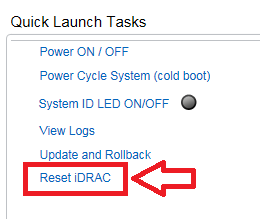
- 連線至 iDRAC
- 輸入使用者名稱和密碼以登入介面
- 在概觀畫面的右下角,會顯示快速啟動工作
- 按一下重設 iDRAC。
- 確認動作
- iDRAC 在數分鐘內無法連線,同時系統效能不會受到影響
使用 iDRAC UI (14G) 重設
iDRAC 的圖形使用者介面 (UI) 提供執行軟重設的選項:
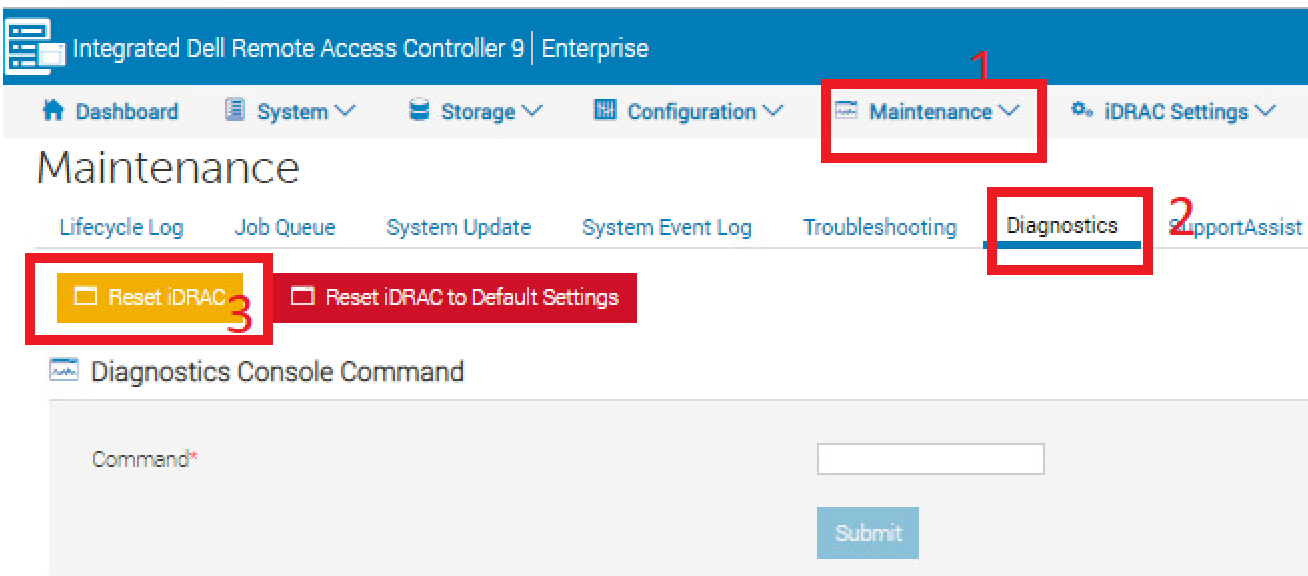
- 連線至 iDRAC
- 輸入使用者名稱和密碼以登入介面
- 按一下頂部的「維護」標籤
- 按一下「Diagnostics」子標籤
- 按一下重設 iDRAC。
- 確認動作
- iDRAC 在數分鐘內無法連線,同時系統效能不會受到影響
Affected Products
PowerFlex rack, VxFlex Ready Nodes, PowerFlex appliance Intelligent Catalog Software, PowerFlex Software, PowerFlex appliance R640, PowerFlex appliance R740XD, PowerFlex appliance R840Article Properties
Article Number: 000019789
Article Type: How To
Last Modified: 09 يناير 2026
Version: 5
Find answers to your questions from other Dell users
Support Services
Check if your device is covered by Support Services.