導入KB:CloudLinkのvSan暗号化を検証する方法。
Summary: この記事では、CloudLinkのvSan暗号化を検証する方法について説明します。
This article applies to
This article does not apply to
This article is not tied to any specific product.
Not all product versions are identified in this article.
Instructions
vCenterを使用してvSAN暗号化をモニターする方法:
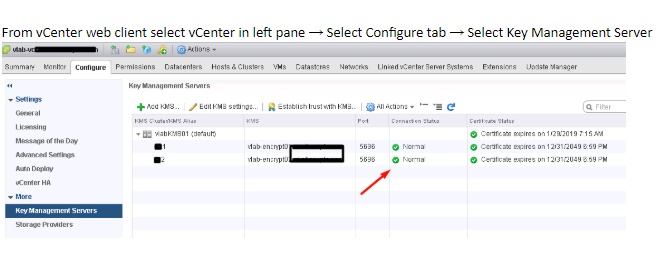
- vCenterおよびKMSサーバーの接続ステータスを確認します。
接続のステータスが正常でない場合は、vCenterがKMSに接続されており、信頼関連の問題がないことを確認します。
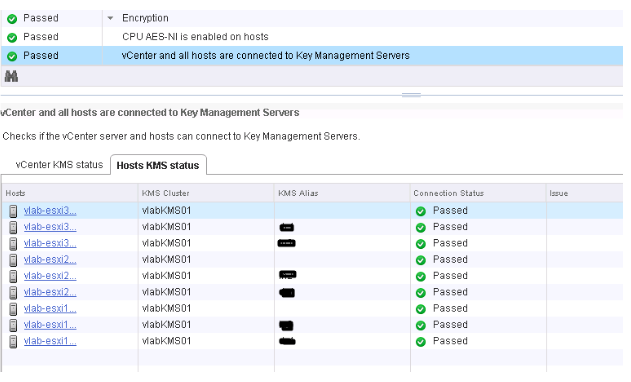
- vSAN暗号化を有効にしたESXiクラスターを選択します。vSAN Healthプラグインには、KMS接続ステータスとディスク暗号化ステータスが表示されます。暗号化を有効にした場合、vSAN Healthプラグインに暗号化リンクが表示されます。
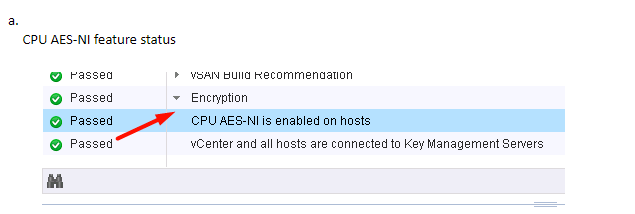
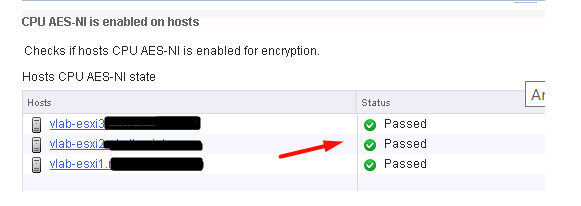
b. KMSとvCenterステータスの確認
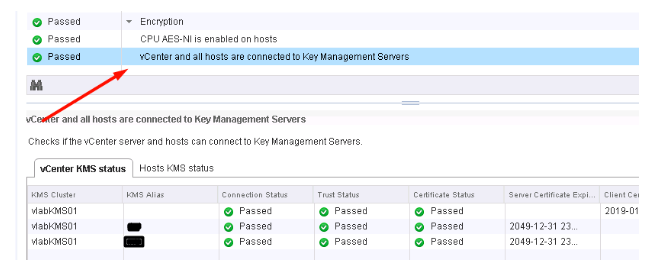
c. KMSおよびESXiホスト接続ステータスの確認
Additional Information
VM暗号化またはvSAN暗号化の実装を検討している場合、次のVMworldセッションを視聴することをお勧めします。
VMworld 2017 - SER1392BU - キーの場所について仮想マシン暗号化に関する一般的な問題の理解と回避策
https://www.youtube.com/watch?v=I5gR_dVqfz0&feature=youtu.be
VMworld 2017 - SER1392BU - キーの場所について仮想マシン暗号化に関する一般的な問題の理解と回避策
https://www.youtube.com/watch?v=I5gR_dVqfz0&feature=youtu.be
Affected Products
CloudLinkProducts
CloudLinkArticle Properties
Article Number: 000022200
Article Type: How To
Last Modified: 17 أبريل 2026
Version: 4
Find answers to your questions from other Dell users
Support Services
Check if your device is covered by Support Services.