部署 KB:如何驗證 Cloudlink 的 vSan 加密。
Summary: 本文說明如何驗證 Cloudlink 的 vSan 加密。
This article applies to
This article does not apply to
This article is not tied to any specific product.
Not all product versions are identified in this article.
Instructions
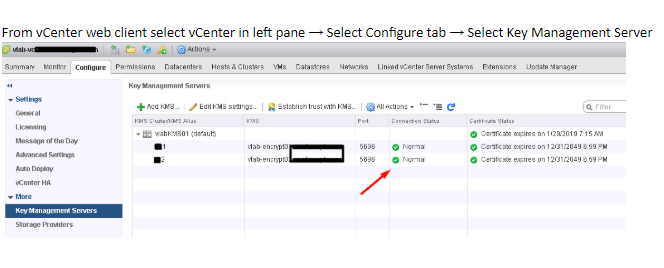
如何使用 vCenter 監控 vSAN 加密:
- 檢查 vCenter 和 KMS 伺服器的連線狀態。
如果連線狀態不正常,請確定 vCenter 已連接至 KMS,並且沒有信任的相關問題。
- 選取您已啟用 vSAN 加密的 ESXi 叢集。vSAN 健全狀況附掛程式會看到 KMS 連線狀態和磁碟加密狀態。如果您已啟用加密,則 vSAN 健全狀況附掛程式中會顯示加密連結。
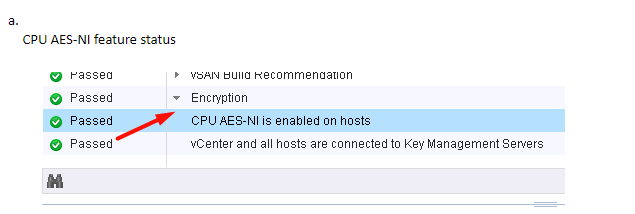
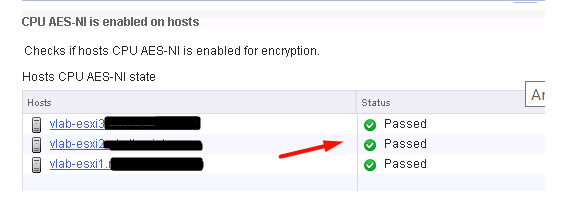
b. 檢查 KMS 和 vCenter 狀態
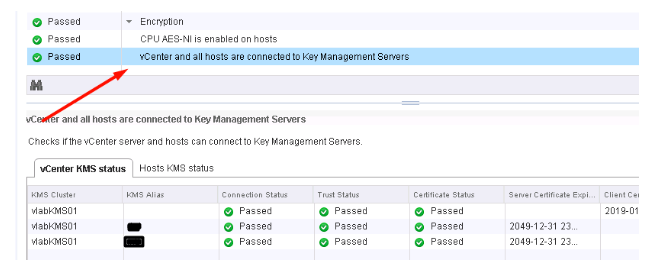
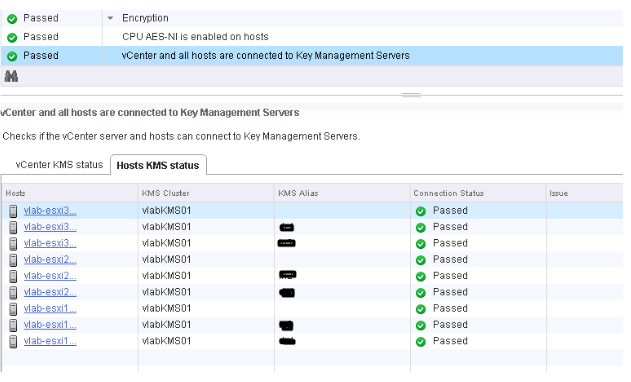
c. 檢查 KMS 和 ESXi 主機連線狀態
Additional Information
如果您想要實作 VM 加密或 vSAN 加密,建議您觀看下方的 VMworld 工作階段:
VMworld 2017 - SER1392BU - 親愛的,我的金鑰在哪裡?瞭解並避免虛擬機器加密的常見問題
https://www.youtube.com/watch?v=I5gR_dVqfz0&feature=youtu.be
VMworld 2017 - SER1392BU - 親愛的,我的金鑰在哪裡?瞭解並避免虛擬機器加密的常見問題
https://www.youtube.com/watch?v=I5gR_dVqfz0&feature=youtu.be
Affected Products
CloudLinkProducts
CloudLinkArticle Properties
Article Number: 000022200
Article Type: How To
Last Modified: 17 أبريل 2026
Version: 4
Find answers to your questions from other Dell users
Support Services
Check if your device is covered by Support Services.