部署 KB:如何验证 CloudLink 的 vSan 加密。
Summary: 本文介绍如何验证 CloudLink 的 vSan 加密。
This article applies to
This article does not apply to
This article is not tied to any specific product.
Not all product versions are identified in this article.
Instructions
如何使用 vCenter 监视 vSAN 加密:
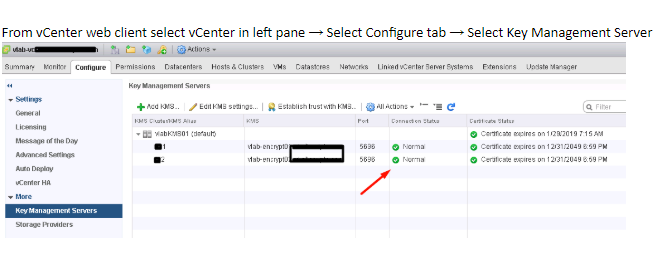
- 检查 vCenter 和 KMS 服务器的连接状态。
如果连接状态不是“Normal”,请确保 vCenter 已连接到 KMS,并且不存在与信任相关的问题。
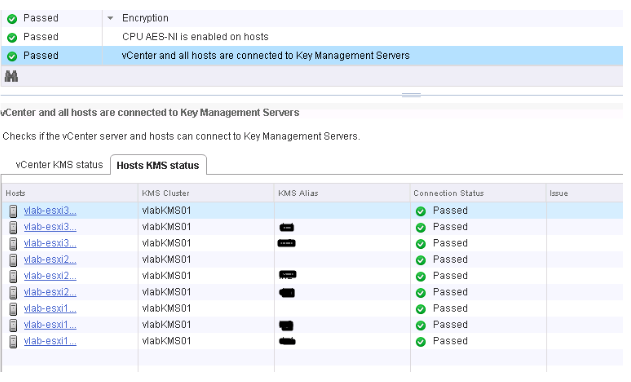
- 选择在其中启用了 vSAN 加密的 ESXi 群集。vSAN 运行状况插件程序会显示 KMS 连接状态和磁盘加密状态。如果您启用了加密,则加密链接会显示在 vSAN 运行状况插件程序中。
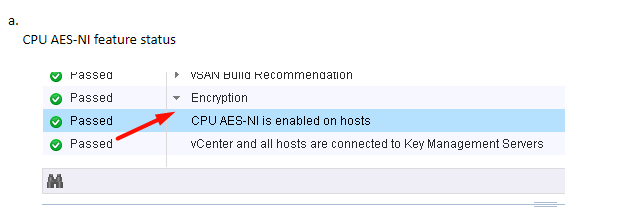
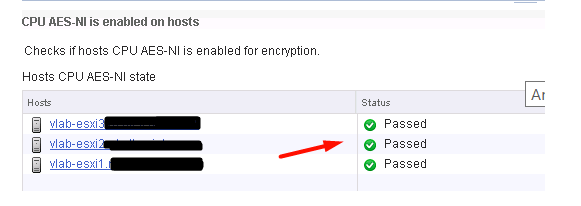
b. 检查 KMS 和 vCenter 状态
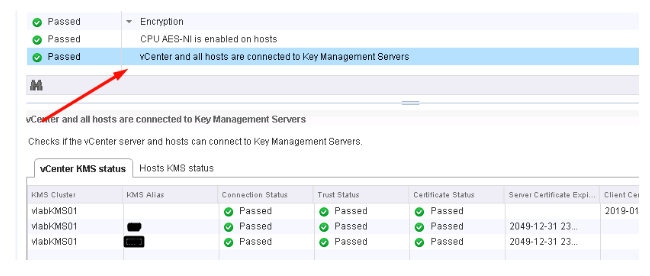
c. 检查 KMS 和 ESXi 主机连接状态
Additional Information
如果您想要实施虚拟机加密或 vSAN 加密,建议观看下面的 VMworld 讲座:
VMworld 2017 — SER1392BU — 亲爱的,我的密钥在哪里?了解和避免虚拟机加密的常见问题
https://www.youtube.com/watch?v=I5gR_dVqfz0&feature=youtu.be
VMworld 2017 — SER1392BU — 亲爱的,我的密钥在哪里?了解和避免虚拟机加密的常见问题
https://www.youtube.com/watch?v=I5gR_dVqfz0&feature=youtu.be
Affected Products
CloudLinkProducts
CloudLinkArticle Properties
Article Number: 000022200
Article Type: How To
Last Modified: 17 أبريل 2026
Version: 4
Find answers to your questions from other Dell users
Support Services
Check if your device is covered by Support Services.