Dell Unity: Details About The Unity Performance Metrics Aging Policy (User Correctable)
Summary: What is the Unity Performance Metrics Aging Policy and the length of retention for Unity Performance Archive (UPA) files?
Instructions
Performance metrics database
Performance metrics data is located in a database stored on the first four system drives. This performance database space is fixed at 16 GB in size and is automatically reserved on every storage system. The fixed size allows the system to retain historical metrics for a fixed duration of time, although not indefinitely (see section 1.2). The target for total consumed space for storing metrics is 70% of the available 16 GB reserved system space for metrics. If there is a lack of space, the system decreases the retention period for the oldest metrics while attempting to retain at least 24 hours' worth of data for all collected metrics.
Performance metrics aging policy
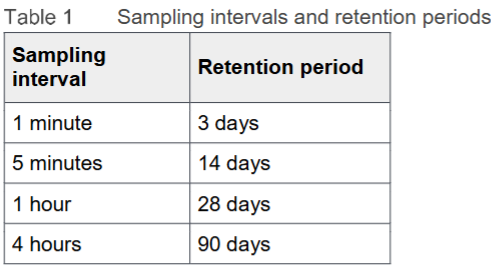
Performance metrics data is consolidated and averaged depending on the age of the data so that the metrics database can hold older data for longer periods. For example, data that is greater than 3 days old is consolidated from 1-minute intervals to 5-minute intervals for a longer sampling interval. The same concept is applied at 14 and 28 days, respectively. Table 1 shows the full list of metric retention periods and associated sampling intervals. More information can be found at Dell EMC Unity: Performance Metrics (October 2019) on page 6.