NetWorker: Backup or Restore fails with the error "Resource does not exist"
Summary: "Resource Does not Exist" - Pop ups on NMC UI. Backup and restore fails with the specific open for the Workflow.
Symptoms
"Resource Does not Exist" - Pop ups on NMC under Groups, Clients, Workflow, Policy, and Actions.
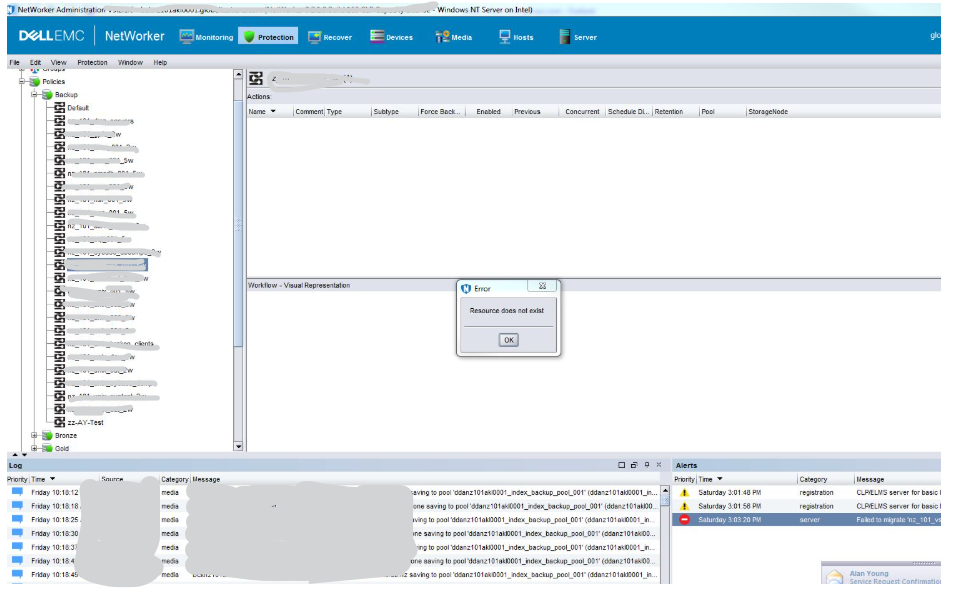
This issue also causes Backup Failure at times and also the restore of the Client.
Cause
When the Client is deleted from the NMC without clearing that Client in Group Properties, the Group Database is sometimes not updated. This can result in an error stating “Resource Does not Exist." It can also cause backup or restore failures for workflows associated with that Group. These issues occur when the Group and Database are not properly synchronized.
Resolution
The resolution for this display message can be fixed from the NMC by following the below steps:
- Go to "Protection" Tab.
- Select "Group."
- Go to "Group Properties" of the current group.
- Check whether any client has been selected on Group Properties, but which reflects as 0 clients available on NMC.
- At this point, check any Client under Group Properties and Click "Ok."
- Again open group properties and uncheck the Client checked in order to update the Database of that group with Clients.
- This updates the Database of the Group.
- Now switch any other group and when clicking this group, no pop-ups occur.
Additional Information
If there is an issue even after following the above steps, then follow up the KB: 'Resource Does Not Exist' open after client belonging to a group has been removed