DPSearch 19.1: Search Fails if NBD Transport is Used for Avamar Virtual Machine Backups
Summary: Virtual Machine (VM) backups within Avamar are not searchable if "[avvcbimage]transport=nbd:nbdssl" parameter is set in the Avamar Administrator Console.
This article applies to
This article does not apply to
This article is not tied to any specific product.
Not all product versions are identified in this article.
Symptoms
Virtual Machine backups within Avamar are not searchable if
[avvcbimage]transport=nbd:nbdssl parameter is set up in the Avamar Administrator Console. No errors are displayed in the Collection activities, there is a successful job with no backup items processed. Therefore any files present in these backups are not found in the Search page as no files are indexed.Cause
The [avvcbimage]transport=nbd:nbdssl transport protocol parameter is set up in the Client Properties in the Avamar Administrator Console, in the Manage Dataset for Windows VMware image, as shown below.
The individual files are not indexed when Avamar VM backups are taken with the NBD transport protocol.
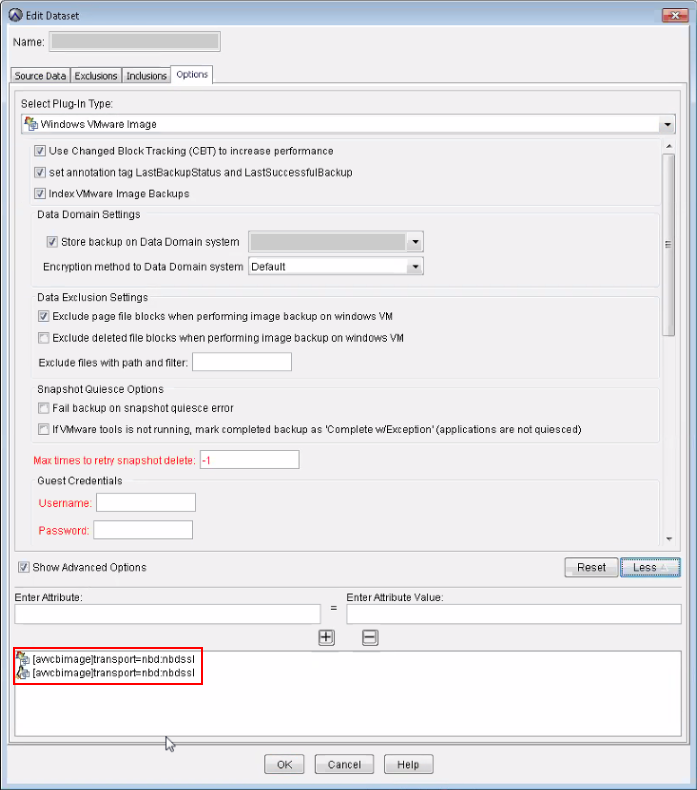
For Virtual Machine backups made with Avamar, DPSearch requires the following file from the backup to get the metadata:
VMFiles/1/zMetadata.sql.
This is the internal SQL file that contains the VMDK metadata (file list). However, when doing it with NBD transport, this file does not exist, so the VM image backups cannot be processed.
Resolution
- Remove the
[avvcbimage]transport=nbd:nbdsslsetting in the Dataset Manager page from the Avamar Administration Console. - Create a new backup for the client.
- Trigger a collection for the Avamar Source in the Search Administrator. Wait for its completion.
- Run a new search from the Search Console.
Affected Products
Data Protection SearchProducts
Data Protection SearchArticle Properties
Article Number: 000044366
Article Type: Solution
Last Modified: 19 مارس 2026
Version: 4
Find answers to your questions from other Dell users
Support Services
Check if your device is covered by Support Services.