Avamar: La configurazione dell'interfaccia di rete viene persa dopo il riavvio di un Avamar Virtual Edition (AVE) implementato su Microsoft Hyper-V
Summary: Configurazioni dell'interfaccia di rete perse dopo il riavvio di AVE implementato su Microsoft Hyper-V
Symptoms
Su un AVE è presente, per impostazione predefinita, un nome creato per l'interfaccia di rete eth0.
Dopo un riavvio AVE, l'interfaccia eth0 non è presente:
ifconfig eth0
eth0: error fetching interface information: Device not found
L'elenco delle interfacce di rete disponibili conferma che eth0 è mancante, ma è presente una nuova interfaccia non configurata denominata eth1:
ifconfig -a
eth1      Link encap:Ethernet  HWaddr 00:15:5D:C8:BC:B4
          BROADCAST MULTICAST  MTU:1500  Metric:1
          RX packets:0 errors:0 dropped:0 overruns:0 frame:0
          TX packets:0 errors:0 dropped:0 overruns:0 carrier:0
          collisions:0 txqueuelen:1080
          RX bytes:0 (0.0 b)  TX bytes:0 (0.0 b)

lo        Link encap:Local Loopback
          inet addr:127.0.0.1  Mask:255.0.0.0
          inet6 addr: ::1/128 Scope:Host
          UP LOOPBACK RUNNING  MTU:16436  Metric:1
          RX packets:5258453 errors:0 dropped:0 overruns:0 frame:0
          TX packets:5258453 errors:0 dropped:0 overruns:0 carrier:0
          collisions:0 txqueuelen:0
          RX bytes:3043137745 (2902.1 Mb)  TX bytes:3043137745 (2902.1 Mb)
Il file di configurazione eth0 è presente e non è stato modificato:
ls -l /etc/sysconfig/network/ifcfg-eth0
-rw-r--r-- 1 root root 62 Jul 21 2003 /etc/sysconfig/network/ifcfg-eth0
cat /etc/sysconfig/network/ifcfg-eth0
STARTMODE='auto'
BOOTPROTO='static'
IPADDR='10.10.10.10/24'
NETMASK='255.255.255.0'
BROADCAST=''
ETHTOOL_OPTIONS=''
MTU=''
NAME=''
NETWORK=''
REMOTE_IPADDR=''
USERCONTROL='no'
Non esiste un file di configurazione eth1:
ls -l /etc/sysconfig/network/ifcfg-eth1
ls: cannot access /etc/sysconfig/network/ifcfg-eth1: No such file or directory
I messaggi del dispositivo mostrano che eth0 è stato rinominato in eth1:
dmesg | grep -i eth0
[ 1678.268338] udev: renamed network interface eth0 to eth1
Lo script /etc/udev/rules.d/70-persistent-net.rules contiene una voce per eth0 e una per eth1, entrambe con indirizzi MAC diversi:
cat /etc/udev/rules.d/70-persistent-net.rules
# PCI device 0x8086:0x100f (e1000)
SUBSYSTEM=="net", ACTION=="add", DRIVERS=="?*", ATTR{address}=="00:50:56:80:94:f7", ATTR{dev_id}=="0x0", ATTR{type}=="1", KERNEL=="eth*", NAME="eth0"
SUBSYSTEM=="net", ACTION=="add", DRIVERS=="?*", ATTR{address}=="00:15:5D:C8:BC:B4", ATTR{dev_id}=="0x0", ATTR{type}=="1", KERNEL=="eth*", NAME="eth1"
Cause
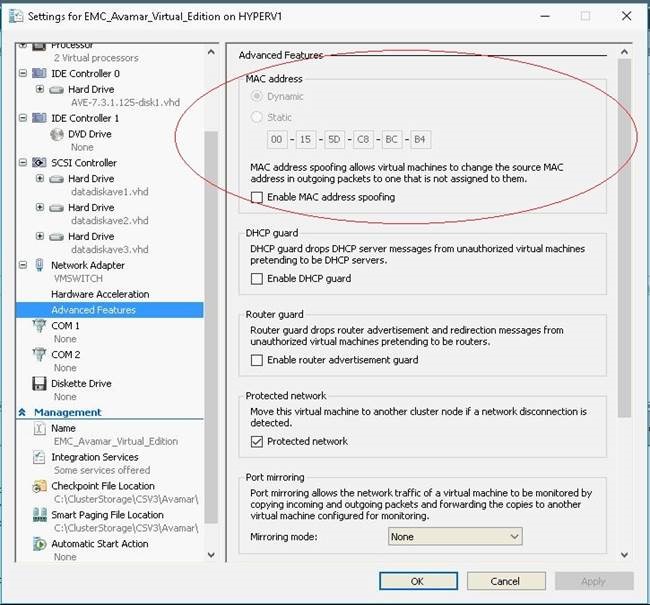
Per impostazione predefinita, Microsoft Hyper-V utilizza la generazione di indirizzi MAC dinamici, che determina la riassegnazione di un indirizzo MAC diverso alla macchina virtuale AVE:
Resolution
1. Arrestare l'AVE.
2. Accedere alle Impostazioni per AVE nel gestore di Hyper-V.
3. Espandere le impostazioni per "Network Adapter" nel riquadro a sinistra e selezionare "Advanced Features":
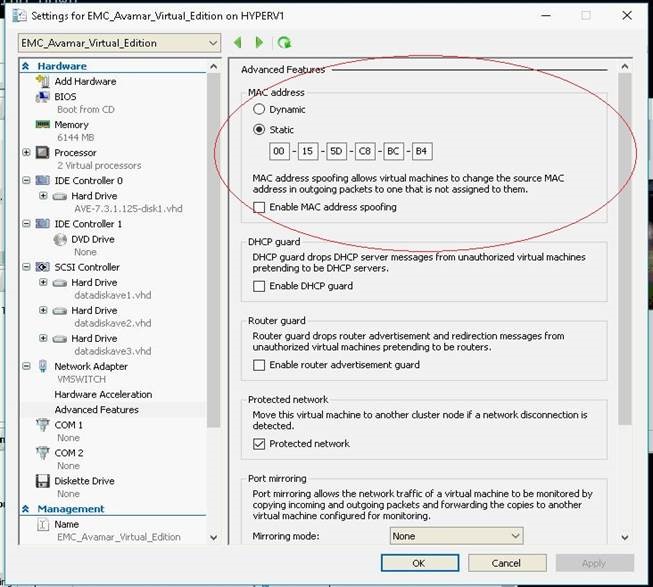
4. Selezionare "Static" nella casella "MAC Address" (come mostrato sopra). I campi dell'indirizzo devono essere già popolati con l'impostazione predefinita assegnata da Hyper-V.
5. Premere OK per salvare le impostazioni.
6. Accendere AVE.
7. Se è presente un Data Domain collegato ad Avamar, utilizzare il comando dpnctl start all per riavviare i servizi Avamar.