DPA: DPA Agent installed on NetWorker is not registered with DPA Application Server
Summary: This article explains the workaround when the DPA Agent installed on NetWorker is not registered with the DPA Application Server.
Symptoms
DPA Agent is installed locally on the NetWorker server, but not registering with the DPA Application server. Agent logs have the following error messages.
ERR      5508.7112     20160530:160845         agent.config - initAgentConfig(): Failed to register agent with the server. Waiting to retry...
WARN     5508.7112     20160530:161118         agent.config - registerAgentProcess(): Missing result in NULL
Communication from the DPA Application server and the DPA agent is working fine. Ping, nslookup from Application to agent and conversely works fine.
Manually put the agent in debug mode and grabbed the debug logs while agent tries to registers with the app server. Reviewed the logs and found that there was a hardware firewall (Internet proxy) was present.
<td class="contentData">
      You must be authenticated to access this URL.
    </td>
  </tr>
 <a href="http://******************/Information%20Security%20Noticeboard/Information%20Security%20Policies%20and%20Procedures/IMS-ITM-PY-00005%20(Internet%20Use%20Policy)-V5.0.pdf">******** Internet Browsing Policy   Click here for review</a>
    </td>
  </tr>
  <td class='helpDeskData' background='/mwg-internal/de5fs23hu73ds/files/default/img/bg_navbar.jpg'>
      For assistance, please contact your system administrator.
    </td>
  </tr>
<td class='footData'>
  generated <span id="time">2016-05-30 16:22:05</span> by New ****** Web Gateway
    <br />
Cause
This is an Environmental issue. DPA is working as designed.
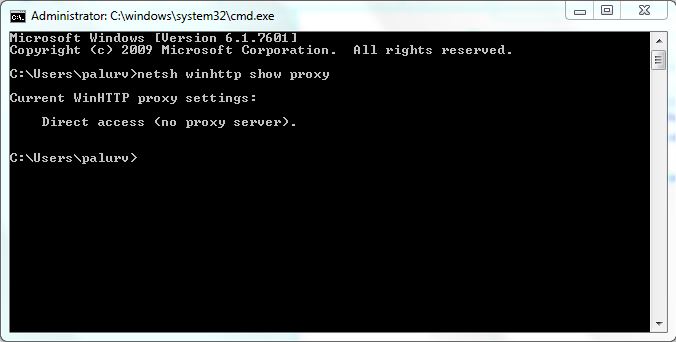
To identify if a proxy is configured, open the command prompt with administrative privileges and run the following command "netsh winhttp show proxy."
If the proxy server is not configured, the output is shown as in screenshot below:
Resolution
Engage the local system System or Network Administrator to modify the rules and parameters configured for the firewall or proxy settings to allow the communication from the DPA Agent server to the Application server.
Another workaround which could be applied is to remove the proxy settings configured on the server. Follow the below steps to remove the proxy server settings:
- Stop the agent services on the server.
- Open the command prompt with administrative privileges.
- Run the command "
netsh winhttp show proxy" to verify again if the proxy server is listed or not. - If listed, run the command "
netsh winhttp reset proxy." This removes the proxy settings configured on the server. - Start the agent service back again and check the agent logs if it is registered successfully with the DPA Application server.
If the above steps did not resolve the issue. Contact EMC Technical Support for assistance