Dell Unity:OEのアップグレードが次のエラー コードで失敗する: 0x6000cb9/cores/serviceに「.bin」ファイルがある場合
Summary: Unity OEのアップグレードが次のエラー コードで失敗します。/cores/serviceに「.bin」ファイルがある場合0x6000cb9(ユーザー修正可能)
This article applies to
This article does not apply to
This article is not tied to any specific product.
Not all product versions are identified in this article.
Symptoms
/cores/service/に「.bin」ファイルがある場合、Unity OEのアップグレードは失敗します。
UIには次のように表示されます。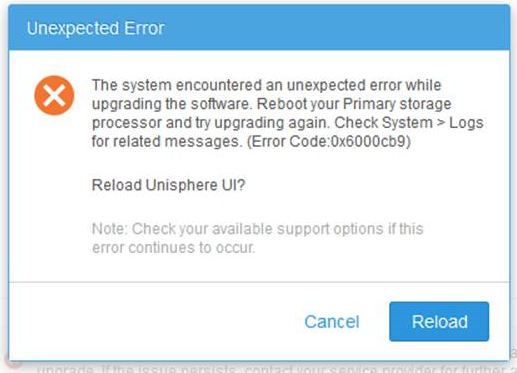
CLIに次のような内容が表示されることがあります。
Operation failed. Error code: 0x6000cb9
The system encountered an unexpected error while upgrading the software. Reboot your Primary storage processor and try upgrading again. Check System > Logs for related messages. (Error Code:0x6000cb9)
Cause
通常、 /cores/service/ にある「esrs_checker.64.bin」ファイル(またはその他の.binファイル)は、この問題を引き起こします。
Resolution
「esrs_checker.64.bin」ファイルを /cores/service/から削除し、アップグレード イメージを再アップロードします。
この操作を行った後、アップグレードは正常に機能するはずです。
さらにサポートが必要な場合は、Dellテクニカル サポートまたは認定サービス担当者にお問い合わせいただき、このナレッジベース記事IDをお伝えください。
この問題は、Dell Unity OEリリース4.2.1.9535982以降で解決されています。
Article Properties
Article Number: 000054844
Article Type: Solution
Last Modified: 22 ديسمبر 2025
Version: 5
Find answers to your questions from other Dell users
Support Services
Check if your device is covered by Support Services.