Dell Unity: Replication Resume Indicates Full Sync After Failover with Sync
Summary: In Dell Unity OE 5.0.x, the Resume confirmation message displayed after a Failover with Sync operation incorrectly states that a full synchronization will be initiated for all selected replication sessions. This is a user interface messaging issue only and does not affect actual replication behavior. Dell Unity Development has identified the issue, and a fix is scheduled for Dell Unity OE 5.1, where the Resume summary message will correctly reflect the replication operation being performed. ...
Symptoms
In Dell Unity OE 5.0.x, the Resume option for a replication session after performing a Failover with Sync displays a confirmation message stating that a full synchronization will be initiated for all affected replication sessions.
This message was introduced as a new feature in Unity OE 5.0.x to inform users of the expected synchronization behavior. Although the message indicates that a full sync will occur, Dell Unity Development has identified and is correcting this behavior in a future release.
This message may be displayed on any Dell Unity array running Unity OE 5.0.x when resuming replication following a Failover with Sync operation.
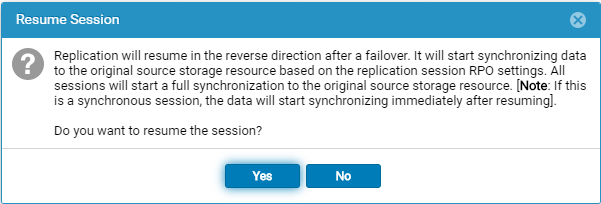
The following message is displayed when the Resume option is selected after a Failover with Sync operation:
Replication will resume in the reverse direction after a failover. It will start synchronizing data to the original source storage resource based on the replication session RPO settings. All sessions will start a full synchronization to the original source storage resource. [Note: If this is a synchronous session, the data will start synchronizing immediately after resuming].

Do you want to resume the session?
Cause
The Resume summary message is incorrect. After performing a Failover with Sync, the confirmation message displayed when selecting Resume indicates that a full synchronization will be initiated for all replication sessions. However, this message does not accurately reflect the actual replication behavior.
The issue is limited to the message presented in the user interface and does not indicate that a full synchronization will occur. Dell Unity Development has identified this as an issue in Unity OE 5.0.x and is working on a correction.
Resolution
The Resume summary message is incorrect and will be corrected in a future Unity OE release.
The message currently indicates that a full synchronization will be initiated for all replication sessions. This is a display issue only and does not reflect the actual replication operation that will be performed.
The correct messages should be:
Failback Confirmation Message
Failback will perform a synchronization from the destination storage resource to the source storage resource, block access to the destination storage resource to allow it to be used for replication, and change the source storage resource access to read/write mode. Replication will then resume. The synchronization could be either delta or full synchronization depending on the replicated snapshots. This operation will be lengthy if a full synchronization is needed during failback.
When the failback operation is complete, you can then connect your hosts to the source storage resource.
Note: Before you begin, you should block writes to the destination storage resource because it will be placed in read-only mode.
Resume Confirmation On Failed Over
Replication will resume in the reverse direction after a failover. It will start synchronizing data to the original source storage resource based on the replication session RPO settings.
All sessions will start a synchronization to the original source storage resource. The synchronization could be either delta or full synchronization depending on the replicated snapshots.
Note: If this is a synchronous session, the data will start synchronizing immediately after resuming. Do you want to resume the session?