PowerScale: NFS identity query failed for user@domain error STATUS_INVALID_PRIMARY_GROUP
Summary: NFS identity query failed for user@domain, error=STATUS_INVALID_PRIMARY_GROUP alerts seen in cluster.
Symptoms
Event : Resolved: NFS identity query failed for group=user@domain, error=STATUS_INVALID_PRIMARY_GROUP

Event ID 400140001 generated for the alert
Cause
Resolution
There are a few different ways to address the alert.
/etc/idmapd.conf match the domain that is set in the clusters NFS settings for the applicable zone. See the example below:
From PowerScale side:

# isi nfs settings zone view --zone=NFS
           NFSv4 Domain: localdomain  <<<<<<<<<<<<<<<
   NFSv4 Replace Domain: Yes
        NFSv4 No Domain: No
   NFSv4 No Domain UIDs: Yes
         NFSv4 No Names: No
NFSv4 Allow Numeric IDs: Yes


Client side:

[root@centos ~]# cat /etc/idmapd.conf | grep -i domain

# The following should be set to the local NFSv4 domain name
# The default is the host's DNS domain name.
Domain = PowerScale.local


Notice the domain on the PowerScale doesn't match the domain on the client. These should be consistent.
Cluster management > Events and Alerts > Alert Management > Scroll down and type in NFS and the alert should show up to be suppressed.
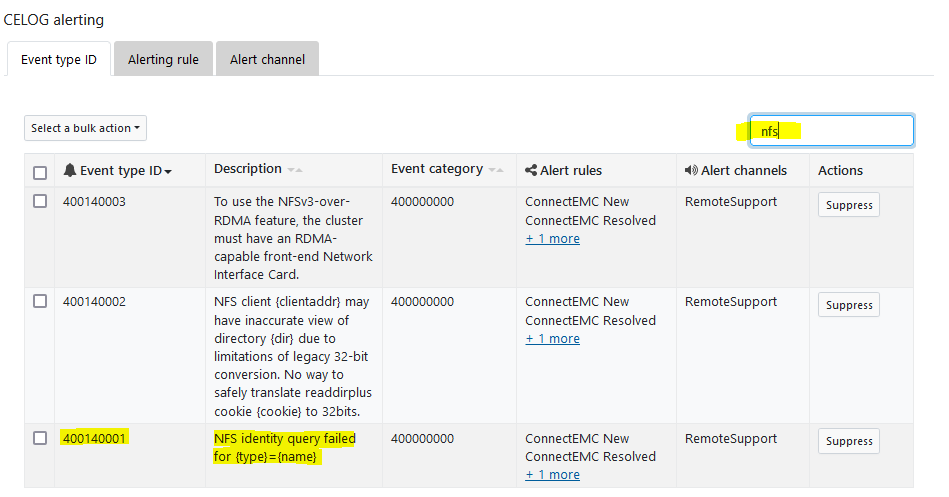
3. For OneFS versions earlier than 9.2, update the following gconfigs to suppress these alerts. This requires restarting NFS, so this change should be scheduled during a maintenance window.
isi_gconfig registry.Services.lwio.Parameters.Drivers.nfs.AlertFailedIDQueryThrottleDurationSec
^ the default value is 3600.
isi_gconfig registry.Services.lwio.Parameters.Drivers.nfs.AlertFailedIDQueryThrottleThreshold
^ the default value is 20.
These would be changed to 0.
NOTE: A restart of NFS across the cluster is needed for the changes to take effect, so this should be carried out in a maintenance window.
Change the gconfigs:

# isi_gconfig registry.Services.lwio.Parameters.Drivers.nfs.AlertFailedIDQueryThrottleDurationSec=0

# isi_gconfig registry.Services.lwio.Parameters.Drivers.nfs.AlertFailedIDQueryThrottleThreshold=0
4. Disable the "nfsv4 replace domain" parameter in the corresponding access zone. This would mean that the domain is pulled from the lsass identity and lsass will not try to look up domain-less users.
NOTE: There is no way for us to know how or if this will impact certain workflows/environments. It is a configuration that is on by default to force all users and groups to the domain configured for that zone.
See current settings:

# isi nfs settings zone view --zone=NFS
           NFSv4 Domain: localdomain
   NFSv4 Replace Domain: Yes <<<<<<<<< default is yes
        NFSv4 No Domain: No
   NFSv4 No Domain UIDs: Yes
         NFSv4 No Names: No
NFSv4 Allow Numeric IDs: Yes


Command to change:

isi nfs settings zone modify --zone=<zone name> --nfsv4-replace-domain=no