Avamar:由於「Avamar Administrator 用戶端與所選伺服器不相容」錯誤,無法存取 Avamar UI
Summary: 無法存取 Avamar UI,並報告錯誤「Avamar Administrator 用戶端與所選伺服器不相容」。
This article applies to
This article does not apply to
This article is not tied to any specific product.
Not all product versions are identified in this article.
Symptoms
無法存取 UI,並回報下列錯誤:
The Avamar Administrator client is not compatible with the selected server.
The Avamar Administrator client cannot continue and will now exit.
螢幕擷取畫面範例:
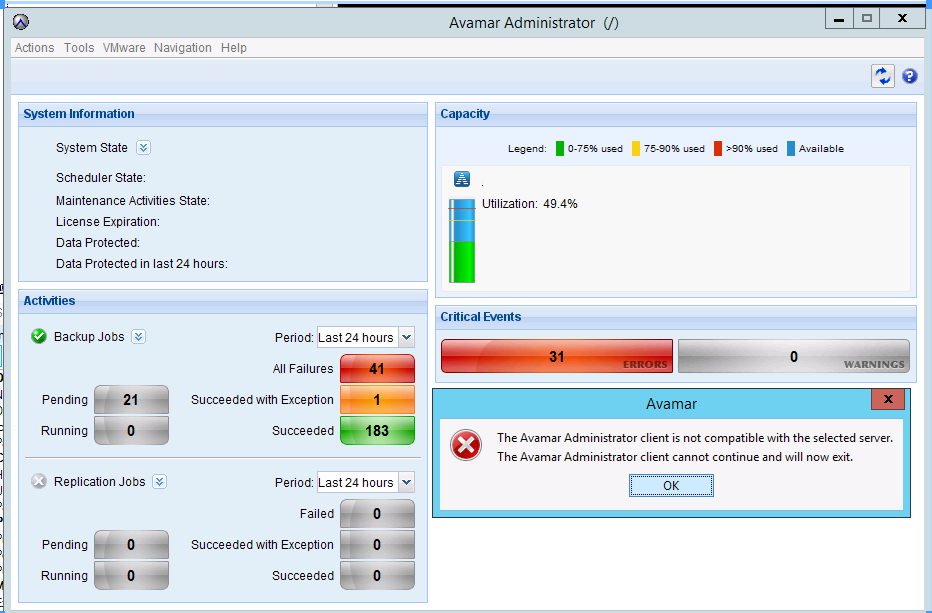
管理主控台伺服器 (MCS) 版本經過驗證,與 Avamar Administrator 版本相符。
注意:如果 MCS 版本與 Avamar Administrator 版本不相符,請從下載頁面下載最新的 Avamar Administrator 版本。
Cause
在某些情況下,一個或多個 Java 進程 ID (PID) 可能會變得無回應。
通常,這些無回應的 Java PID 的開始日期相當舊。
下列命令可用來確認:
ps -ef | grep javaResolution
1.以系統管理員身分登入 Avamar Utility Node。
2.停止 MCS小 EMT以及 AVinstaller 服務:
(備份排程器已使用 MCS 停止。)
dpnctl stop mcs
dpnctl stop emt
dpnctl stop avinstaller
3.提升至 root 權限。
4.以 root 身分終止所有 Java 程序:
killall java
5.確認沒有剩餘的 Java 程序:
ps -ef |grep -i java
6.切換到管理員。
7.重新啟動服務:
dpnctl start
8.假設上述輸出中未報告任何錯誤,請確認所有服務都在執行中:
dpnctl statusAffected Products
AvamarProducts
Avamar, Avamar ServerArticle Properties
Article Number: 000071469
Article Type: Solution
Last Modified: 21 مايو 2026
Version: 6
Find answers to your questions from other Dell users
Support Services
Check if your device is covered by Support Services.