파일 시스템용 SourceOne: 파일 활동으로 항목을 바로 가기를 할 수 없음
Summary: 파일 활동은 파일을 바로 가려고 할 때 권한 문제를 가져오지 않습니다.
This article applies to
This article does not apply to
This article is not tied to any specific product.
Not all product versions are identified in this article.
Symptoms
SourceOne File Archive Historical Shortcut 활동을 실행하는 동안 항목이 처리되지 않는 것을 볼 수 있습니다. 처리된 개수가 증가하고 실패한 개수는 0으로 유지됩니다.
작업 로그를 열면 아래 항목이 표시됩니다.
2020/06/09 11:34:41.558 *** 바로 가기 파일을 생성하지 못했습니다. ***
이름: File_to_be_shortcut.xls.url
파일: \\?\UNC\share\folder_1\folder_2\folder_3\File_to_be_shortcut.xls
ID: 00000000D12A5D296B8C0D6AFF1A8ED7C3EFAB1383CE3EFF00
이유: 액세스가 거부되었습니다. (-2147024891)
소스: ExDirectoryThread.cpp(5562): CExDirectoryThread::iCreateLinkFile:
이름: File_to_be_shortcut.xls.url
파일: \\?\UNC\share\folder_1\folder_2\folder_3\File_to_be_shortcut.xls
ID: 00000000D12A5D296B8C0D6AFF1A8ED7C3EFAB1383CE3EFF00
이유: 액세스가 거부되었습니다. (-2147024891)
소스: ExDirectoryThread.cpp(5562): CExDirectoryThread::iCreateLinkFile:
Cause
루트 공유에 대해 설정된 공유 권한이 잘못되었습니다.
Resolution
이 문제를 해결하려면 보안 탭과 공유 탭에서 SourceOne 계정에 전체 액세스 권한을 부여해야 합니다.
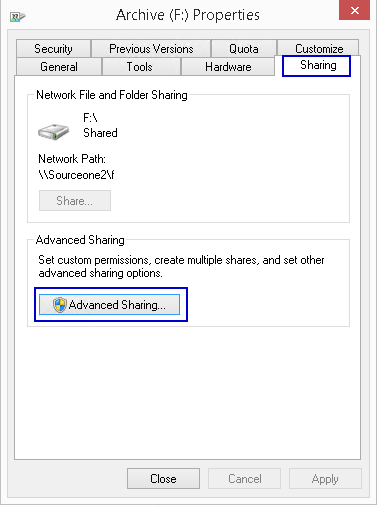
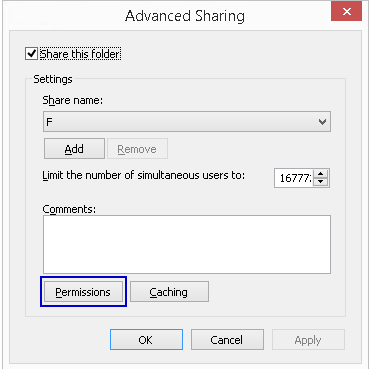
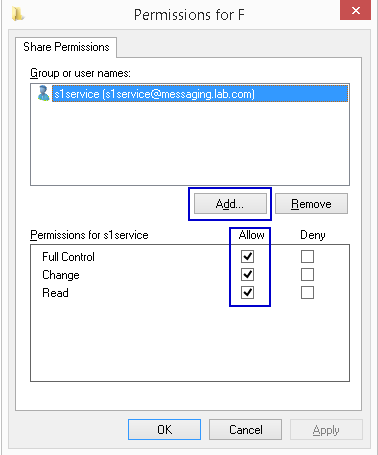
- 루트 공유에 액세스하고 Properties를 엽니다.
- 공유 탭 선택
- 고급 공유 열기
- 사용 권한 열기
- 추가 전체 제어 권한이 있는 SourceOne 서비스 계정
Affected Products
SourceOneProducts
SourceOne, SourceOne for File SystemsArticle Properties
Article Number: 000082343
Article Type: Solution
Last Modified: 18 أبريل 2026
Version: 5
Find answers to your questions from other Dell users
Support Services
Check if your device is covered by Support Services.