文件系统的 SourceOne:文件活动不能快捷方式项目
Summary: 尝试快捷文件时,文件活动不会出现权限问题。
This article applies to
This article does not apply to
This article is not tied to any specific product.
Not all product versions are identified in this article.
Symptoms
在运行 SourceOne 文件归档历史快捷方式活动时,您可能会看到未处理这些项目。 已处理的计数将增长,而失败的计数将保持为零。
当您打开作业日志时,您将看到以下条目:
2020/06/09 11:34:41.558 *** 无法创建快捷方式文件 ***
名称:File_to_be_shortcut.xls.url
文件:\\?\UNC\share\folder_1\folder_2\folder_3\File_to_be_shortcut.xls
ID:00000000D12A5D296B8C0D6AFF1A8ED7C3EFAB1383CE3EFF00
Reason:访问被拒绝。(-2147024891)
源:ExDirectoryThread.cpp(5562):CExDirectoryThread:: iCreateLinkFile:
名称:File_to_be_shortcut.xls.url
文件:\\?\UNC\share\folder_1\folder_2\folder_3\File_to_be_shortcut.xls
ID:00000000D12A5D296B8C0D6AFF1A8ED7C3EFAB1383CE3EFF00
Reason:访问被拒绝。(-2147024891)
源:ExDirectoryThread.cpp(5562):CExDirectoryThread:: iCreateLinkFile:
Cause
为根共享设置的共享权限不正确。
Resolution
要解决此问题,您需要在 Security 选项卡以及 Sharing 选项卡上授予 SourceOne 帐户完全访问权限。
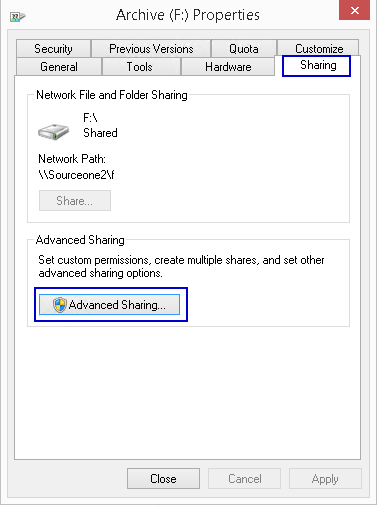
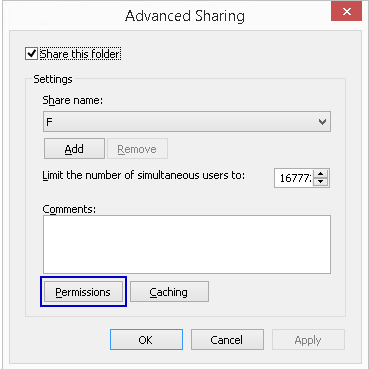
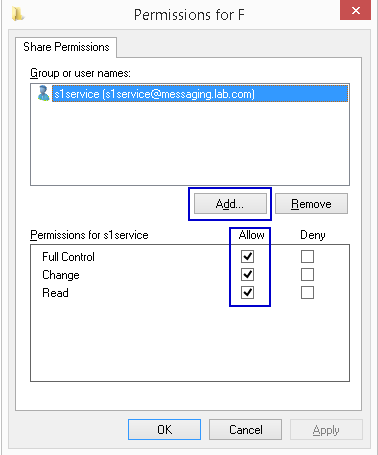
- 访问根共享并打开 属性
- 选择 “共享 ”选项卡
- 打开 “高级共享”
- 打开 权限
- 添加 具有 完全控制 权限的 SourceOne 服务帐户
Affected Products
SourceOneProducts
SourceOne, SourceOne for File SystemsArticle Properties
Article Number: 000082343
Article Type: Solution
Last Modified: 18 أبريل 2026
Version: 5
Find answers to your questions from other Dell users
Support Services
Check if your device is covered by Support Services.