Dell Nutanix: How to check each version
Summary: This article introduces how to check each version of AOS, Files(File Server), Hypervisor, NCC, LCM and Foundation
This article applies to
This article does not apply to
This article is not tied to any specific product.
Not all product versions are identified in this article.
Instructions
Article Summary
This article provides how to confirm versions of Acropolis OS(AOS), Files(File Sever), Hypervisor, Nutanix Cluster Check(NCC), Life Cycle Manager(LCM) and Foundation.
How to Confirm Versions
With Prism GUI(Log in to Prism GUI of the cluster and perform the following operations)
Note: Depending on AOS/LCM versions, the images might be different from the actual ones. If you have any questions, please contact our support.
・AOS/LCM/NCC/Foundation/Files/Hypervisor
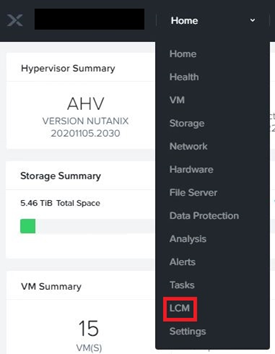
- Click LCM in the Home tab on the top left.
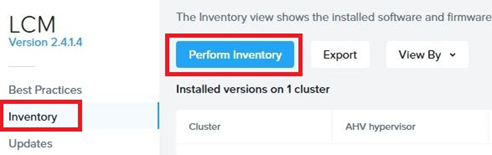
- Click Inventory in the left menu, then click Perform Inventory button.
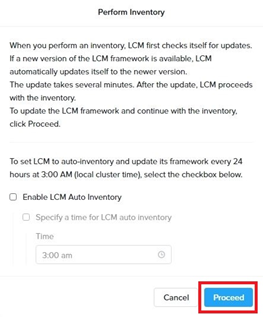
- Click Proceed button in the window. The inventory process will start.
- Click Back to Inventory button after completed inventory.
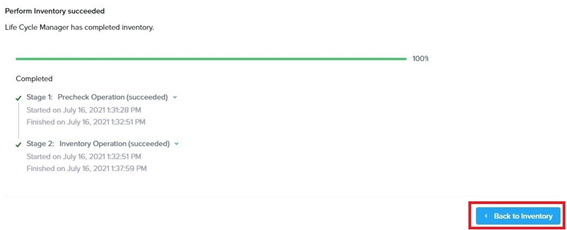
- The current version of each software is displayed under Installed version on ~.
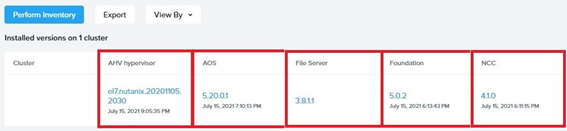
・AOS/LCM/NCC
- Click the user name on the top right, and click About Nutanix.
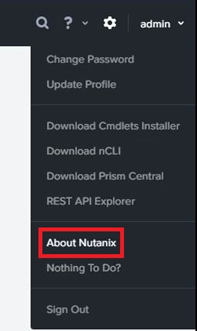
- The current version is displayed in the window.
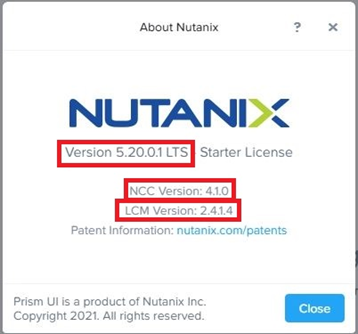
Note: You can also check the Prism Central/NCC/LCM version by logging in to the Prism GUI of the Prism Central VM and performing the same method.
・AOS/NCC/Files/Foundation/Hypervisor
- Click the gear icon on the top right.

- Click Upgrade Software in the left menu.
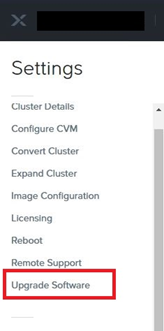
- Click the tab you want to confirm the version in the window.
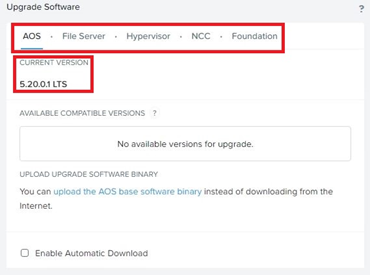
Note: For AHV, the Hypervisor version may not be displayed. In that case, please check by other methods.
With Commandline(Log in to any CVM of the cluster with SSH and execute the following commands)
・AOS
$ ncli cluster version
After executing the command, the column "Cluster Version" will be displayed as the current AOS version.
Note: You can also check the Prism Central version by logging in to the Prism Central VM with SSH and executing the same command.
・NCC
$ ncc --ncc_version
Note: You can also check the Prism Central NCC version by logging in to the Prism Central VM with SSH and executing the same command.
・Hypervisor(AHV)
$ hostssh “uname -a”
・Hypervisor(ESXi)
$ for i in `hostips`; do echo ESXi host:$i; ssh root@$i vmware -vl;done
・Hypervisor(Hyper-V)
$ allssh "winsh 'systeminfo | grep OS'"
・Foundation
$ cat ~/foundation/foundation_version
・LCM
$ cat ~/cluster/config/lcm/version.txt
Note: You can also check the Prism Central LCM version by logging in to the Prism Central VM with SSH and executing the same command.
Affected Products
Dell XC720XD Hyper-converged Appliance, Dell XC430 Hyper-converged Appliance, Dell XC430 Xpress Hyper-converged Appliance, Dell XC630 Hyper-converged Appliance, Dell XC6320 Hyper-converged Appliance, Dell EMC XC Series XC640 Appliance
, Dell EMC XC Series XC6420 Appliance, Dell XC730 Hyper-converged Appliance, Dell XC730XD Hyper-converged Appliance, Dell EMC XC Series XC740xd Appliance, Dell EMC XC Series XC940 Appliance
...
Article Properties
Article Number: 000122072
Article Type: How To
Last Modified: 29 يوليو 2025
Version: 5
Find answers to your questions from other Dell users
Support Services
Check if your device is covered by Support Services.