如何識別 CrowdStrike Falcon Sensor 的版本
Summary: 瞭解如何識別 CrowdStrike Falcon Sensor 版本,以瞭解問題、程序變更或系統需求。請按照 Windows、Mac 或 Linux 的步驟操作。
This article applies to
This article does not apply to
This article is not tied to any specific product.
Not all product versions are identified in this article.
Instructions
瞭解 CrowdStrike Falcon Sensor 的版本可讓您:
- 識別已知問題
- 瞭解程序變更
- 確認系統需求
受影響的產品:
- CrowdStrike Falcon Sensor
受影響的作業系統:
- Windows
- Mac
- Linux
如需有關如何識別 CrowdStrike Falcon Sensor 版本的指示,請按一下 Windows、 Mac 或 Linux。
註:
- 必須先安裝 CrowdStrike Falcon Sensor,才能識別版本。如需安裝程序的相關資訊,請參閱如何安裝 CrowdStrike Falcon Sensor。
- 如需關於檢查 CrowdStrike Falcon Sensor 的詳細資訊,請參閱 https://supportportal.crowdstrike.com/s/article/Checking-Falcon-Sensor-Version-Locally
。
Windows
- 以滑鼠右鍵按一下 Windows「開始」功能表,然後按一下執行。

- 在「執行」UI 中,輸入 ,然後按下確定。
cmd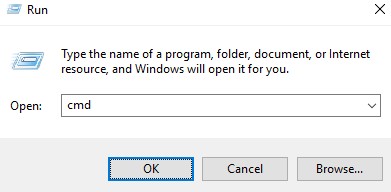
- 在「命令提示字元」中,輸入 ,然後按下 Enter 鍵。
"C:\Program Files\CrowdStrike\CSSensorSettings.exe" –version
- 記下版本。在範例中,版本是 7.04.17605.0。
 您的感應器版本可能會與上述螢幕擷取畫面不同。
Mac
- 找到並按兩下終端機。

- 在 「終端機」中,鍵入以下命令,然後按 Enter 鍵。
sysctl cs.version
- 記下版本。在範例中,版本是 4.18.8013.0。
 您的感應器版本可能會與上述螢幕擷取畫面不同。
Linux
- 在目標端點上開啟終端機。

- 在 「終端機」中,鍵入以下命令,然後按 Enter 鍵。
sudo /opt/CrowdStrike/falconctl -g --version
- 填入 sudo 帳戶密碼,然後按下 Enter 鍵。
- 記下版本。在範例中,版本是 4.20.6602.0。
 您的感應器版本可能會與上述螢幕擷取畫面不同。
Additional Information
Videos
Affected Products
CrowdStrikeArticle Properties
Article Number: 000126120
Article Type: How To
Last Modified: 27 يوليو 2026
Version: 23
Find answers to your questions from other Dell users
Support Services
Check if your device is covered by Support Services.