Dell Encryption 엔드포인트의 BAD_SYSTEM_CONFIG_INFO 또는 SESSION3_INITIALIZATION_FAILURE 오류
Summary: Dell Encryption Enterprise 및 Dell Encryption Personal BAD_SYSTEM_CONFIG_INFO 및 SESSION3_INITIALIZATION_FAILURE 오류는 다음 지침에 따라 해결할 수 있습니다.
This article applies to
This article does not apply to
This article is not tied to any specific product.
Not all product versions are identified in this article.
Symptoms
영향을 받는 제품:
- Dell Encryption Enterprise
- Dell Data Protection | Enterprise Edition
- Dell Data Protection | Server Edition
- Dell Encryption Personal
- Dell Data Protection | Personal Edition
Dell Encryption Enterprise(이전 Dell Data Protection | Enterprise Edition) 또는 Dell Encryption Enterprise Personal(이전 Dell Data Protection | Personal Edition)으로 보호되는 엔드포인트의 경우 다음 오류가 표시될 수 있습니다.
BAD_SYSTEM_CONFIG_INFO (stop code 0x00000074)System32 파일 또는 하드웨어 체크섬을 수정하거나 변조한 후SESSION3_INITIALIZATION_FAILURE (stop code 0x0000006f)Windows 레지스트리의 수정 또는 변조 후
Cause
이러한 오류는 Dell Encryption Enterprise/Dell Encryption Personal의 부산물로, 엔드포인트를 무단 변경으로부터 보호합니다.
Resolution
BAD_SYSTEM_CONFIG_INFO 또는 SESSION3_INITIALIZATION_FAILURE 부팅 중에 다음 중 하나로 발생합니다.
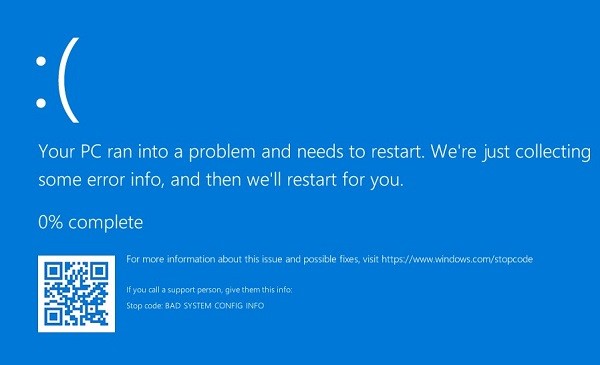
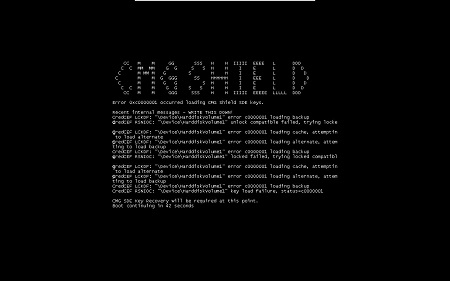
엔드포인트에서 오류가 약간 다를 수 있습니다.
체크섬이나 레지스트리 수정이 의도적인 경우 LSA(Local Security Administrator) 복구를 수행하여 블루 또는 블랙 스크린을 해결할 수 있습니다. 복구 프로세스에 관한 자세한 내용은 Dell Encryption Enterprise/Dell Encryption Personal Recovery 번들을 실행하는 방법을 참조하십시오.
Affected Products
Dell EncryptionArticle Properties
Article Number: 000126735
Article Type: Solution
Last Modified: 30 يوليو 2026
Version: 12
Find answers to your questions from other Dell users
Support Services
Check if your device is covered by Support Services.