Dell Networking: N-series version 6.5 and newer code using LLDP with older Cisco phones placed into incorrect VLAN
Summary: Dell Networking N-series version 6.5 (and newer) code using Link Layer Discovery Protocol (LLDP) with older Cisco phones placed into incorrect VLAN
Symptoms
When upgrading N-series switches (N1500, N2000, N3000) from an older DNOS versions of firmware (6.3.x and prior) to newer version (6.5.x and newer), some older model Cisco IP phones (ex. Cisco 8945 6945, 7900-series), might not work correctly. The phone may be placed into Data VLAN instead of Voice VLAN (switchport mode in "General" or hybrid), and its MAC address added to the Data VLAN table.
Description:
LLDP TLV pushes out different options than that of previous versions. LLDP TLV in 6.5 adds information for EEE (green Ethernet) and Port-Vlan-ID, that was not being sent out in LLDP in versions 6.3.x.x.
-
Some older versions of deprecated Cisco IOS firmware for older phones have documented issues with LLDP. This issue is documented as a known bug in Cisco's firmware: https://quickview.cloudapps.cisco.com/quickview/bug/CSCub98603
-
A suggested workaround from Cisco is as follows:
Disable Cisco Discovery Protocol (CDP) and reset the phone using the call agent. For example, in the CUCM Administration pages disable "Cisco Discovery Protocol (CDP): Switch PortRequired" on the phone configuration page.

Cause
This unexpected behavior is due to changes in LLDP TLV.
Resolution
Solution:
Newer versions of LLDP used in the 6.5 firmware train push out a port-vlan ID, and EEE (green Ethernet) TLV's in the LLDP packet. A packet capture and comparison confirm this.
LLDP packet capture from DNOS version 6.3: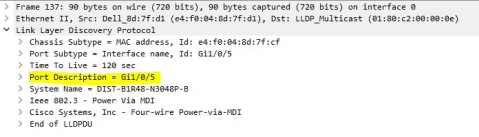
LLDP packet capture from DNOS version 6.5: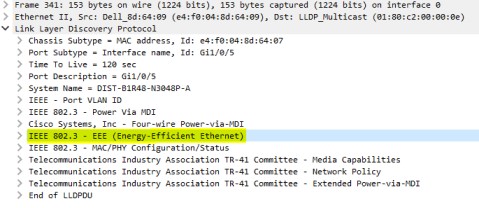
Option 1: Turn off the TLV's for these options using the commands:
No green-mode eee
No lldp tlv-select port-vlan
These commands are done in the port configuration level. An example configuration would appear as follows:
interface Gi1/0/6
no green-mode eee
spanning-tree portfast
switchport mode general

switchport general pvid 25
switchport general allowed vlan add 25
switchport general allowed vlan add 102 tagged
switchport voice vlan 102
no lldp tlv-select port-vlan
exit
Option 2: Hard code the individual phone with the Voice VLAN ID, however, this could pose a scaling issue on larger deployments. The EEE TLV (green mode Ethernet) may still require to be turned off at the port, per the previous paragraph.