Sådan administreres storage i PowerPath til Windows
Summary: Hvis kunden rapporterer, at diskene ikke er synlige og i Powermt-skærmindstillinger, hvis du bemærker, at storagesystemet ikke er administreret, Sådan administreres det
This article applies to
This article does not apply to
This article is not tied to any specific product.
Not all product versions are identified in this article.
Instructions
I visse scenarier, når en kunde rapporterer, at vedkommende ikke kan bemærke nogen diske, der leveres fra et storagesystem i PowerPath. Når du kører Powermt-skærmindstillinger, og du bemærker, at storagesystemet er "Ikke-administreret", så I et Windows-miljø med PowerPath. Følg den anbefalede handlingsplan i denne KB for at gøre det samme som "Administreret".
Her er et scenarie, hvor kunden har præsenteret diske fra Symmetrix Storage-systemet og har rapporteret, at de ikke kan finde nogen diske i PowerPath efter opgraderingen.
Resultatet af " powermt-skærmindstillinger " viser:
** POWERMT-SKÆRMINDSTILLINGER **
Vis CLARiiON LUN-navne: True
Path Latency Monitor: Oplysninger om Off
Persist Path: On
Performance Monitor: deaktiveret
Autostandby: IO er pr. fejl (iopf): aktiveret
iopf-ældningsperiode: 1 d
IOPF grænse : 6000
Auto Host Registration: disabled
Storage
System Class Attributes
------------ ----------
Symmetrix periodic autorestore = on
reactive autorestore = on
status = unmanaged
proximity based autostandby = on
proximity based autostandby threshold = default
CLARiiON periodic autorestore = on
reactive autorestore = on
status = unmanaged
proximity based autostandby = N/A
Invista periodic autorestore = on
reactive autorestore = on
status = managed
proximity based autostandby = N/A
Hitachi periodic autorestore = on
reactive autorestore = on
status = unmanaged
proximity based autostandby = N/A
HP xp periodic autorestore = on
reactive autorestore = on
status = unmanaged
proximity based autostandby = N/A
Ess periodic autorestore = on
reactive autorestore = on
status = unmanaged
proximity based autostandby = N/A
Generic periodic autorestore = on
reactive autorestore = on
status = managed
proximity based autostandby = N/A
VPLEX periodic autorestore = on
reactive autorestore = on
status = managed
proximity based autostandby = on
proximity based autostandby threshold = default
VNX periodic autorestore = on
reactive autorestore = on
status = unmanaged
proximity based autostandby = N/A
NetApp periodic autorestore = on
reactive autorestore = on
status = unmanaged
proximity based autostandby = N/A
XtremIO periodic autorestore = on
reactive autorestore = on
status = managed
proximity based autostandby = N/A
Unity periodic autorestore = on
reactive autorestore = on
status = unmanaged
proximity based autostandby = N/A
SC periodic autorestore = on
reactive autorestore = on
status = managed
proximity based autostandby = off
Notice how some of the storage array and especially Symmetrix here is "unmanaged"
Here are the steps along with the screenshot from our lab server , how to make it "Managed"
Open Control Panel :
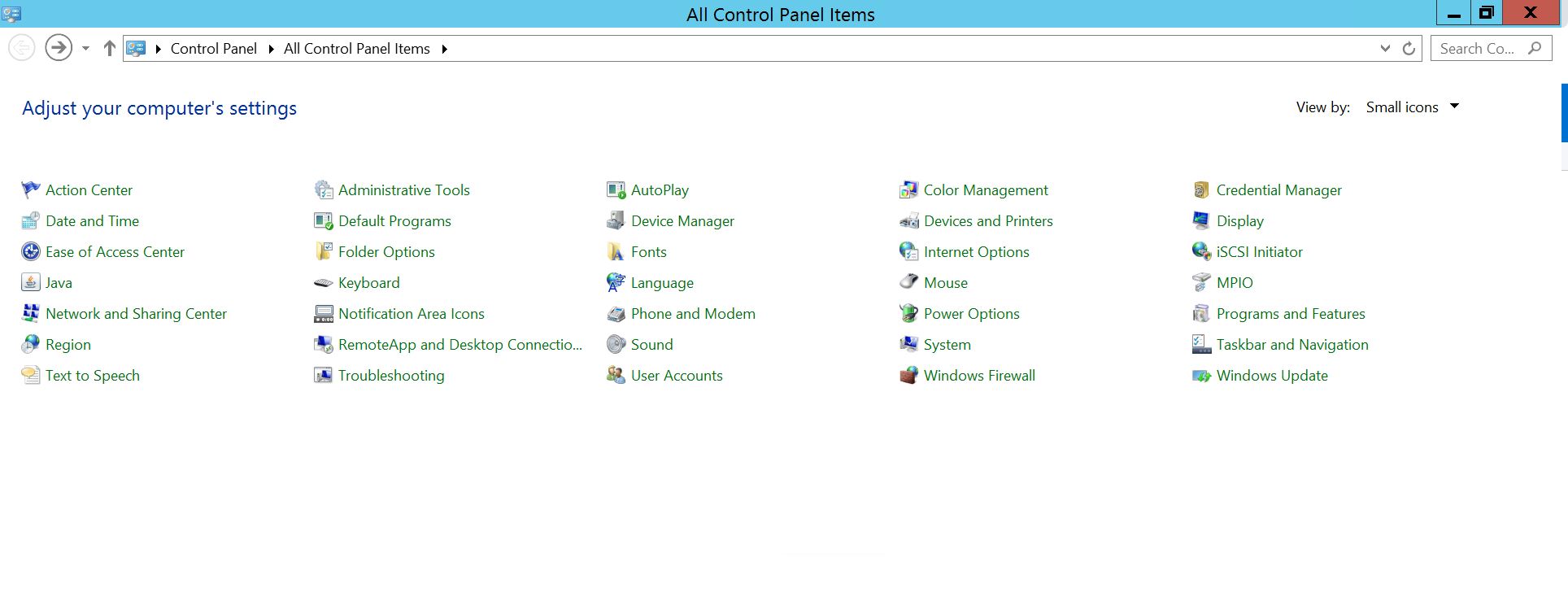
Vælg Program og funktioner
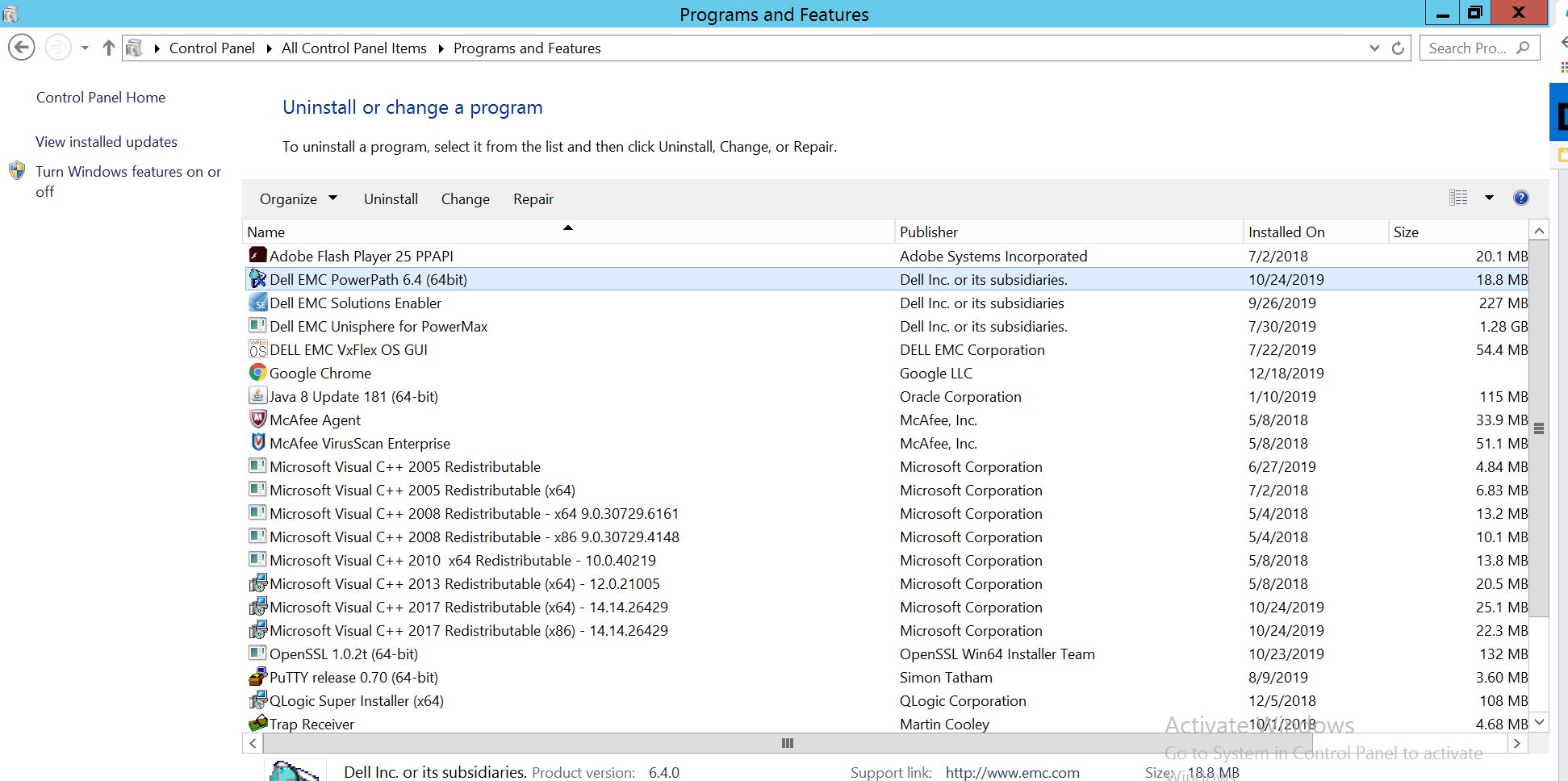
Vælg PowerPath, og vælg Rediger/Skift, som åbner installationsprompten:
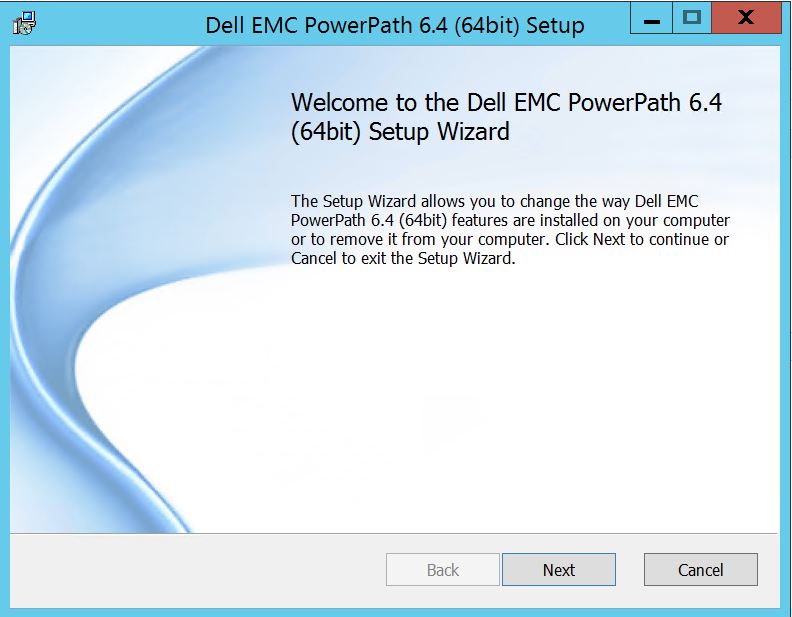
Klik på Næste og følg vælg ændring:
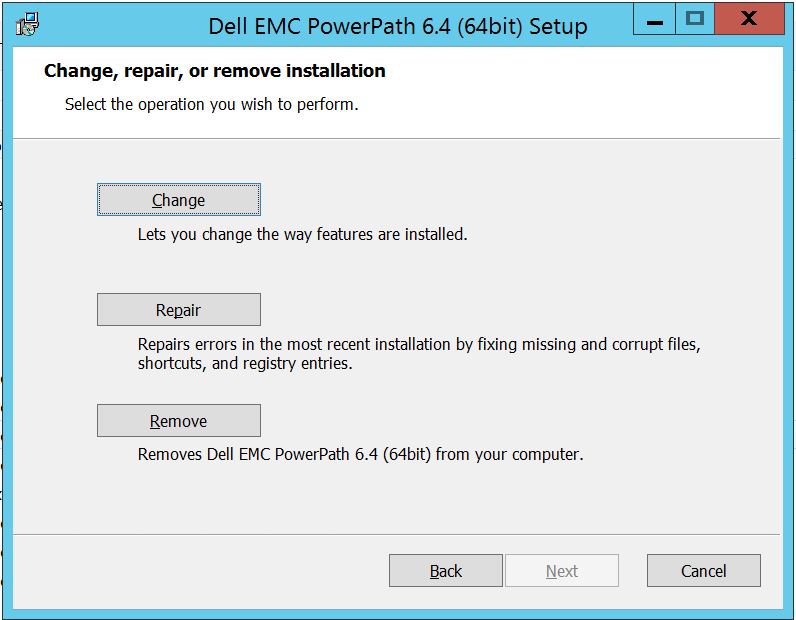
Hvilket fører dig til brugerdefineret opsætning:
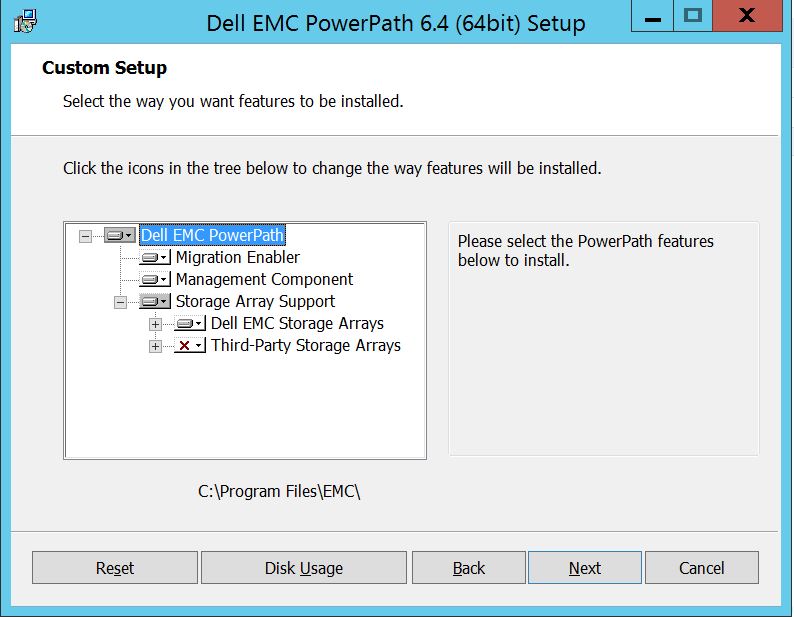
Du kan nu udvide understøttelsen af storagesystemet, hvis det ikke allerede er og også udvide Dell EMC-storagesystemer, som viser alle de storagesystemer, der understøttes under PowerPath:
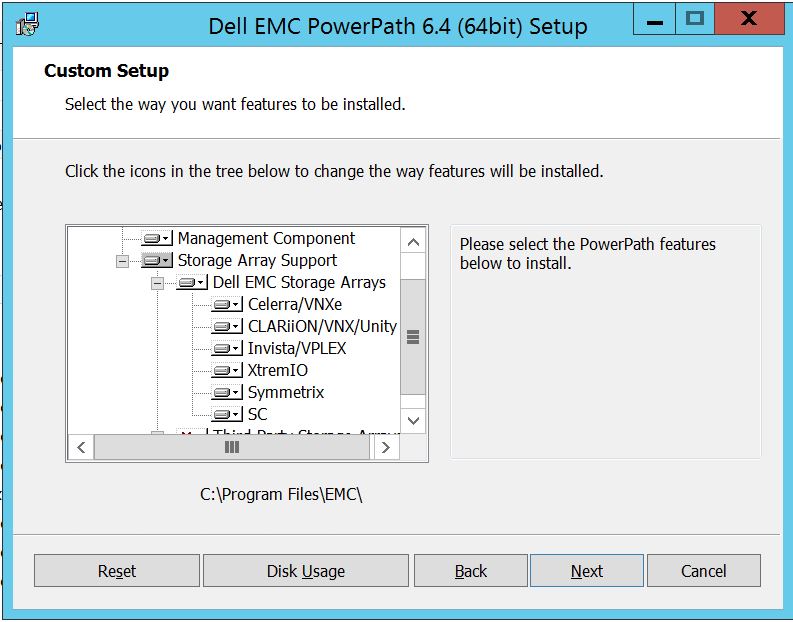
Derefter kan du yderligere bruge den lille downkey i nærheden af et hvilket som helst af storageelementerne. Lad os for eksempel tage Symmetrix her. Det vil yderligere vise 2 muligheder :
1. Vil blive installeret på lokal harddisk
2. Hele funktionen vil blive installeret på lokal harddisk
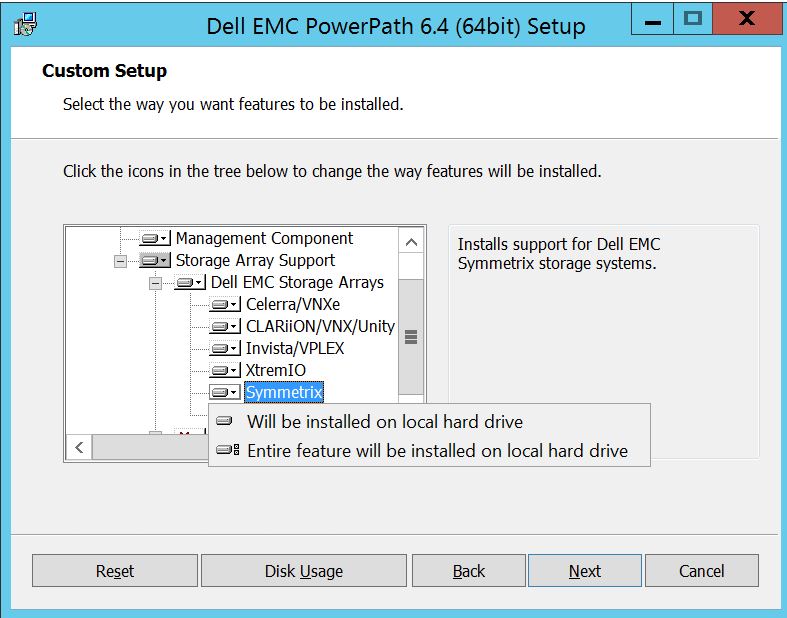
Hvis du ønsker, at hele Dell EMC Storage-systemet skal administreres (hvilket i bund og grund er standardindstillingen),
kan du gøre det samme på rullelisten Dell EMC Storage Array: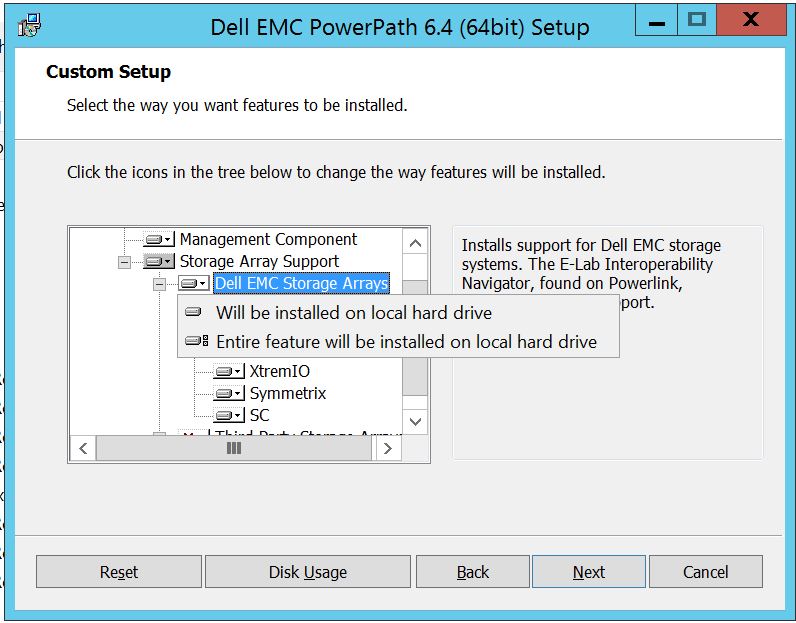
Når du er færdig, skal du vælge næste
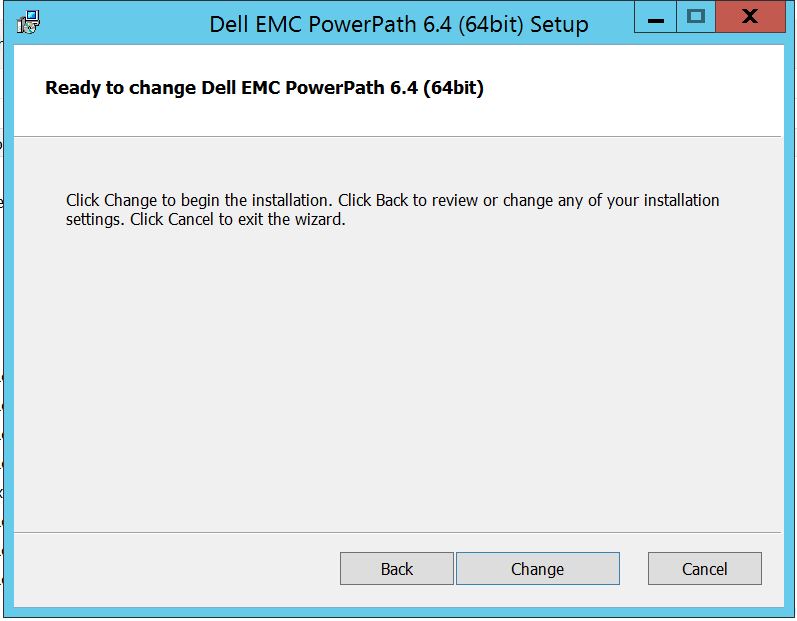
Klik på Skift, hvilket vil fuldføre de nødvendige ændringer:
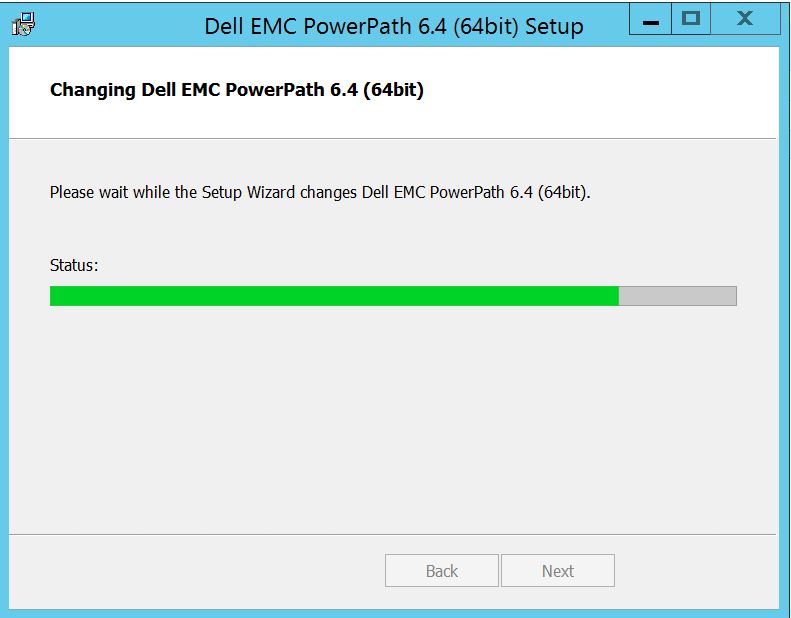
Post, som du skal se dette, hvor i du kan vælge "Afslut "
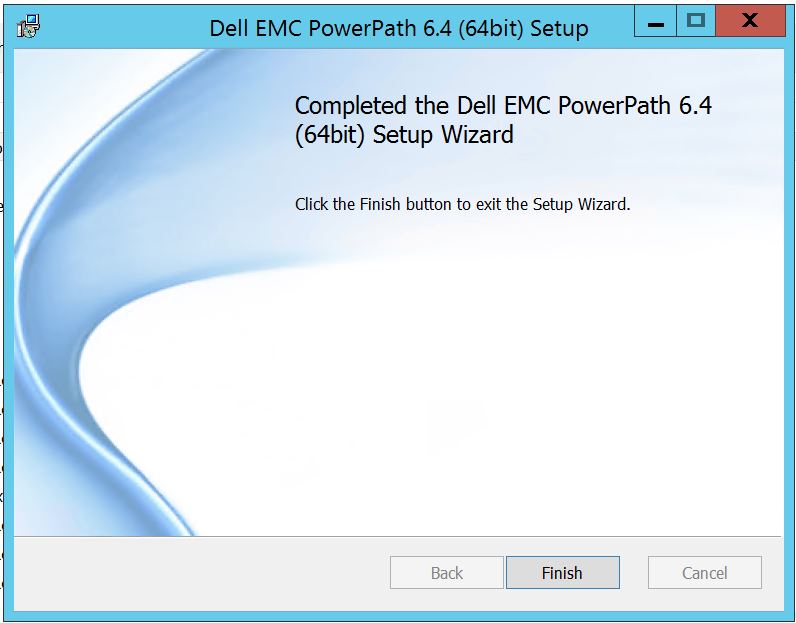 Efter færdig, får du en pop op, der beder om genstart, skal du vælge at genstarte serveren, da ændringerne skal implementeres på serverniveau, som derefter vil gøre lagersystemdiskene synlige i PowerPath.
Efter genstart, når du kører powermt-visningsindstillinger, Sådan ser outputtet ud:
** POWERMT-SKÆRMINDSTILLINGER **
Vis CLARiiON LUN-navne: True
Path Latency Monitor: Oplysninger om Off
Persist Path: On
Performance Monitor: deaktiveret
Autostandby: IO er pr. fejl (iopf): aktiveret
iopf-ældningsperiode: 1 d
IOPF grænse : 6000
Storage
System Class Attributes
------------ ----------
Symmetrix periodic autorestore = on
reactive autorestore = on
status = managed
proximity based autostandby = off
auto host registration = enabled
app finger printing = enabled
device to array performance report = enabled
device in use to array report = enabled
CLARiiON periodic autorestore = on
reactive autorestore = on
status = managed
proximity based autostandby = N/A
auto host registration = disabled
app finger printing = N/A
device to array performance report = N/A
device in use to array report = N/A
Invista periodic autorestore = on
reactive autorestore = on
status = managed
proximity based autostandby = N/A
auto host registration = N/A
app finger printing = N/A
device to array performance report = N/A
device in use to array report = N/A
Hitachi periodic autorestore = on
reactive autorestore = on
status = unmanaged
proximity based autostandby = N/A
auto host registration = N/A
app finger printing = N/A
device to array performance report = N/A
device in use to array report = N/A
HP xp periodic autorestore = on
reactive autorestore = on
status = unmanaged
proximity based autostandby = N/A
auto host registration = N/A
app finger printing = N/A
device to array performance report = N/A
device in use to array report = N/A
Ess periodic autorestore = on
reactive autorestore = on
status = unmanaged
proximity based autostandby = N/A
auto host registration = N/A
app finger printing = N/A
device to array performance report = N/A
device in use to array report = N/A
Generic periodic autorestore = on
reactive autorestore = on
status = managed
proximity based autostandby = N/A
auto host registration = N/A
app finger printing = N/A
device to array performance report = N/A
device in use to array report = N/A
VPLEX periodic autorestore = on
reactive autorestore = on
status = managed
proximity based autostandby = on
proximity based autostandby threshold = default
auto host registration = N/A
app finger printing = N/A
device to array performance report = N/A
device in use to array report = N/A
VNX periodic autorestore = on
reactive autorestore = on
status = managed
proximity based autostandby = N/A
auto host registration = disabled
app finger printing = N/A
device to array performance report = N/A
device in use to array report = N/A
NetApp periodic autorestore = on
reactive autorestore = on
status = unmanaged
proximity based autostandby = N/A
auto host registration = N/A
app finger printing = N/A
device to array performance report = N/A
device in use to array report = N/A
XtremIO periodic autorestore = on
reactive autorestore = on
status = managed
proximity based autostandby = N/A
auto host registration = N/A
app finger printing = N/A
device to array performance report = N/A
device in use to array report = N/A
Unity periodic autorestore = on
reactive autorestore = on
status = managed
proximity based autostandby = N/A
auto host registration = disabled
app finger printing = N/A
device to array performance report = N/A
device in use to array report = N/A
SC periodic autorestore = on
reactive autorestore = on
status = managed
proximity based autostandby = N/A
auto host registration = N/A
app finger printing = N/A
device to array performance report = N/A
device in use to array report = N/A
Her er et scenarie, hvor kunden har præsenteret diske fra Symmetrix Storage-systemet og har rapporteret, at de ikke kan finde nogen diske i PowerPath efter opgraderingen.
Resultatet af " powermt-skærmindstillinger " viser:
** POWERMT-SKÆRMINDSTILLINGER **
Vis CLARiiON LUN-navne: True
Path Latency Monitor: Oplysninger om Off
Persist Path: On
Performance Monitor: deaktiveret
Autostandby: IO er pr. fejl (iopf): aktiveret
iopf-ældningsperiode: 1 d
IOPF grænse : 6000
Auto Host Registration: disabled
Storage
System Class Attributes
------------ ----------
Symmetrix periodic autorestore = on
reactive autorestore = on
status = unmanaged
proximity based autostandby = on
proximity based autostandby threshold = default
CLARiiON periodic autorestore = on
reactive autorestore = on
status = unmanaged
proximity based autostandby = N/A
Invista periodic autorestore = on
reactive autorestore = on
status = managed
proximity based autostandby = N/A
Hitachi periodic autorestore = on
reactive autorestore = on
status = unmanaged
proximity based autostandby = N/A
HP xp periodic autorestore = on
reactive autorestore = on
status = unmanaged
proximity based autostandby = N/A
Ess periodic autorestore = on
reactive autorestore = on
status = unmanaged
proximity based autostandby = N/A
Generic periodic autorestore = on
reactive autorestore = on
status = managed
proximity based autostandby = N/A
VPLEX periodic autorestore = on
reactive autorestore = on
status = managed
proximity based autostandby = on
proximity based autostandby threshold = default
VNX periodic autorestore = on
reactive autorestore = on
status = unmanaged
proximity based autostandby = N/A
NetApp periodic autorestore = on
reactive autorestore = on
status = unmanaged
proximity based autostandby = N/A
XtremIO periodic autorestore = on
reactive autorestore = on
status = managed
proximity based autostandby = N/A
Unity periodic autorestore = on
reactive autorestore = on
status = unmanaged
proximity based autostandby = N/A
SC periodic autorestore = on
reactive autorestore = on
status = managed
proximity based autostandby = off
Notice how some of the storage array and especially Symmetrix here is "unmanaged"
Here are the steps along with the screenshot from our lab server , how to make it "Managed"
Open Control Panel :
Vælg Program og funktioner
Vælg PowerPath, og vælg Rediger/Skift, som åbner installationsprompten:
Klik på Næste og følg vælg ændring:
Hvilket fører dig til brugerdefineret opsætning:
Du kan nu udvide understøttelsen af storagesystemet, hvis det ikke allerede er og også udvide Dell EMC-storagesystemer, som viser alle de storagesystemer, der understøttes under PowerPath:
Derefter kan du yderligere bruge den lille downkey i nærheden af et hvilket som helst af storageelementerne. Lad os for eksempel tage Symmetrix her. Det vil yderligere vise 2 muligheder :
1. Vil blive installeret på lokal harddisk
2. Hele funktionen vil blive installeret på lokal harddisk
Hvis du ønsker, at hele Dell EMC Storage-systemet skal administreres (hvilket i bund og grund er standardindstillingen),
kan du gøre det samme på rullelisten Dell EMC Storage Array:
Når du er færdig, skal du vælge næste
Klik på Skift, hvilket vil fuldføre de nødvendige ændringer:
Post, som du skal se dette, hvor i du kan vælge "Afslut "
Efter færdig, får du en pop op, der beder om genstart, skal du vælge at genstarte serveren, da ændringerne skal implementeres på serverniveau, som derefter vil gøre lagersystemdiskene synlige i PowerPath.
Efter genstart, når du kører powermt-visningsindstillinger, Sådan ser outputtet ud:
** POWERMT-SKÆRMINDSTILLINGER **
Vis CLARiiON LUN-navne: True
Path Latency Monitor: Oplysninger om Off
Persist Path: On
Performance Monitor: deaktiveret
Autostandby: IO er pr. fejl (iopf): aktiveret
iopf-ældningsperiode: 1 d
IOPF grænse : 6000
Storage
System Class Attributes
------------ ----------
Symmetrix periodic autorestore = on
reactive autorestore = on
status = managed
proximity based autostandby = off
auto host registration = enabled
app finger printing = enabled
device to array performance report = enabled
device in use to array report = enabled
CLARiiON periodic autorestore = on
reactive autorestore = on
status = managed
proximity based autostandby = N/A
auto host registration = disabled
app finger printing = N/A
device to array performance report = N/A
device in use to array report = N/A
Invista periodic autorestore = on
reactive autorestore = on
status = managed
proximity based autostandby = N/A
auto host registration = N/A
app finger printing = N/A
device to array performance report = N/A
device in use to array report = N/A
Hitachi periodic autorestore = on
reactive autorestore = on
status = unmanaged
proximity based autostandby = N/A
auto host registration = N/A
app finger printing = N/A
device to array performance report = N/A
device in use to array report = N/A
HP xp periodic autorestore = on
reactive autorestore = on
status = unmanaged
proximity based autostandby = N/A
auto host registration = N/A
app finger printing = N/A
device to array performance report = N/A
device in use to array report = N/A
Ess periodic autorestore = on
reactive autorestore = on
status = unmanaged
proximity based autostandby = N/A
auto host registration = N/A
app finger printing = N/A
device to array performance report = N/A
device in use to array report = N/A
Generic periodic autorestore = on
reactive autorestore = on
status = managed
proximity based autostandby = N/A
auto host registration = N/A
app finger printing = N/A
device to array performance report = N/A
device in use to array report = N/A
VPLEX periodic autorestore = on
reactive autorestore = on
status = managed
proximity based autostandby = on
proximity based autostandby threshold = default
auto host registration = N/A
app finger printing = N/A
device to array performance report = N/A
device in use to array report = N/A
VNX periodic autorestore = on
reactive autorestore = on
status = managed
proximity based autostandby = N/A
auto host registration = disabled
app finger printing = N/A
device to array performance report = N/A
device in use to array report = N/A
NetApp periodic autorestore = on
reactive autorestore = on
status = unmanaged
proximity based autostandby = N/A
auto host registration = N/A
app finger printing = N/A
device to array performance report = N/A
device in use to array report = N/A
XtremIO periodic autorestore = on
reactive autorestore = on
status = managed
proximity based autostandby = N/A
auto host registration = N/A
app finger printing = N/A
device to array performance report = N/A
device in use to array report = N/A
Unity periodic autorestore = on
reactive autorestore = on
status = managed
proximity based autostandby = N/A
auto host registration = disabled
app finger printing = N/A
device to array performance report = N/A
device in use to array report = N/A
SC periodic autorestore = on
reactive autorestore = on
status = managed
proximity based autostandby = N/A
auto host registration = N/A
app finger printing = N/A
device to array performance report = N/A
device in use to array report = N/A
Affected Products
PowerPath for WindowsProducts
PowerPath for WindowsArticle Properties
Article Number: 000158477
Article Type: How To
Last Modified: 17 أكتوبر 2025
Version: 4
Find answers to your questions from other Dell users
Support Services
Check if your device is covered by Support Services.