Tallennustilan hallinta PowerPath for Windowsissa
Summary: Jos asiakas ilmoittaa, että levyt eivät ole näkyvissä ja että Powermt-näyttöasetuksissa huomaat, että tallennusjärjestelmä ei ole hallinnassa, miten sitä hallitaan
This article applies to
This article does not apply to
This article is not tied to any specific product.
Not all product versions are identified in this article.
Instructions
Tietyissä tilanteissa asiakas ilmoittaa, ettei hän pysty havaitsemaan PowerPathin tallennusjärjestelmän toimittamia levyjä. Jos huomaat tallennusjärjestelmän olevan hallitsematon, kun suoritat powermt-näyttöasetuksia, Windows-ympäristössä, jossa on PowerPath. Tee sama kuin tässä tietämyskannan artikkelissa suositellun toimintasuunnitelman mukaisesti nimellä "Hallittu".
Tässä tilanteessa asiakas on esitellyt Symmetrix Storage -levyjärjestelmän levyjä ja ilmoittanut, ettei PowerPathista löydy levyjä päivityksen jälkeen.
" powermt display options " -tuloste näyttää:
** POWERMT-NÄYTTÖVAIHTOEHDOT **
Näytä CLARiiON-levyjen nimet: Todellinen
polkuviiveen valvonta: Off-Persist-polun
tiedot: Performance Monitorissa
: ei käytössä
Automaattinen valmiustila: IOs per Failure (IOPF): Käytössä
IOPF:n erääntymisjakso: 1 d
IOPF-raja: 6000
Auto Host Registration: disabled
Storage
System Class Attributes
------------ ----------
Symmetrix periodic autorestore = on
reactive autorestore = on
status = unmanaged
proximity based autostandby = on
proximity based autostandby threshold = default
CLARiiON periodic autorestore = on
reactive autorestore = on
status = unmanaged
proximity based autostandby = N/A
Invista periodic autorestore = on
reactive autorestore = on
status = managed
proximity based autostandby = N/A
Hitachi periodic autorestore = on
reactive autorestore = on
status = unmanaged
proximity based autostandby = N/A
HP xp periodic autorestore = on
reactive autorestore = on
status = unmanaged
proximity based autostandby = N/A
Ess periodic autorestore = on
reactive autorestore = on
status = unmanaged
proximity based autostandby = N/A
Generic periodic autorestore = on
reactive autorestore = on
status = managed
proximity based autostandby = N/A
VPLEX periodic autorestore = on
reactive autorestore = on
status = managed
proximity based autostandby = on
proximity based autostandby threshold = default
VNX periodic autorestore = on
reactive autorestore = on
status = unmanaged
proximity based autostandby = N/A
NetApp periodic autorestore = on
reactive autorestore = on
status = unmanaged
proximity based autostandby = N/A
XtremIO periodic autorestore = on
reactive autorestore = on
status = managed
proximity based autostandby = N/A
Unity periodic autorestore = on
reactive autorestore = on
status = unmanaged
proximity based autostandby = N/A
SC periodic autorestore = on
reactive autorestore = on
status = managed
proximity based autostandby = off
Notice how some of the storage array and especially Symmetrix here is "unmanaged"
Here are the steps along with the screenshot from our lab server , how to make it "Managed"
Open Control Panel :
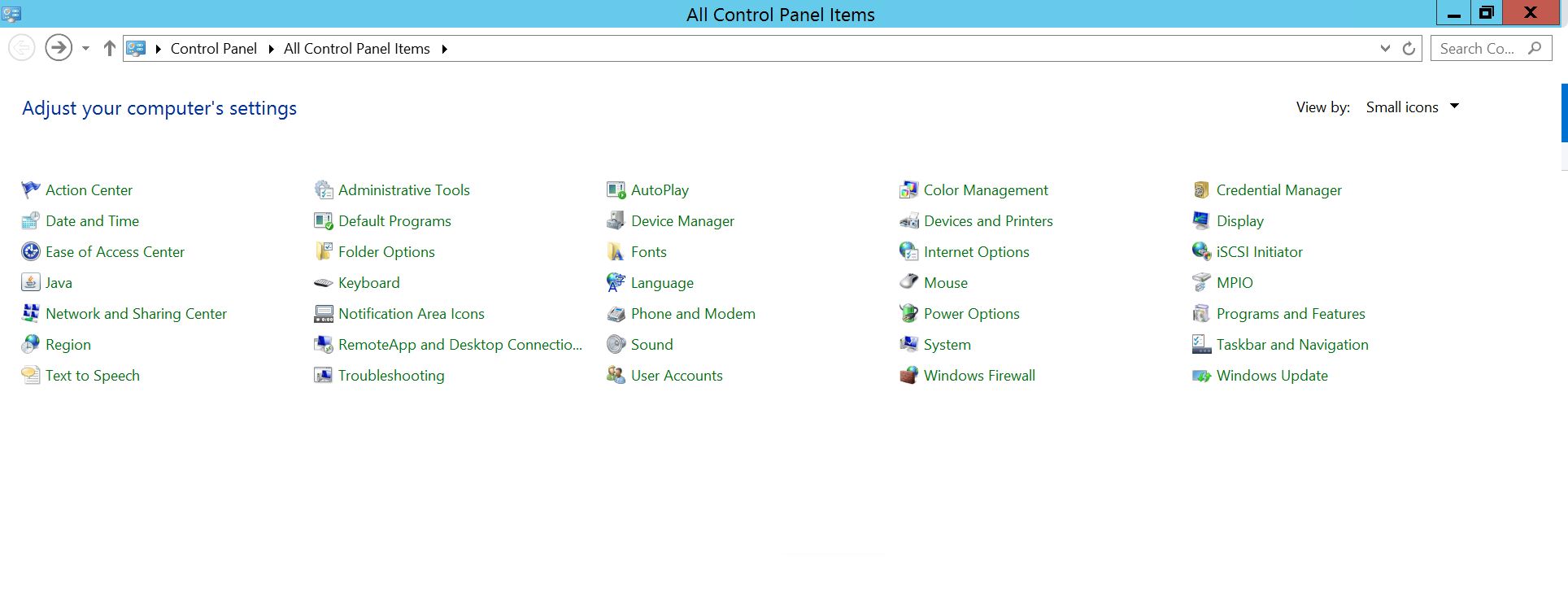
Valitse Ohjelma ja toiminnot
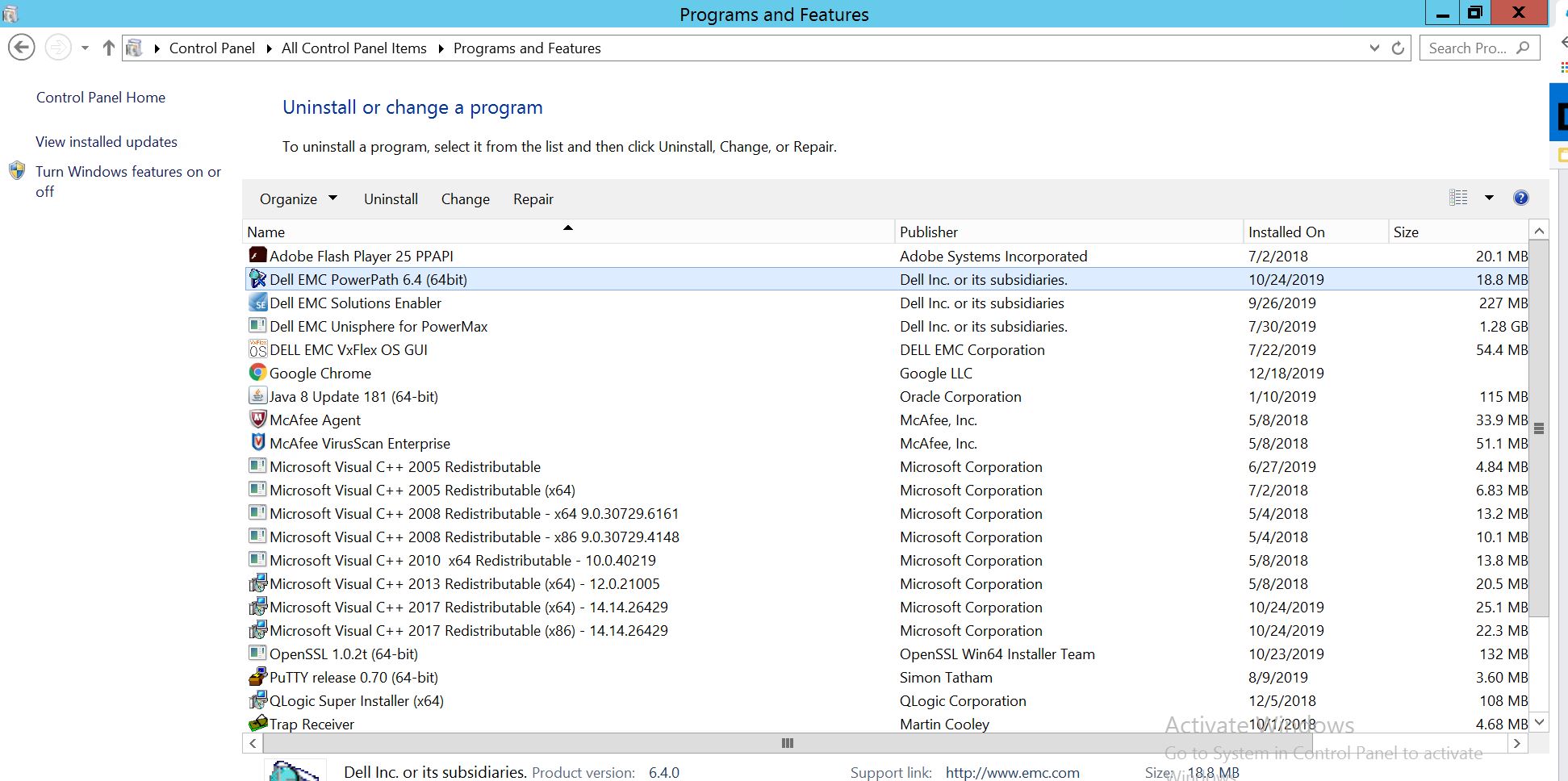
Valitse PowerPath ja valitse muokkaa/muuta, mikä avaa asennuskehotteen:
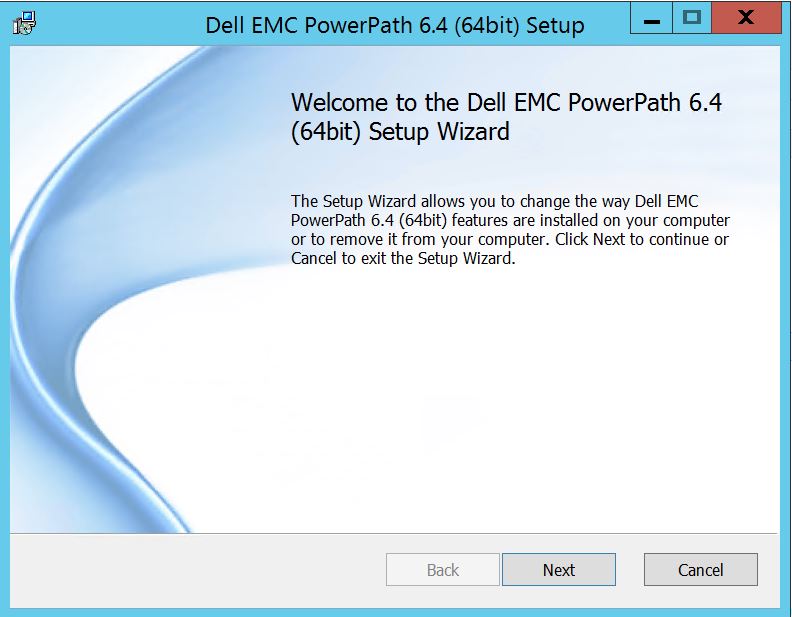
Napsauta Seuraava ja seuraa valittua muutosta:
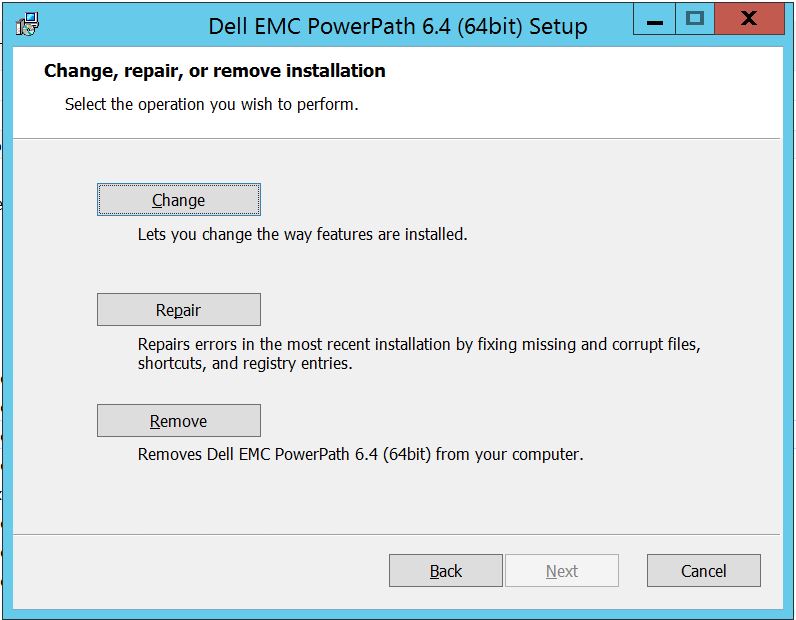
Mikä vie sinut mukautettuun määritykseen:
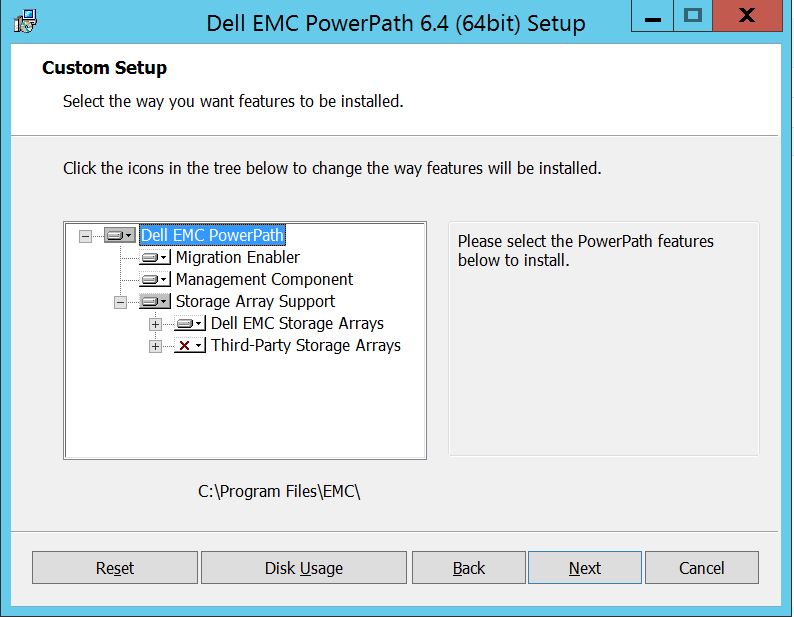
Voit nyt laajentaa tallennusjärjestelmän tukea, jos ei jo ole, ja laajentaa myös Dell EMC Storage Arrays -järjestelmiä, jotka näyttävät kaikki PowerPathin tukemat tallennusjärjestelmät:
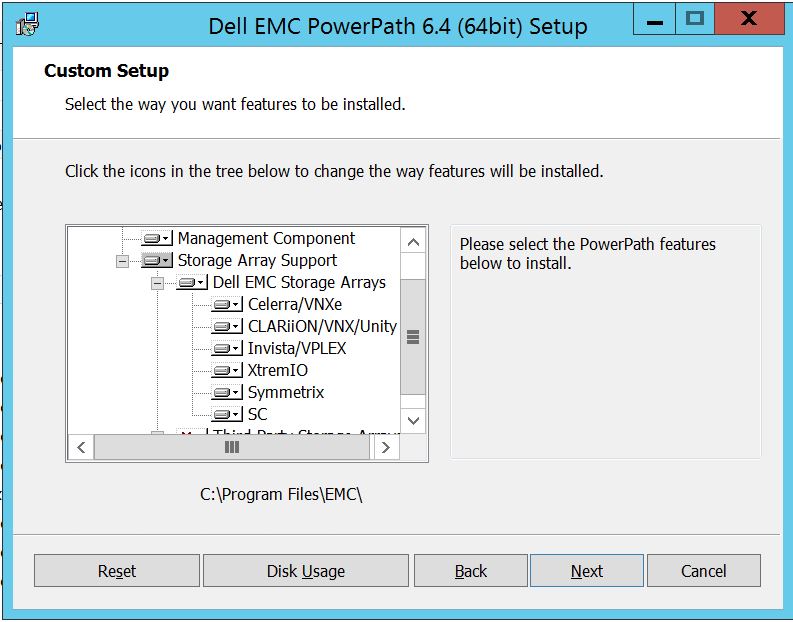
Sitten voit käyttää pientä alaavainta minkä tahansa tallennustilan lähellä. Otetaan esimerkiksi Symmetrix. Se näyttää lisäksi 2 vaihtoehtoa:
1. Asennetaan paikalliselle kiintolevylle
2. Koko ominaisuus asennetaan paikalliselle kiintolevylle
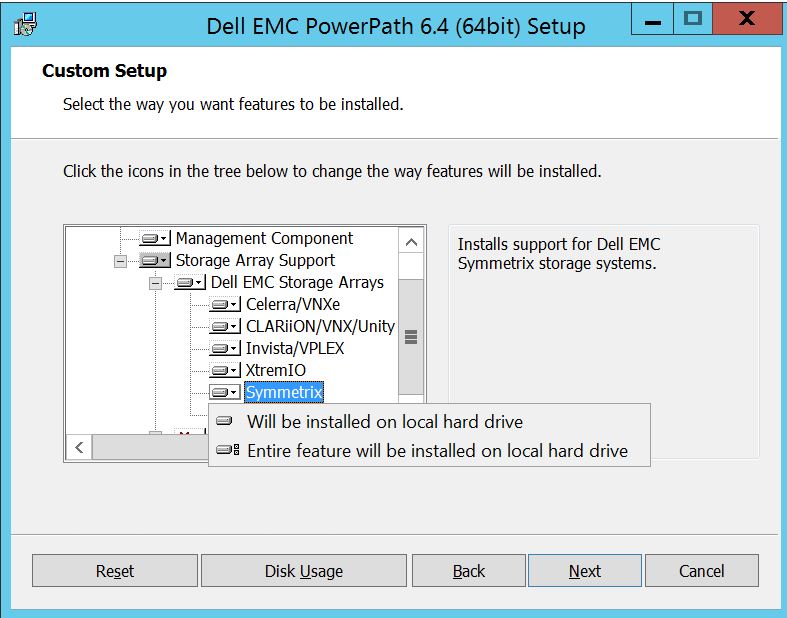
Jos haluat, että kaikkia Dell EMC -tallennusjärjestelmiä hallitaan (oletus),
voit tehdä saman myös avattavassa Dell EMC Storage Array -valikossa: Kun olet valmis: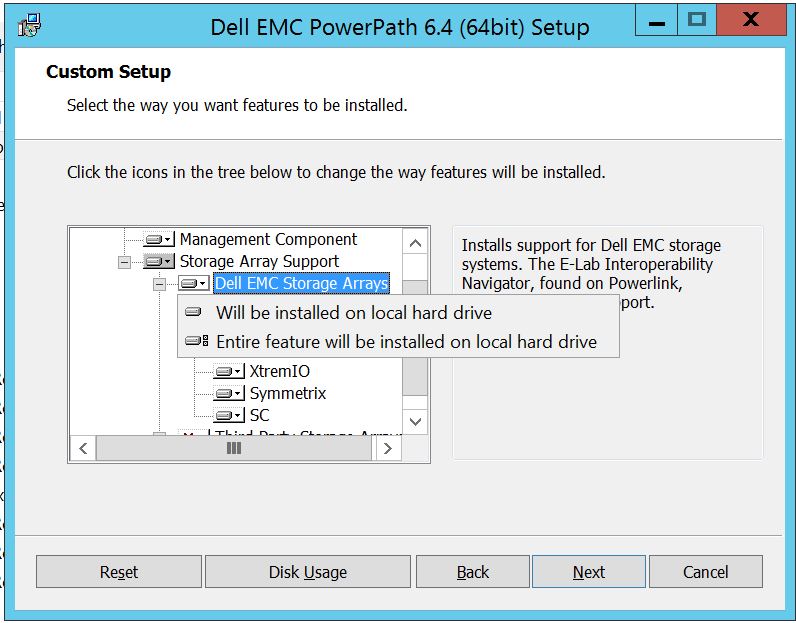
Valitse seuraava Valitse Seuraava
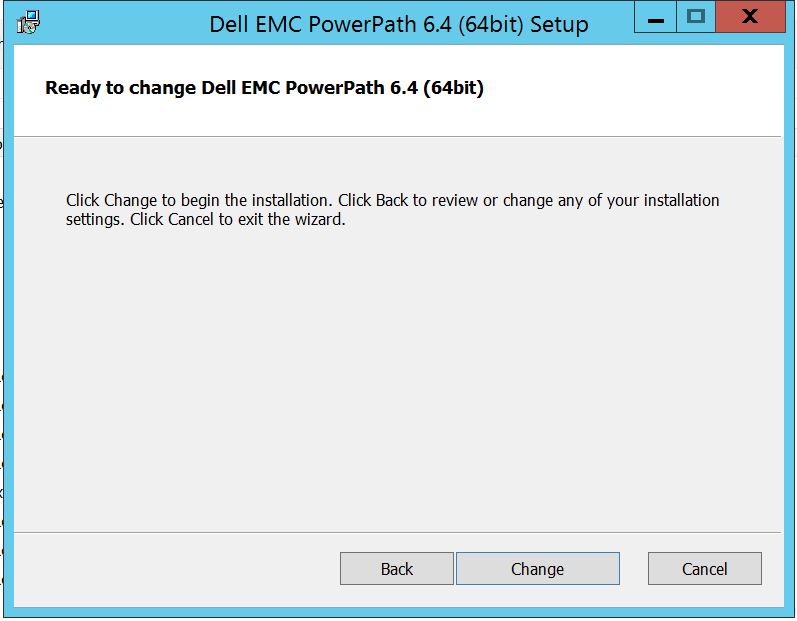
Valitse Muuta, jolloin tarvittavat muutokset tehdään:
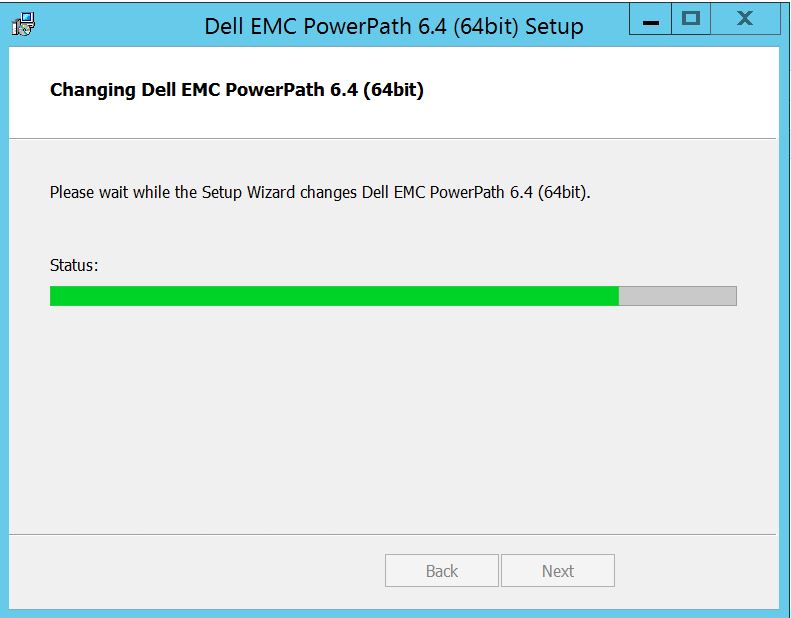
Post, jonka pitäisi näkyä tässä, jossa voit valita "Finish "
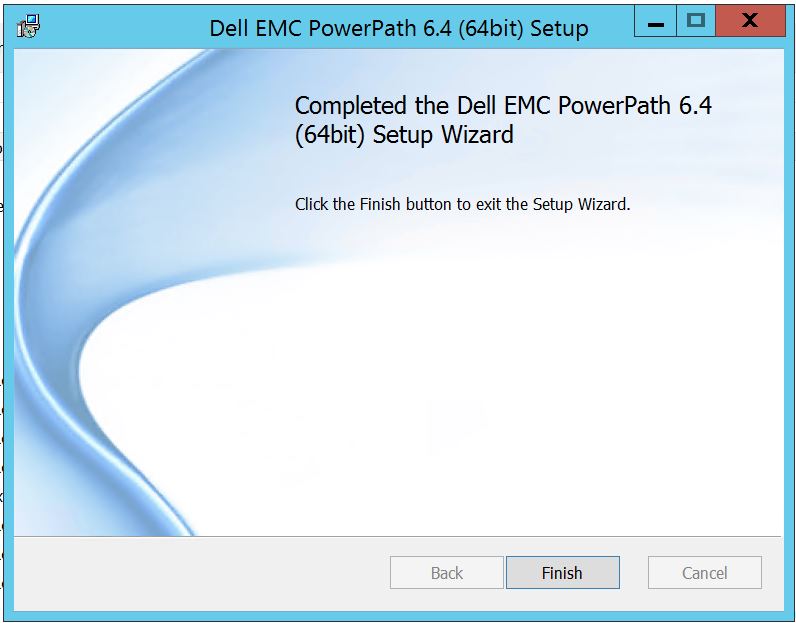 Post finish you saat ponnahdusikkunan, jossa pyydetään käynnistämään palvelin uudelleen, Please Choose to restart the Server Koska muutokset on otettava käyttöön palvelintasolla, jolloin tallennusjärjestelmän levyt näkyvät PowerPathissa.
Uudelleenkäynnistyksen jälkeen, kun suoritat powermt-näyttöasetuksia, Näin tuloste näyttää:
** POWERMT-NÄYTTÖVAIHTOEHDOT **
Näytä CLARiiON-levyjen nimet: Todellinen
polkuviiveen valvonta: Off-Persist-polun
tiedot: Performance Monitorissa
: ei käytössä
Automaattinen valmiustila: IOs per Failure (IOPF): Käytössä
IOPF:n erääntymisjakso: 1 d
IOPF-raja: 6000
Storage
System Class Attributes
------------ ----------
Symmetrix periodic autorestore = on
reactive autorestore = on
status = managed
proximity based autostandby = off
auto host registration = enabled
app finger printing = enabled
device to array performance report = enabled
device in use to array report = enabled
CLARiiON periodic autorestore = on
reactive autorestore = on
status = managed
proximity based autostandby = N/A
auto host registration = disabled
app finger printing = N/A
device to array performance report = N/A
device in use to array report = N/A
Invista periodic autorestore = on
reactive autorestore = on
status = managed
proximity based autostandby = N/A
auto host registration = N/A
app finger printing = N/A
device to array performance report = N/A
device in use to array report = N/A
Hitachi periodic autorestore = on
reactive autorestore = on
status = unmanaged
proximity based autostandby = N/A
auto host registration = N/A
app finger printing = N/A
device to array performance report = N/A
device in use to array report = N/A
HP xp periodic autorestore = on
reactive autorestore = on
status = unmanaged
proximity based autostandby = N/A
auto host registration = N/A
app finger printing = N/A
device to array performance report = N/A
device in use to array report = N/A
Ess periodic autorestore = on
reactive autorestore = on
status = unmanaged
proximity based autostandby = N/A
auto host registration = N/A
app finger printing = N/A
device to array performance report = N/A
device in use to array report = N/A
Generic periodic autorestore = on
reactive autorestore = on
status = managed
proximity based autostandby = N/A
auto host registration = N/A
app finger printing = N/A
device to array performance report = N/A
device in use to array report = N/A
VPLEX periodic autorestore = on
reactive autorestore = on
status = managed
proximity based autostandby = on
proximity based autostandby threshold = default
auto host registration = N/A
app finger printing = N/A
device to array performance report = N/A
device in use to array report = N/A
VNX periodic autorestore = on
reactive autorestore = on
status = managed
proximity based autostandby = N/A
auto host registration = disabled
app finger printing = N/A
device to array performance report = N/A
device in use to array report = N/A
NetApp periodic autorestore = on
reactive autorestore = on
status = unmanaged
proximity based autostandby = N/A
auto host registration = N/A
app finger printing = N/A
device to array performance report = N/A
device in use to array report = N/A
XtremIO periodic autorestore = on
reactive autorestore = on
status = managed
proximity based autostandby = N/A
auto host registration = N/A
app finger printing = N/A
device to array performance report = N/A
device in use to array report = N/A
Unity periodic autorestore = on
reactive autorestore = on
status = managed
proximity based autostandby = N/A
auto host registration = disabled
app finger printing = N/A
device to array performance report = N/A
device in use to array report = N/A
SC periodic autorestore = on
reactive autorestore = on
status = managed
proximity based autostandby = N/A
auto host registration = N/A
app finger printing = N/A
device to array performance report = N/A
device in use to array report = N/A
Tässä tilanteessa asiakas on esitellyt Symmetrix Storage -levyjärjestelmän levyjä ja ilmoittanut, ettei PowerPathista löydy levyjä päivityksen jälkeen.
" powermt display options " -tuloste näyttää:
** POWERMT-NÄYTTÖVAIHTOEHDOT **
Näytä CLARiiON-levyjen nimet: Todellinen
polkuviiveen valvonta: Off-Persist-polun
tiedot: Performance Monitorissa
: ei käytössä
Automaattinen valmiustila: IOs per Failure (IOPF): Käytössä
IOPF:n erääntymisjakso: 1 d
IOPF-raja: 6000
Auto Host Registration: disabled
Storage
System Class Attributes
------------ ----------
Symmetrix periodic autorestore = on
reactive autorestore = on
status = unmanaged
proximity based autostandby = on
proximity based autostandby threshold = default
CLARiiON periodic autorestore = on
reactive autorestore = on
status = unmanaged
proximity based autostandby = N/A
Invista periodic autorestore = on
reactive autorestore = on
status = managed
proximity based autostandby = N/A
Hitachi periodic autorestore = on
reactive autorestore = on
status = unmanaged
proximity based autostandby = N/A
HP xp periodic autorestore = on
reactive autorestore = on
status = unmanaged
proximity based autostandby = N/A
Ess periodic autorestore = on
reactive autorestore = on
status = unmanaged
proximity based autostandby = N/A
Generic periodic autorestore = on
reactive autorestore = on
status = managed
proximity based autostandby = N/A
VPLEX periodic autorestore = on
reactive autorestore = on
status = managed
proximity based autostandby = on
proximity based autostandby threshold = default
VNX periodic autorestore = on
reactive autorestore = on
status = unmanaged
proximity based autostandby = N/A
NetApp periodic autorestore = on
reactive autorestore = on
status = unmanaged
proximity based autostandby = N/A
XtremIO periodic autorestore = on
reactive autorestore = on
status = managed
proximity based autostandby = N/A
Unity periodic autorestore = on
reactive autorestore = on
status = unmanaged
proximity based autostandby = N/A
SC periodic autorestore = on
reactive autorestore = on
status = managed
proximity based autostandby = off
Notice how some of the storage array and especially Symmetrix here is "unmanaged"
Here are the steps along with the screenshot from our lab server , how to make it "Managed"
Open Control Panel :
Valitse Ohjelma ja toiminnot
Valitse PowerPath ja valitse muokkaa/muuta, mikä avaa asennuskehotteen:
Napsauta Seuraava ja seuraa valittua muutosta:
Mikä vie sinut mukautettuun määritykseen:
Voit nyt laajentaa tallennusjärjestelmän tukea, jos ei jo ole, ja laajentaa myös Dell EMC Storage Arrays -järjestelmiä, jotka näyttävät kaikki PowerPathin tukemat tallennusjärjestelmät:
Sitten voit käyttää pientä alaavainta minkä tahansa tallennustilan lähellä. Otetaan esimerkiksi Symmetrix. Se näyttää lisäksi 2 vaihtoehtoa:
1. Asennetaan paikalliselle kiintolevylle
2. Koko ominaisuus asennetaan paikalliselle kiintolevylle
Jos haluat, että kaikkia Dell EMC -tallennusjärjestelmiä hallitaan (oletus),
voit tehdä saman myös avattavassa Dell EMC Storage Array -valikossa: Kun olet valmis:
Valitse seuraava Valitse Seuraava
Valitse Muuta, jolloin tarvittavat muutokset tehdään:
Post, jonka pitäisi näkyä tässä, jossa voit valita "Finish "
Post finish you saat ponnahdusikkunan, jossa pyydetään käynnistämään palvelin uudelleen, Please Choose to restart the Server Koska muutokset on otettava käyttöön palvelintasolla, jolloin tallennusjärjestelmän levyt näkyvät PowerPathissa.
Uudelleenkäynnistyksen jälkeen, kun suoritat powermt-näyttöasetuksia, Näin tuloste näyttää:
** POWERMT-NÄYTTÖVAIHTOEHDOT **
Näytä CLARiiON-levyjen nimet: Todellinen
polkuviiveen valvonta: Off-Persist-polun
tiedot: Performance Monitorissa
: ei käytössä
Automaattinen valmiustila: IOs per Failure (IOPF): Käytössä
IOPF:n erääntymisjakso: 1 d
IOPF-raja: 6000
Storage
System Class Attributes
------------ ----------
Symmetrix periodic autorestore = on
reactive autorestore = on
status = managed
proximity based autostandby = off
auto host registration = enabled
app finger printing = enabled
device to array performance report = enabled
device in use to array report = enabled
CLARiiON periodic autorestore = on
reactive autorestore = on
status = managed
proximity based autostandby = N/A
auto host registration = disabled
app finger printing = N/A
device to array performance report = N/A
device in use to array report = N/A
Invista periodic autorestore = on
reactive autorestore = on
status = managed
proximity based autostandby = N/A
auto host registration = N/A
app finger printing = N/A
device to array performance report = N/A
device in use to array report = N/A
Hitachi periodic autorestore = on
reactive autorestore = on
status = unmanaged
proximity based autostandby = N/A
auto host registration = N/A
app finger printing = N/A
device to array performance report = N/A
device in use to array report = N/A
HP xp periodic autorestore = on
reactive autorestore = on
status = unmanaged
proximity based autostandby = N/A
auto host registration = N/A
app finger printing = N/A
device to array performance report = N/A
device in use to array report = N/A
Ess periodic autorestore = on
reactive autorestore = on
status = unmanaged
proximity based autostandby = N/A
auto host registration = N/A
app finger printing = N/A
device to array performance report = N/A
device in use to array report = N/A
Generic periodic autorestore = on
reactive autorestore = on
status = managed
proximity based autostandby = N/A
auto host registration = N/A
app finger printing = N/A
device to array performance report = N/A
device in use to array report = N/A
VPLEX periodic autorestore = on
reactive autorestore = on
status = managed
proximity based autostandby = on
proximity based autostandby threshold = default
auto host registration = N/A
app finger printing = N/A
device to array performance report = N/A
device in use to array report = N/A
VNX periodic autorestore = on
reactive autorestore = on
status = managed
proximity based autostandby = N/A
auto host registration = disabled
app finger printing = N/A
device to array performance report = N/A
device in use to array report = N/A
NetApp periodic autorestore = on
reactive autorestore = on
status = unmanaged
proximity based autostandby = N/A
auto host registration = N/A
app finger printing = N/A
device to array performance report = N/A
device in use to array report = N/A
XtremIO periodic autorestore = on
reactive autorestore = on
status = managed
proximity based autostandby = N/A
auto host registration = N/A
app finger printing = N/A
device to array performance report = N/A
device in use to array report = N/A
Unity periodic autorestore = on
reactive autorestore = on
status = managed
proximity based autostandby = N/A
auto host registration = disabled
app finger printing = N/A
device to array performance report = N/A
device in use to array report = N/A
SC periodic autorestore = on
reactive autorestore = on
status = managed
proximity based autostandby = N/A
auto host registration = N/A
app finger printing = N/A
device to array performance report = N/A
device in use to array report = N/A
Affected Products
PowerPath for WindowsProducts
PowerPath for WindowsArticle Properties
Article Number: 000158477
Article Type: How To
Last Modified: 17 أكتوبر 2025
Version: 4
Find answers to your questions from other Dell users
Support Services
Check if your device is covered by Support Services.