PowerPath for Windows에서 스토리지를 관리하는 방법
Summary: 고객이 디스크가 표시되지 않고 Powermt 디스플레이 옵션에서 스토리지 어레이를 관리되지 않는 것으로 표시하는 경우 관리하는 방법
This article applies to
This article does not apply to
This article is not tied to any specific product.
Not all product versions are identified in this article.
Instructions
특정 시나리오에서 고객이 PowerPath의 스토리지 어레이에서 제공된 디스크를 인식할 수 없다고 보고하는 경우입니다. powermt display options를 실행할 때 스토리지 어레이가 "Unmanaged"로 표시되는 경우 PowerPath가 있는 Windows 환경에서. 이 KB의 권장 작업 계획에 따라 "관리"와 동일하게 만드십시오.
다음은 고객이 Symmetrix Storage 어레이의 디스크를 제시하고 업그레이드 후 PowerPath에서 디스크를 검색할 수 없다고 보고한 시나리오입니다.
" powermt display options "의 출력에는 다음이 표시됩니다.
** POWERMT 디스플레이 옵션 **
Show CLARiiON LUN names: 트루
경로 레이턴시 모니터링: Persist Path Information(경로 정보 유지) 해제
: 성능 모니터링 켜짐
: 비활성화
됨 자동 대기: iopf(IOs per Failure): 활성화
된 iopf 에이징 기간: 1 d
iopf 제한 : 6000
Auto Host Registration: disabled
Storage
System Class Attributes
------------ ----------
Symmetrix periodic autorestore = on
reactive autorestore = on
status = unmanaged
proximity based autostandby = on
proximity based autostandby threshold = default
CLARiiON periodic autorestore = on
reactive autorestore = on
status = unmanaged
proximity based autostandby = N/A
Invista periodic autorestore = on
reactive autorestore = on
status = managed
proximity based autostandby = N/A
Hitachi periodic autorestore = on
reactive autorestore = on
status = unmanaged
proximity based autostandby = N/A
HP xp periodic autorestore = on
reactive autorestore = on
status = unmanaged
proximity based autostandby = N/A
Ess periodic autorestore = on
reactive autorestore = on
status = unmanaged
proximity based autostandby = N/A
Generic periodic autorestore = on
reactive autorestore = on
status = managed
proximity based autostandby = N/A
VPLEX periodic autorestore = on
reactive autorestore = on
status = managed
proximity based autostandby = on
proximity based autostandby threshold = default
VNX periodic autorestore = on
reactive autorestore = on
status = unmanaged
proximity based autostandby = N/A
NetApp periodic autorestore = on
reactive autorestore = on
status = unmanaged
proximity based autostandby = N/A
XtremIO periodic autorestore = on
reactive autorestore = on
status = managed
proximity based autostandby = N/A
Unity periodic autorestore = on
reactive autorestore = on
status = unmanaged
proximity based autostandby = N/A
SC periodic autorestore = on
reactive autorestore = on
status = managed
proximity based autostandby = off
Notice how some of the storage array and especially Symmetrix here is "unmanaged"
Here are the steps along with the screenshot from our lab server , how to make it "Managed"
Open Control Panel :
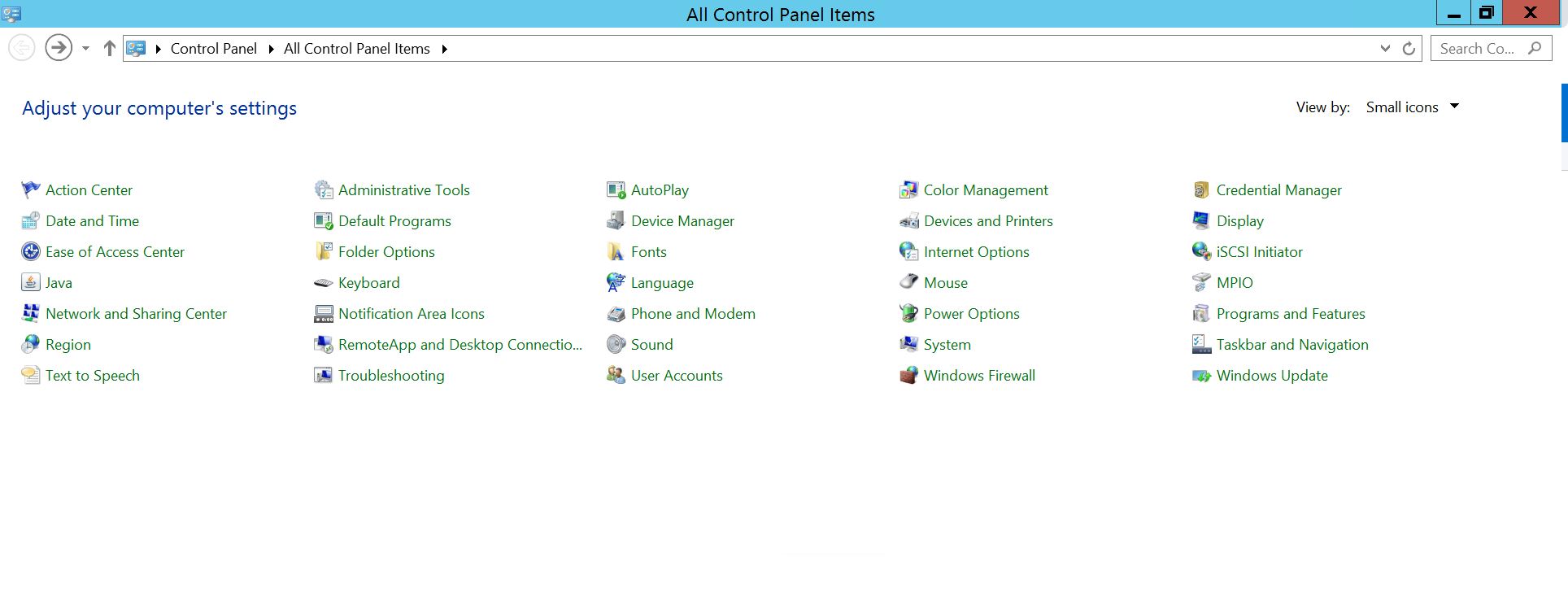
Program and Features
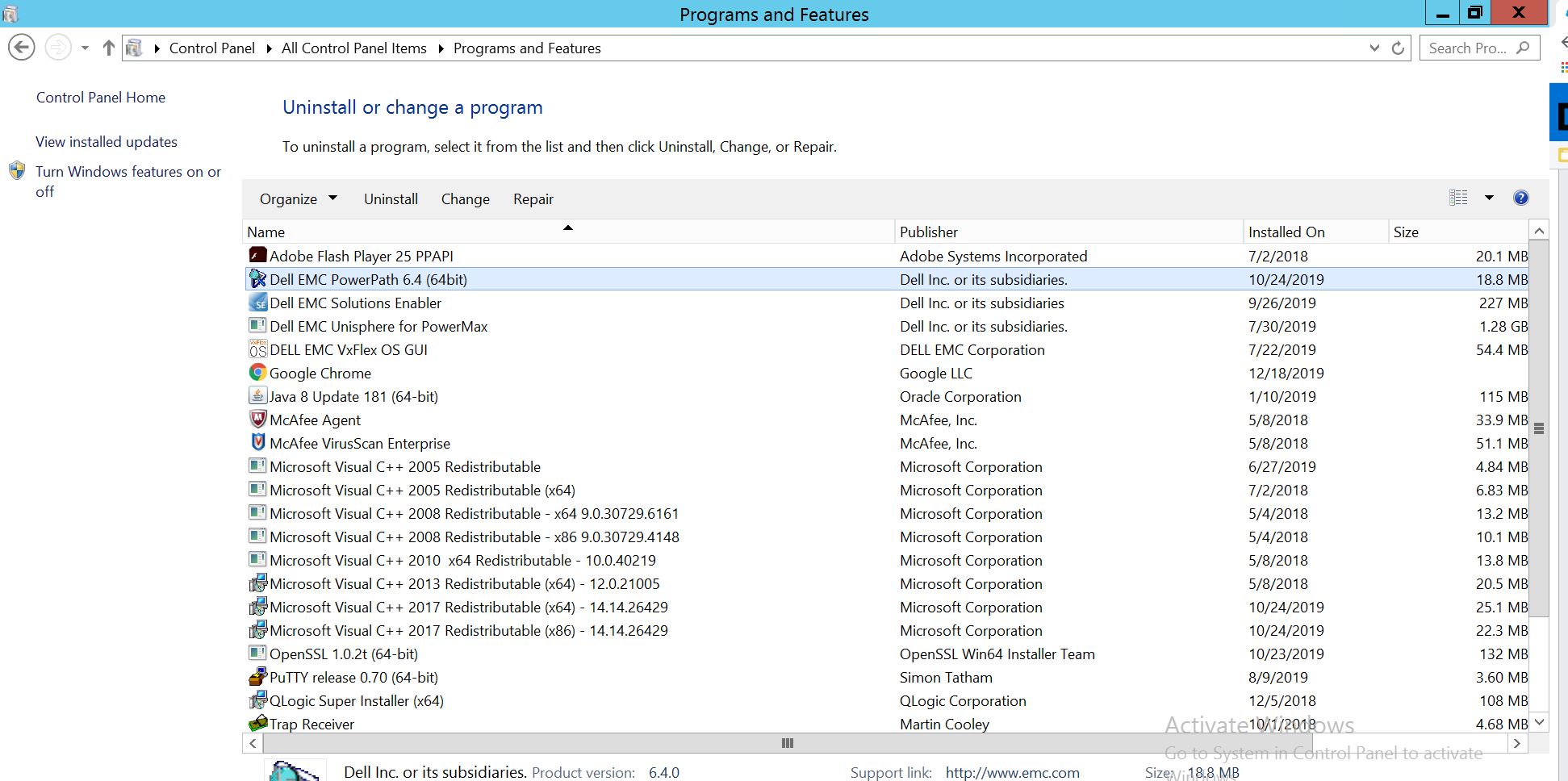
를 선택하고 PowerPath를 선택한 다음 modify/Change를 선택하면 설치 프로그램 프롬프트가 열립니다.
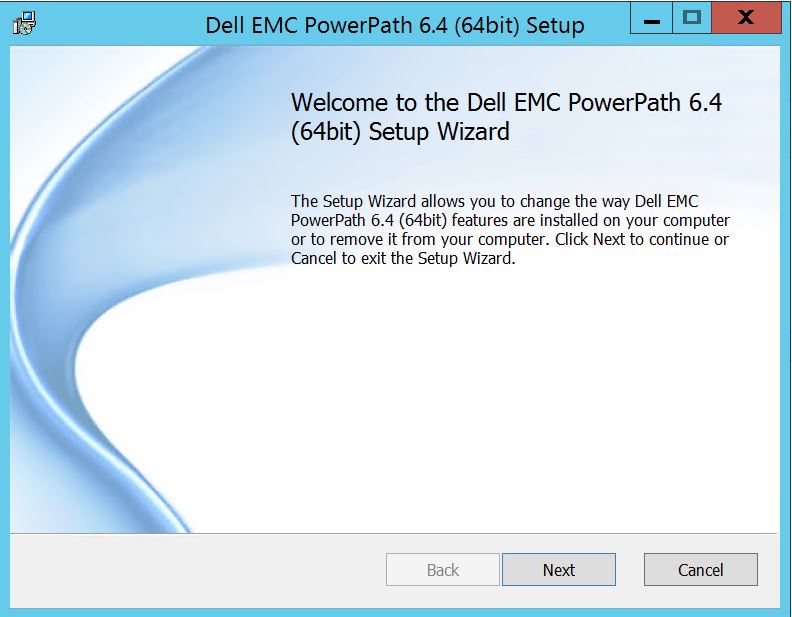
Next(다음)를 클릭하고 선택 변경을 따릅니다.
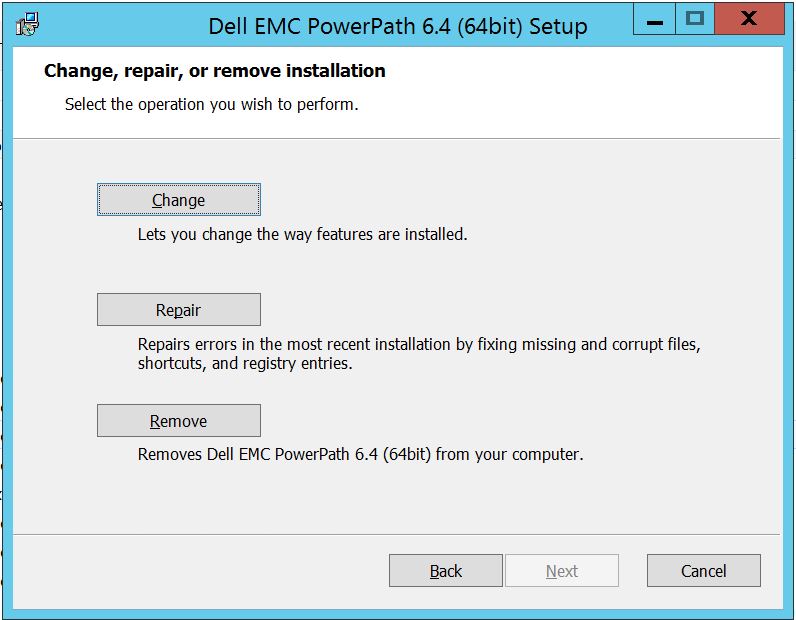
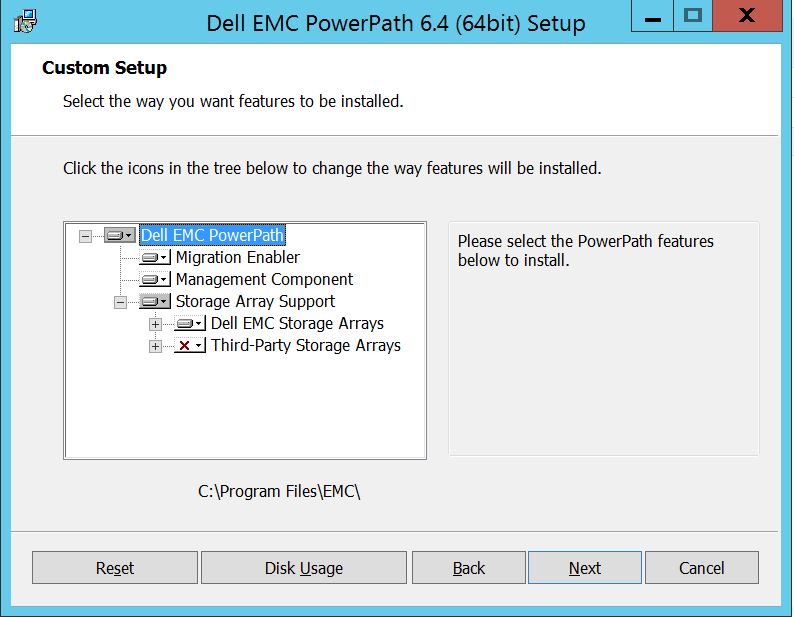
아직 확장하지 않은 경우 스토리지 어레이 지원을 확장하고 PowerPath
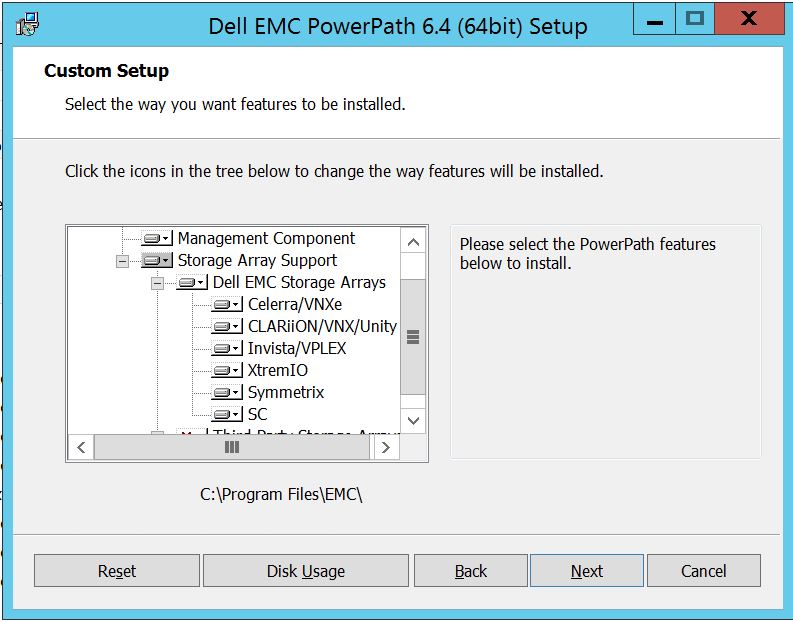
에서 지원되는 모든 스토리지 어레이를 표시하는 Dell EMC 스토리지 어레이도 확장할 수 있습니다. 그런 다음 스토리지 근처에서 소형 다운키를 추가로 사용할 수 있습니다. 예를 들어 Symmetrix를 예로 들어 보겠습니다. 2 가지 옵션이 추가로 표시됩니다.
1. 로컬 하드 드라이브
2에 설치됩니다. 전체 기능이 로컬 하드 드라이브에
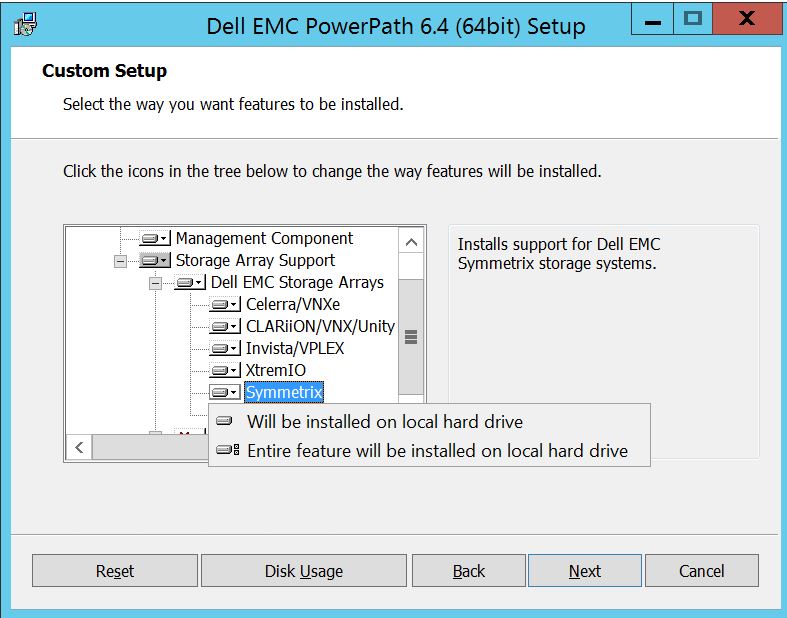
설치됩니다.모든 Dell EMC Storage 어레이를 관리하려는 경우(기본적으로 기본값)
Dell EMC Storage Array 드롭다운에서도 동일한 작업을 수행할 수 있습니다.
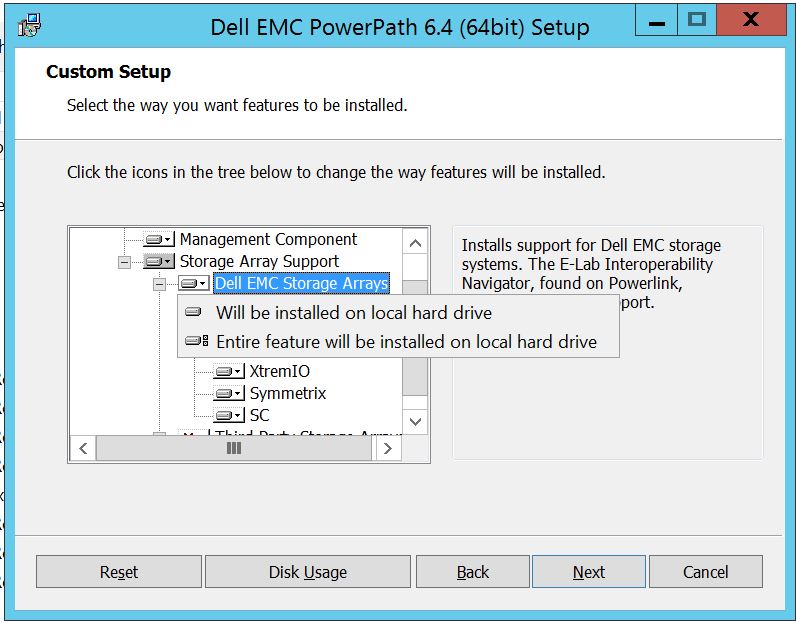
완료되면 다음을
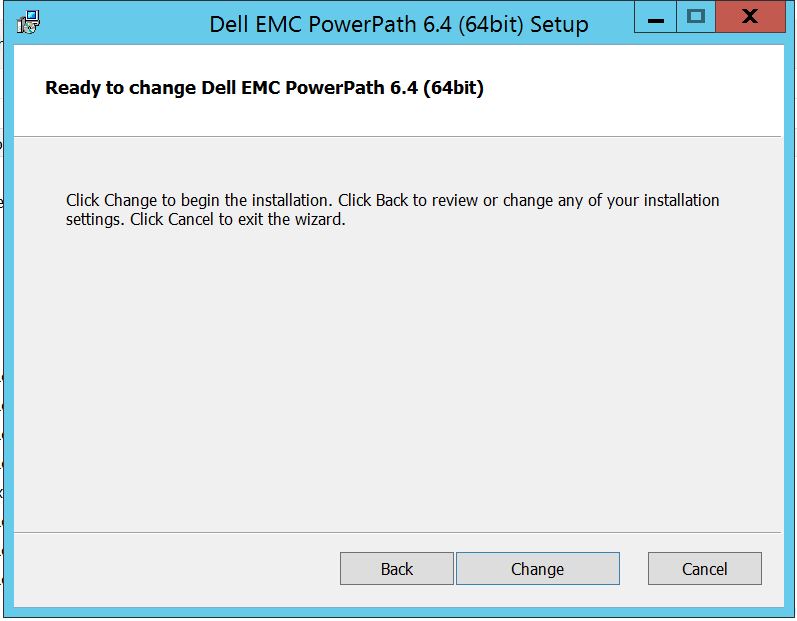
선택합니다. Change를 클릭하면 필요한 변경이 완료됩니다.
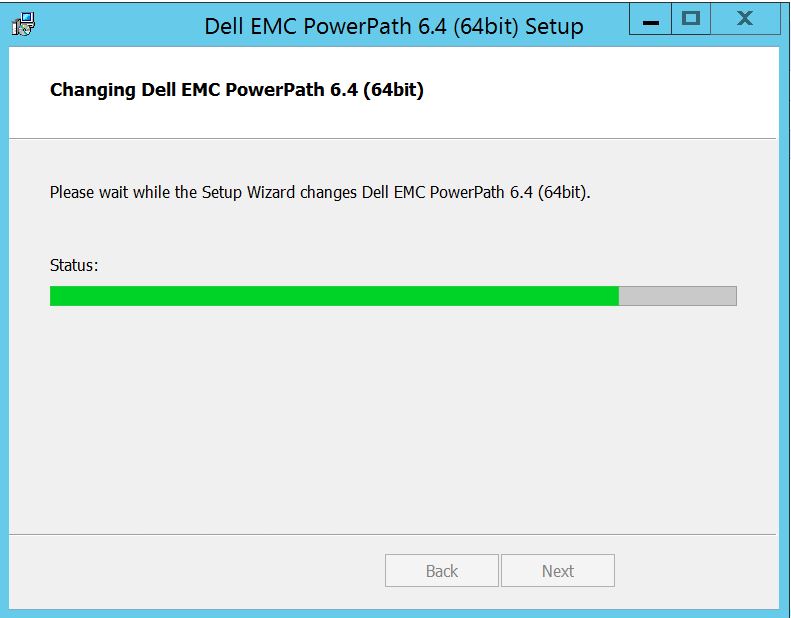
이 메시지가 표시되는 경우 "Finish"
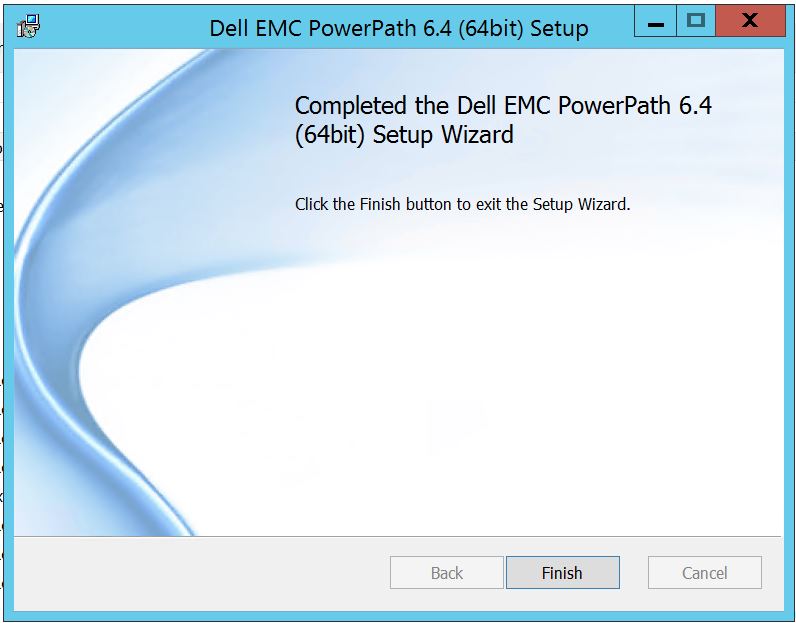 를 선택할 수 있습니다. 완료되면 재부팅을 요청하는 팝업이 나타납니다. 서버 수준에서 변경 사항을 구현해야 하므로 서버를 재부팅하도록 선택하십시오. 그러면 스토리지 어레이 디스크가 PowerPath에 표시됩니다.
powermt display options를 실행할 때 재부팅 후 출력은 다음과 같이 표시됩니다.
** POWERMT 디스플레이 옵션 **
Show CLARiiON LUN names: 트루
경로 레이턴시 모니터링: Persist Path Information(경로 정보 유지) 해제
: 성능 모니터링 켜짐
: 비활성화
됨 자동 대기: iopf(IOs per Failure): 활성화
된 iopf 에이징 기간: 1 d
iopf 제한 : 6000
Storage
System Class Attributes
------------ ----------
Symmetrix periodic autorestore = on
reactive autorestore = on
status = managed
proximity based autostandby = off
auto host registration = enabled
app finger printing = enabled
device to array performance report = enabled
device in use to array report = enabled
CLARiiON periodic autorestore = on
reactive autorestore = on
status = managed
proximity based autostandby = N/A
auto host registration = disabled
app finger printing = N/A
device to array performance report = N/A
device in use to array report = N/A
Invista periodic autorestore = on
reactive autorestore = on
status = managed
proximity based autostandby = N/A
auto host registration = N/A
app finger printing = N/A
device to array performance report = N/A
device in use to array report = N/A
Hitachi periodic autorestore = on
reactive autorestore = on
status = unmanaged
proximity based autostandby = N/A
auto host registration = N/A
app finger printing = N/A
device to array performance report = N/A
device in use to array report = N/A
HP xp periodic autorestore = on
reactive autorestore = on
status = unmanaged
proximity based autostandby = N/A
auto host registration = N/A
app finger printing = N/A
device to array performance report = N/A
device in use to array report = N/A
Ess periodic autorestore = on
reactive autorestore = on
status = unmanaged
proximity based autostandby = N/A
auto host registration = N/A
app finger printing = N/A
device to array performance report = N/A
device in use to array report = N/A
Generic periodic autorestore = on
reactive autorestore = on
status = managed
proximity based autostandby = N/A
auto host registration = N/A
app finger printing = N/A
device to array performance report = N/A
device in use to array report = N/A
VPLEX periodic autorestore = on
reactive autorestore = on
status = managed
proximity based autostandby = on
proximity based autostandby threshold = default
auto host registration = N/A
app finger printing = N/A
device to array performance report = N/A
device in use to array report = N/A
VNX periodic autorestore = on
reactive autorestore = on
status = managed
proximity based autostandby = N/A
auto host registration = disabled
app finger printing = N/A
device to array performance report = N/A
device in use to array report = N/A
NetApp periodic autorestore = on
reactive autorestore = on
status = unmanaged
proximity based autostandby = N/A
auto host registration = N/A
app finger printing = N/A
device to array performance report = N/A
device in use to array report = N/A
XtremIO periodic autorestore = on
reactive autorestore = on
status = managed
proximity based autostandby = N/A
auto host registration = N/A
app finger printing = N/A
device to array performance report = N/A
device in use to array report = N/A
Unity periodic autorestore = on
reactive autorestore = on
status = managed
proximity based autostandby = N/A
auto host registration = disabled
app finger printing = N/A
device to array performance report = N/A
device in use to array report = N/A
SC periodic autorestore = on
reactive autorestore = on
status = managed
proximity based autostandby = N/A
auto host registration = N/A
app finger printing = N/A
device to array performance report = N/A
device in use to array report = N/A
다음은 고객이 Symmetrix Storage 어레이의 디스크를 제시하고 업그레이드 후 PowerPath에서 디스크를 검색할 수 없다고 보고한 시나리오입니다.
" powermt display options "의 출력에는 다음이 표시됩니다.
** POWERMT 디스플레이 옵션 **
Show CLARiiON LUN names: 트루
경로 레이턴시 모니터링: Persist Path Information(경로 정보 유지) 해제
: 성능 모니터링 켜짐
: 비활성화
됨 자동 대기: iopf(IOs per Failure): 활성화
된 iopf 에이징 기간: 1 d
iopf 제한 : 6000
Auto Host Registration: disabled
Storage
System Class Attributes
------------ ----------
Symmetrix periodic autorestore = on
reactive autorestore = on
status = unmanaged
proximity based autostandby = on
proximity based autostandby threshold = default
CLARiiON periodic autorestore = on
reactive autorestore = on
status = unmanaged
proximity based autostandby = N/A
Invista periodic autorestore = on
reactive autorestore = on
status = managed
proximity based autostandby = N/A
Hitachi periodic autorestore = on
reactive autorestore = on
status = unmanaged
proximity based autostandby = N/A
HP xp periodic autorestore = on
reactive autorestore = on
status = unmanaged
proximity based autostandby = N/A
Ess periodic autorestore = on
reactive autorestore = on
status = unmanaged
proximity based autostandby = N/A
Generic periodic autorestore = on
reactive autorestore = on
status = managed
proximity based autostandby = N/A
VPLEX periodic autorestore = on
reactive autorestore = on
status = managed
proximity based autostandby = on
proximity based autostandby threshold = default
VNX periodic autorestore = on
reactive autorestore = on
status = unmanaged
proximity based autostandby = N/A
NetApp periodic autorestore = on
reactive autorestore = on
status = unmanaged
proximity based autostandby = N/A
XtremIO periodic autorestore = on
reactive autorestore = on
status = managed
proximity based autostandby = N/A
Unity periodic autorestore = on
reactive autorestore = on
status = unmanaged
proximity based autostandby = N/A
SC periodic autorestore = on
reactive autorestore = on
status = managed
proximity based autostandby = off
Notice how some of the storage array and especially Symmetrix here is "unmanaged"
Here are the steps along with the screenshot from our lab server , how to make it "Managed"
Open Control Panel :
Program and Features
를 선택하고 PowerPath를 선택한 다음 modify/Change를 선택하면 설치 프로그램 프롬프트가 열립니다.
Next(다음)를 클릭하고 선택 변경을 따릅니다.
아직 확장하지 않은 경우 스토리지 어레이 지원을 확장하고 PowerPath
에서 지원되는 모든 스토리지 어레이를 표시하는 Dell EMC 스토리지 어레이도 확장할 수 있습니다. 그런 다음 스토리지 근처에서 소형 다운키를 추가로 사용할 수 있습니다. 예를 들어 Symmetrix를 예로 들어 보겠습니다. 2 가지 옵션이 추가로 표시됩니다.
1. 로컬 하드 드라이브
2에 설치됩니다. 전체 기능이 로컬 하드 드라이브에
설치됩니다.모든 Dell EMC Storage 어레이를 관리하려는 경우(기본적으로 기본값)
Dell EMC Storage Array 드롭다운에서도 동일한 작업을 수행할 수 있습니다.
완료되면 다음을
선택합니다. Change를 클릭하면 필요한 변경이 완료됩니다.
이 메시지가 표시되는 경우 "Finish"
를 선택할 수 있습니다. 완료되면 재부팅을 요청하는 팝업이 나타납니다. 서버 수준에서 변경 사항을 구현해야 하므로 서버를 재부팅하도록 선택하십시오. 그러면 스토리지 어레이 디스크가 PowerPath에 표시됩니다.
powermt display options를 실행할 때 재부팅 후 출력은 다음과 같이 표시됩니다.
** POWERMT 디스플레이 옵션 **
Show CLARiiON LUN names: 트루
경로 레이턴시 모니터링: Persist Path Information(경로 정보 유지) 해제
: 성능 모니터링 켜짐
: 비활성화
됨 자동 대기: iopf(IOs per Failure): 활성화
된 iopf 에이징 기간: 1 d
iopf 제한 : 6000
Storage
System Class Attributes
------------ ----------
Symmetrix periodic autorestore = on
reactive autorestore = on
status = managed
proximity based autostandby = off
auto host registration = enabled
app finger printing = enabled
device to array performance report = enabled
device in use to array report = enabled
CLARiiON periodic autorestore = on
reactive autorestore = on
status = managed
proximity based autostandby = N/A
auto host registration = disabled
app finger printing = N/A
device to array performance report = N/A
device in use to array report = N/A
Invista periodic autorestore = on
reactive autorestore = on
status = managed
proximity based autostandby = N/A
auto host registration = N/A
app finger printing = N/A
device to array performance report = N/A
device in use to array report = N/A
Hitachi periodic autorestore = on
reactive autorestore = on
status = unmanaged
proximity based autostandby = N/A
auto host registration = N/A
app finger printing = N/A
device to array performance report = N/A
device in use to array report = N/A
HP xp periodic autorestore = on
reactive autorestore = on
status = unmanaged
proximity based autostandby = N/A
auto host registration = N/A
app finger printing = N/A
device to array performance report = N/A
device in use to array report = N/A
Ess periodic autorestore = on
reactive autorestore = on
status = unmanaged
proximity based autostandby = N/A
auto host registration = N/A
app finger printing = N/A
device to array performance report = N/A
device in use to array report = N/A
Generic periodic autorestore = on
reactive autorestore = on
status = managed
proximity based autostandby = N/A
auto host registration = N/A
app finger printing = N/A
device to array performance report = N/A
device in use to array report = N/A
VPLEX periodic autorestore = on
reactive autorestore = on
status = managed
proximity based autostandby = on
proximity based autostandby threshold = default
auto host registration = N/A
app finger printing = N/A
device to array performance report = N/A
device in use to array report = N/A
VNX periodic autorestore = on
reactive autorestore = on
status = managed
proximity based autostandby = N/A
auto host registration = disabled
app finger printing = N/A
device to array performance report = N/A
device in use to array report = N/A
NetApp periodic autorestore = on
reactive autorestore = on
status = unmanaged
proximity based autostandby = N/A
auto host registration = N/A
app finger printing = N/A
device to array performance report = N/A
device in use to array report = N/A
XtremIO periodic autorestore = on
reactive autorestore = on
status = managed
proximity based autostandby = N/A
auto host registration = N/A
app finger printing = N/A
device to array performance report = N/A
device in use to array report = N/A
Unity periodic autorestore = on
reactive autorestore = on
status = managed
proximity based autostandby = N/A
auto host registration = disabled
app finger printing = N/A
device to array performance report = N/A
device in use to array report = N/A
SC periodic autorestore = on
reactive autorestore = on
status = managed
proximity based autostandby = N/A
auto host registration = N/A
app finger printing = N/A
device to array performance report = N/A
device in use to array report = N/A
Affected Products
PowerPath for WindowsProducts
PowerPath for WindowsArticle Properties
Article Number: 000158477
Article Type: How To
Last Modified: 17 أكتوبر 2025
Version: 4
Find answers to your questions from other Dell users
Support Services
Check if your device is covered by Support Services.