Storage beheerd maken in PowerPath voor Windows
Summary: Als de klant meldt dat schijven niet zichtbaar zijn en in Powermt weergaveopties worden weergegeven als u merkt dat de storage-array als onbeheerd wordt beschouwd, Hoe u deze beheerd kunt maken ...
This article applies to
This article does not apply to
This article is not tied to any specific product.
Not all product versions are identified in this article.
Instructions
In bepaalde scenario's, wanneer een klant meldt dat ze geen schijven kunnen opmerken die zijn geleverd vanuit de storage-array in PowerPath. Wanneer u PowerMT-weergaveopties uitvoert, Als u merkt dat de storage-array "Unmanaged" is, bevindt deze zich in een Windows-omgeving met PowerPath. Volg het aanbevolen actieplan in deze KB om hetzelfde te maken als "Beheerd".
Hier is een scenario waarin de klant schijven van de Symmetrix Storage-array heeft gepresenteerd en heeft gemeld dat ze na de upgrade geen schijven in PowerPath kunnen detecteren.
De uitgang van de " powermt display options " toont:
** POWERMT-WEERGAVEOPTIES **
CLARiiON LUN-namen weergeven: True
Path Latentiemonitor: Off
Persist Path Information: On
Performance Monitor: uitgeschakeld
Autostandby: IOs per Failure (iopf): ingeschakelde
IOPF-verouderingsperiode: 1 D
IOPF-limiet: 6000
Auto Host Registration: disabled
Storage
System Class Attributes
------------ ----------
Symmetrix periodic autorestore = on
reactive autorestore = on
status = unmanaged
proximity based autostandby = on
proximity based autostandby threshold = default
CLARiiON periodic autorestore = on
reactive autorestore = on
status = unmanaged
proximity based autostandby = N/A
Invista periodic autorestore = on
reactive autorestore = on
status = managed
proximity based autostandby = N/A
Hitachi periodic autorestore = on
reactive autorestore = on
status = unmanaged
proximity based autostandby = N/A
HP xp periodic autorestore = on
reactive autorestore = on
status = unmanaged
proximity based autostandby = N/A
Ess periodic autorestore = on
reactive autorestore = on
status = unmanaged
proximity based autostandby = N/A
Generic periodic autorestore = on
reactive autorestore = on
status = managed
proximity based autostandby = N/A
VPLEX periodic autorestore = on
reactive autorestore = on
status = managed
proximity based autostandby = on
proximity based autostandby threshold = default
VNX periodic autorestore = on
reactive autorestore = on
status = unmanaged
proximity based autostandby = N/A
NetApp periodic autorestore = on
reactive autorestore = on
status = unmanaged
proximity based autostandby = N/A
XtremIO periodic autorestore = on
reactive autorestore = on
status = managed
proximity based autostandby = N/A
Unity periodic autorestore = on
reactive autorestore = on
status = unmanaged
proximity based autostandby = N/A
SC periodic autorestore = on
reactive autorestore = on
status = managed
proximity based autostandby = off
Notice how some of the storage array and especially Symmetrix here is "unmanaged"
Here are the steps along with the screenshot from our lab server , how to make it "Managed"
Open Control Panel :
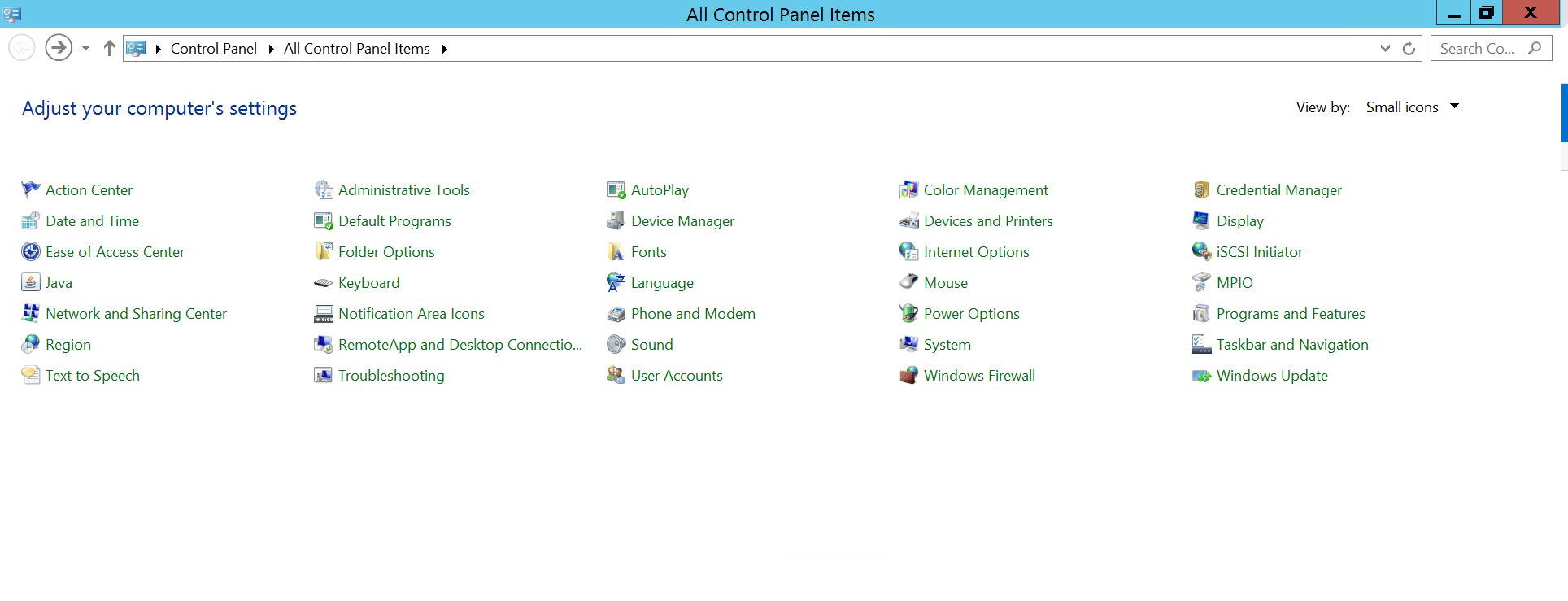
Selecteer programma en onderdelen
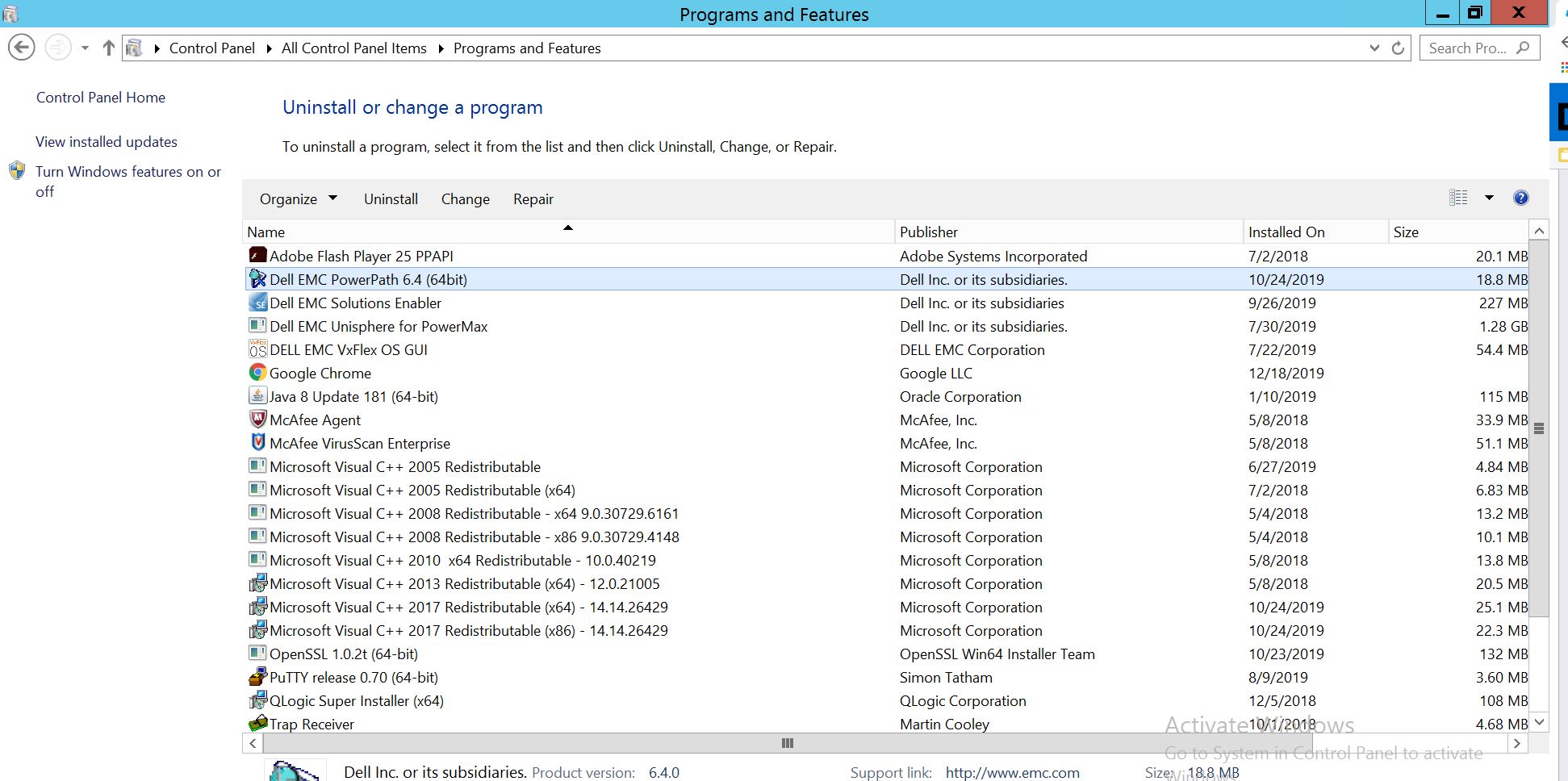
Selecteer PowerPath en kies wijzigen/wijzigen om de prompt van het installatieprogramma te openen:
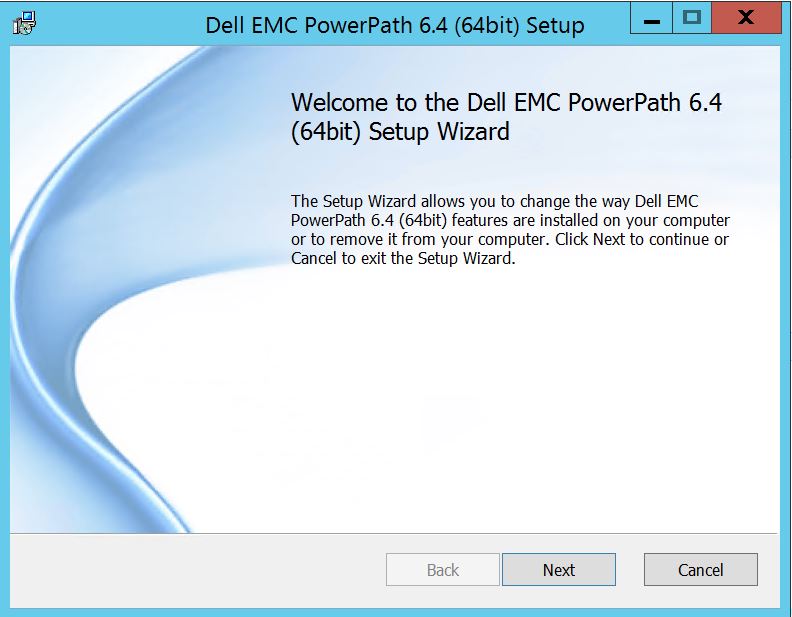
Klik op Volgende en volg de geselecteerde wijziging:
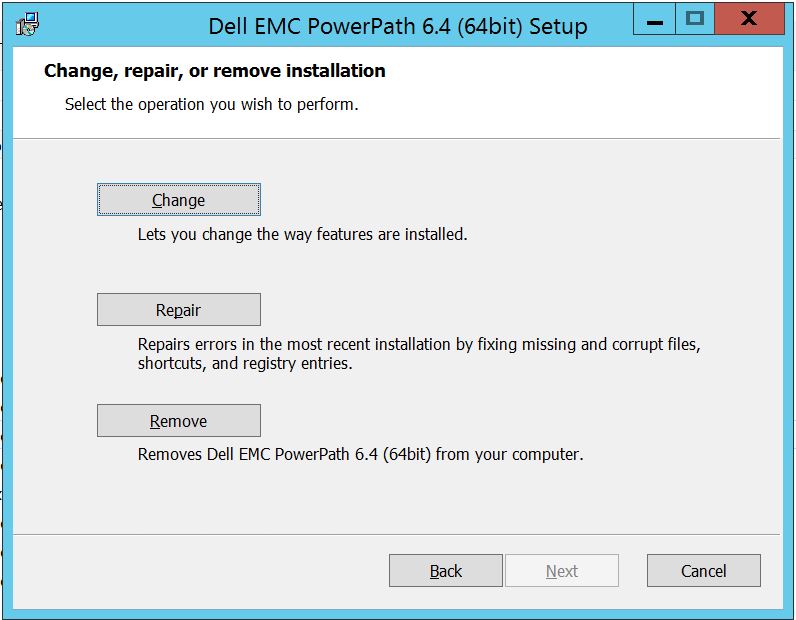
die u naar aangepaste instellingen brengt:
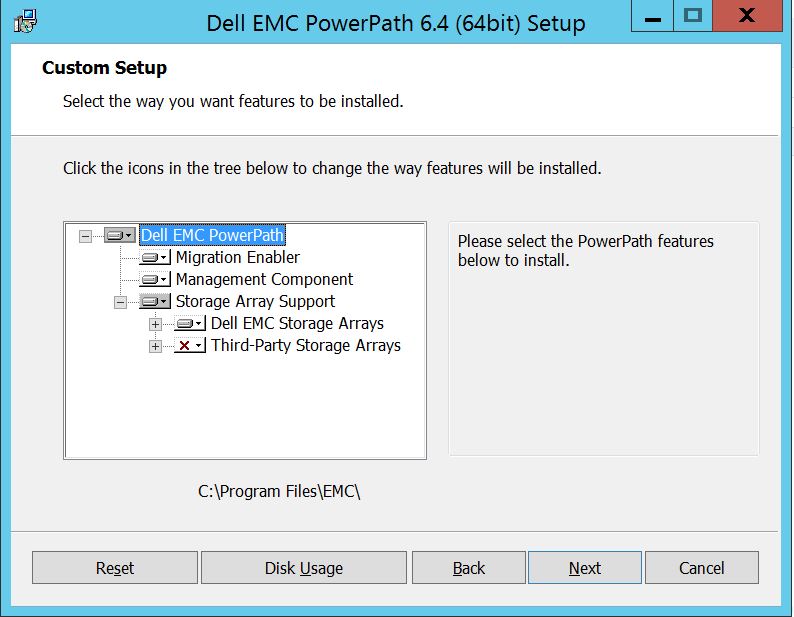
U kunt nu de ondersteuning voor de storage-array uitbreiden, als dit nog niet het geval is, en ook Dell EMC storage-arrays uitbreiden, waarin alle storage-arrays worden weergegeven die worden ondersteund onder PowerPath:
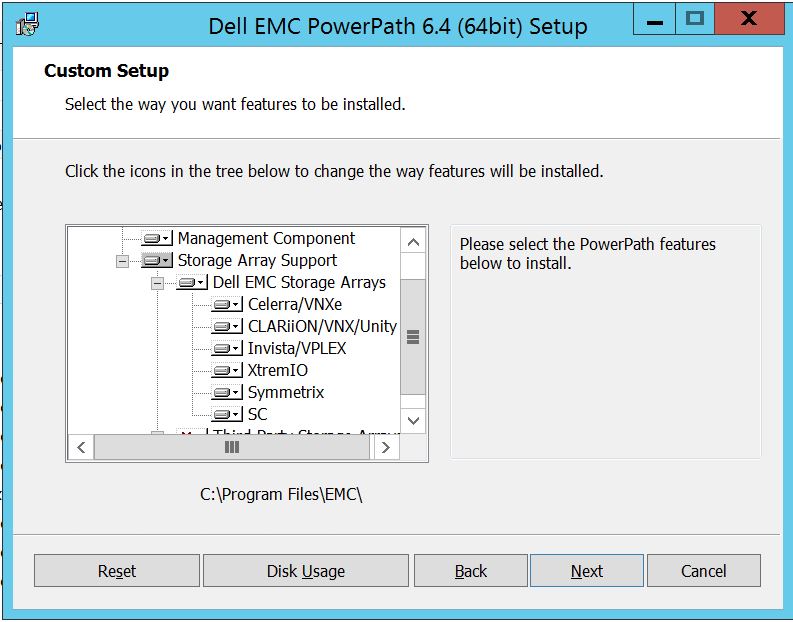
Dan kunt u de kleine downkey in de buurt van een van de storage verder gebruiken. Laten we hier als voorbeeld Symmetrix nemen. Het toont verder 2 opties:
1. Wordt geïnstalleerd op lokale harde schijf
2. De volledige functie wordt geïnstalleerd op de lokale harde schijf
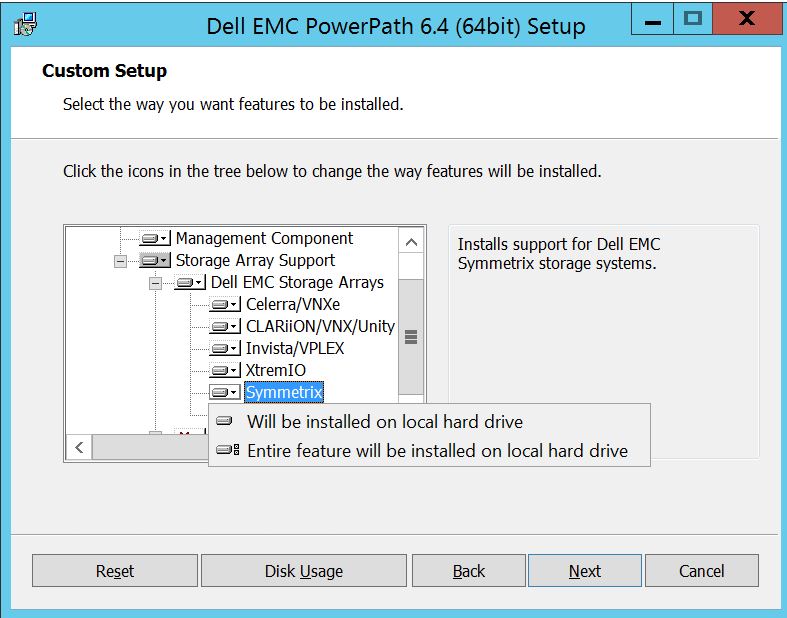
Als u wilt dat alle Dell EMC storage-arrays worden beheerd (wat in wezen de standaardinstelling is),
kunt u hetzelfde doen in de vervolgkeuzelijst Dell EMC storage-array: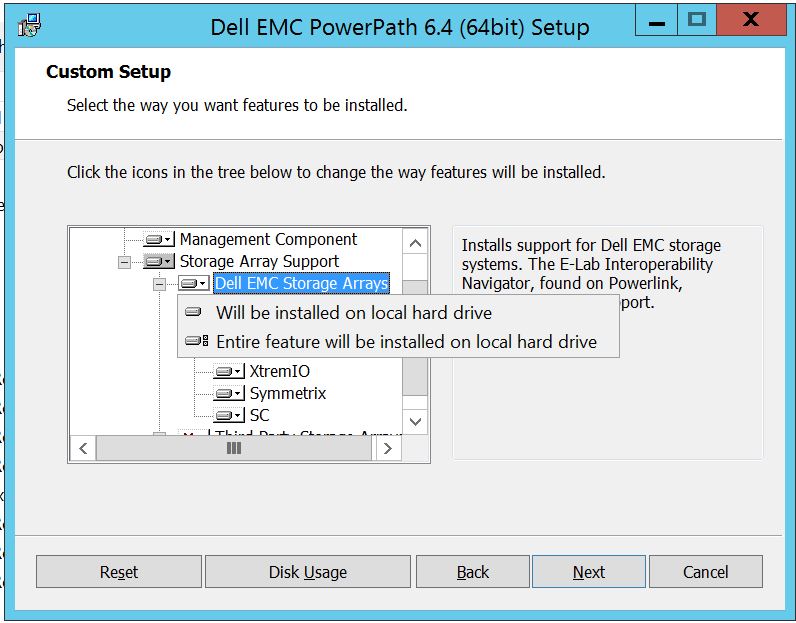
Eenmaal voltooid Selecteer volgende
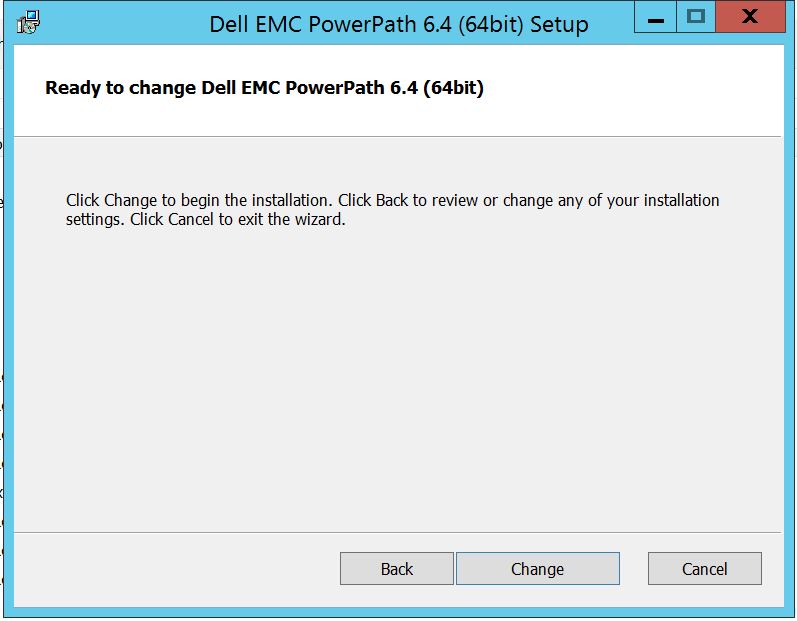
Klik op Wijzigen om de noodzakelijke wijzigingen te voltooien:
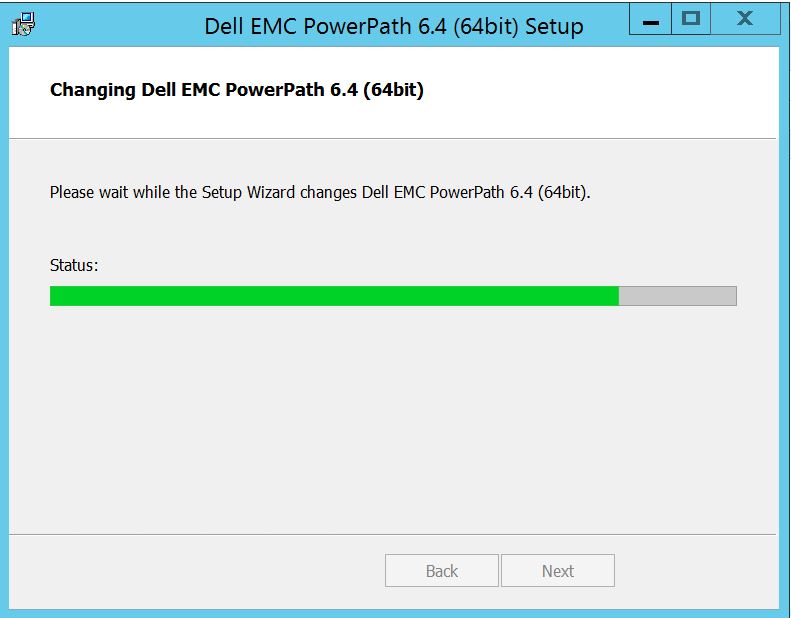
Bericht dat u dit zou moeten zien, waar u "Voltooien"
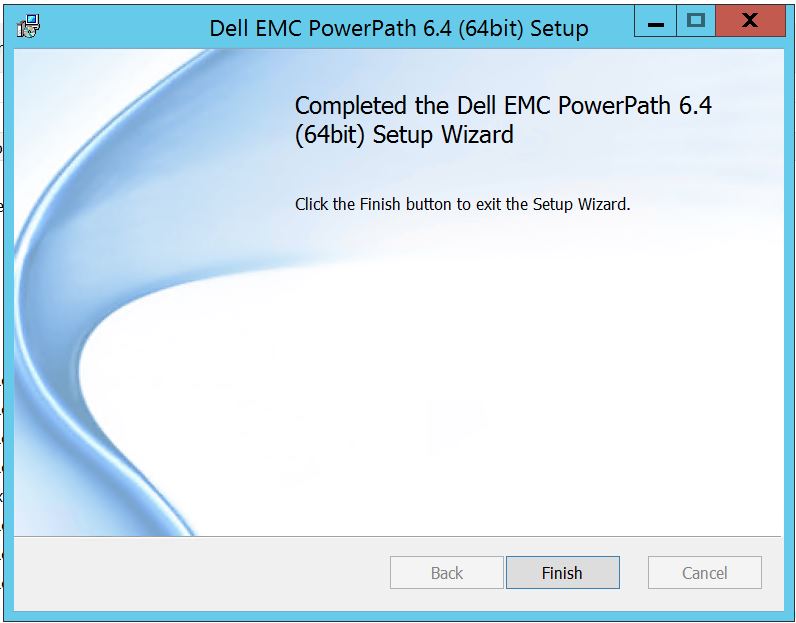 kunt selecteren Nadat voltooid, krijgt u een pop-up waarin u wordt gevraagd om opnieuw op te starten, selecteer om de server opnieuw op te starten Aangezien de wijzigingen moeten worden geïmplementeerd op serverniveau, worden de schijven van de storage-array zichtbaar in PowerPath.
Na het opnieuw opstarten wanneer u powermt-weergaveopties uitvoert, ziet de uitvoer er als volgt uit:
** POWERMT-WEERGAVEOPTIES **
CLARiiON LUN-namen weergeven: True
Path Latentiemonitor: Off
Persist Path Information: On
Performance Monitor: uitgeschakeld
Autostandby: IOs per Failure (iopf): ingeschakelde
IOPF-verouderingsperiode: 1 D
IOPF-limiet: 6000
Storage
System Class Attributes
------------ ----------
Symmetrix periodic autorestore = on
reactive autorestore = on
status = managed
proximity based autostandby = off
auto host registration = enabled
app finger printing = enabled
device to array performance report = enabled
device in use to array report = enabled
CLARiiON periodic autorestore = on
reactive autorestore = on
status = managed
proximity based autostandby = N/A
auto host registration = disabled
app finger printing = N/A
device to array performance report = N/A
device in use to array report = N/A
Invista periodic autorestore = on
reactive autorestore = on
status = managed
proximity based autostandby = N/A
auto host registration = N/A
app finger printing = N/A
device to array performance report = N/A
device in use to array report = N/A
Hitachi periodic autorestore = on
reactive autorestore = on
status = unmanaged
proximity based autostandby = N/A
auto host registration = N/A
app finger printing = N/A
device to array performance report = N/A
device in use to array report = N/A
HP xp periodic autorestore = on
reactive autorestore = on
status = unmanaged
proximity based autostandby = N/A
auto host registration = N/A
app finger printing = N/A
device to array performance report = N/A
device in use to array report = N/A
Ess periodic autorestore = on
reactive autorestore = on
status = unmanaged
proximity based autostandby = N/A
auto host registration = N/A
app finger printing = N/A
device to array performance report = N/A
device in use to array report = N/A
Generic periodic autorestore = on
reactive autorestore = on
status = managed
proximity based autostandby = N/A
auto host registration = N/A
app finger printing = N/A
device to array performance report = N/A
device in use to array report = N/A
VPLEX periodic autorestore = on
reactive autorestore = on
status = managed
proximity based autostandby = on
proximity based autostandby threshold = default
auto host registration = N/A
app finger printing = N/A
device to array performance report = N/A
device in use to array report = N/A
VNX periodic autorestore = on
reactive autorestore = on
status = managed
proximity based autostandby = N/A
auto host registration = disabled
app finger printing = N/A
device to array performance report = N/A
device in use to array report = N/A
NetApp periodic autorestore = on
reactive autorestore = on
status = unmanaged
proximity based autostandby = N/A
auto host registration = N/A
app finger printing = N/A
device to array performance report = N/A
device in use to array report = N/A
XtremIO periodic autorestore = on
reactive autorestore = on
status = managed
proximity based autostandby = N/A
auto host registration = N/A
app finger printing = N/A
device to array performance report = N/A
device in use to array report = N/A
Unity periodic autorestore = on
reactive autorestore = on
status = managed
proximity based autostandby = N/A
auto host registration = disabled
app finger printing = N/A
device to array performance report = N/A
device in use to array report = N/A
SC periodic autorestore = on
reactive autorestore = on
status = managed
proximity based autostandby = N/A
auto host registration = N/A
app finger printing = N/A
device to array performance report = N/A
device in use to array report = N/A
Hier is een scenario waarin de klant schijven van de Symmetrix Storage-array heeft gepresenteerd en heeft gemeld dat ze na de upgrade geen schijven in PowerPath kunnen detecteren.
De uitgang van de " powermt display options " toont:
** POWERMT-WEERGAVEOPTIES **
CLARiiON LUN-namen weergeven: True
Path Latentiemonitor: Off
Persist Path Information: On
Performance Monitor: uitgeschakeld
Autostandby: IOs per Failure (iopf): ingeschakelde
IOPF-verouderingsperiode: 1 D
IOPF-limiet: 6000
Auto Host Registration: disabled
Storage
System Class Attributes
------------ ----------
Symmetrix periodic autorestore = on
reactive autorestore = on
status = unmanaged
proximity based autostandby = on
proximity based autostandby threshold = default
CLARiiON periodic autorestore = on
reactive autorestore = on
status = unmanaged
proximity based autostandby = N/A
Invista periodic autorestore = on
reactive autorestore = on
status = managed
proximity based autostandby = N/A
Hitachi periodic autorestore = on
reactive autorestore = on
status = unmanaged
proximity based autostandby = N/A
HP xp periodic autorestore = on
reactive autorestore = on
status = unmanaged
proximity based autostandby = N/A
Ess periodic autorestore = on
reactive autorestore = on
status = unmanaged
proximity based autostandby = N/A
Generic periodic autorestore = on
reactive autorestore = on
status = managed
proximity based autostandby = N/A
VPLEX periodic autorestore = on
reactive autorestore = on
status = managed
proximity based autostandby = on
proximity based autostandby threshold = default
VNX periodic autorestore = on
reactive autorestore = on
status = unmanaged
proximity based autostandby = N/A
NetApp periodic autorestore = on
reactive autorestore = on
status = unmanaged
proximity based autostandby = N/A
XtremIO periodic autorestore = on
reactive autorestore = on
status = managed
proximity based autostandby = N/A
Unity periodic autorestore = on
reactive autorestore = on
status = unmanaged
proximity based autostandby = N/A
SC periodic autorestore = on
reactive autorestore = on
status = managed
proximity based autostandby = off
Notice how some of the storage array and especially Symmetrix here is "unmanaged"
Here are the steps along with the screenshot from our lab server , how to make it "Managed"
Open Control Panel :
Selecteer programma en onderdelen
Selecteer PowerPath en kies wijzigen/wijzigen om de prompt van het installatieprogramma te openen:
Klik op Volgende en volg de geselecteerde wijziging:
die u naar aangepaste instellingen brengt:
U kunt nu de ondersteuning voor de storage-array uitbreiden, als dit nog niet het geval is, en ook Dell EMC storage-arrays uitbreiden, waarin alle storage-arrays worden weergegeven die worden ondersteund onder PowerPath:
Dan kunt u de kleine downkey in de buurt van een van de storage verder gebruiken. Laten we hier als voorbeeld Symmetrix nemen. Het toont verder 2 opties:
1. Wordt geïnstalleerd op lokale harde schijf
2. De volledige functie wordt geïnstalleerd op de lokale harde schijf
Als u wilt dat alle Dell EMC storage-arrays worden beheerd (wat in wezen de standaardinstelling is),
kunt u hetzelfde doen in de vervolgkeuzelijst Dell EMC storage-array:
Eenmaal voltooid Selecteer volgende
Klik op Wijzigen om de noodzakelijke wijzigingen te voltooien:
Bericht dat u dit zou moeten zien, waar u "Voltooien"
kunt selecteren Nadat voltooid, krijgt u een pop-up waarin u wordt gevraagd om opnieuw op te starten, selecteer om de server opnieuw op te starten Aangezien de wijzigingen moeten worden geïmplementeerd op serverniveau, worden de schijven van de storage-array zichtbaar in PowerPath.
Na het opnieuw opstarten wanneer u powermt-weergaveopties uitvoert, ziet de uitvoer er als volgt uit:
** POWERMT-WEERGAVEOPTIES **
CLARiiON LUN-namen weergeven: True
Path Latentiemonitor: Off
Persist Path Information: On
Performance Monitor: uitgeschakeld
Autostandby: IOs per Failure (iopf): ingeschakelde
IOPF-verouderingsperiode: 1 D
IOPF-limiet: 6000
Storage
System Class Attributes
------------ ----------
Symmetrix periodic autorestore = on
reactive autorestore = on
status = managed
proximity based autostandby = off
auto host registration = enabled
app finger printing = enabled
device to array performance report = enabled
device in use to array report = enabled
CLARiiON periodic autorestore = on
reactive autorestore = on
status = managed
proximity based autostandby = N/A
auto host registration = disabled
app finger printing = N/A
device to array performance report = N/A
device in use to array report = N/A
Invista periodic autorestore = on
reactive autorestore = on
status = managed
proximity based autostandby = N/A
auto host registration = N/A
app finger printing = N/A
device to array performance report = N/A
device in use to array report = N/A
Hitachi periodic autorestore = on
reactive autorestore = on
status = unmanaged
proximity based autostandby = N/A
auto host registration = N/A
app finger printing = N/A
device to array performance report = N/A
device in use to array report = N/A
HP xp periodic autorestore = on
reactive autorestore = on
status = unmanaged
proximity based autostandby = N/A
auto host registration = N/A
app finger printing = N/A
device to array performance report = N/A
device in use to array report = N/A
Ess periodic autorestore = on
reactive autorestore = on
status = unmanaged
proximity based autostandby = N/A
auto host registration = N/A
app finger printing = N/A
device to array performance report = N/A
device in use to array report = N/A
Generic periodic autorestore = on
reactive autorestore = on
status = managed
proximity based autostandby = N/A
auto host registration = N/A
app finger printing = N/A
device to array performance report = N/A
device in use to array report = N/A
VPLEX periodic autorestore = on
reactive autorestore = on
status = managed
proximity based autostandby = on
proximity based autostandby threshold = default
auto host registration = N/A
app finger printing = N/A
device to array performance report = N/A
device in use to array report = N/A
VNX periodic autorestore = on
reactive autorestore = on
status = managed
proximity based autostandby = N/A
auto host registration = disabled
app finger printing = N/A
device to array performance report = N/A
device in use to array report = N/A
NetApp periodic autorestore = on
reactive autorestore = on
status = unmanaged
proximity based autostandby = N/A
auto host registration = N/A
app finger printing = N/A
device to array performance report = N/A
device in use to array report = N/A
XtremIO periodic autorestore = on
reactive autorestore = on
status = managed
proximity based autostandby = N/A
auto host registration = N/A
app finger printing = N/A
device to array performance report = N/A
device in use to array report = N/A
Unity periodic autorestore = on
reactive autorestore = on
status = managed
proximity based autostandby = N/A
auto host registration = disabled
app finger printing = N/A
device to array performance report = N/A
device in use to array report = N/A
SC periodic autorestore = on
reactive autorestore = on
status = managed
proximity based autostandby = N/A
auto host registration = N/A
app finger printing = N/A
device to array performance report = N/A
device in use to array report = N/A
Affected Products
PowerPath for WindowsProducts
PowerPath for WindowsArticle Properties
Article Number: 000158477
Article Type: How To
Last Modified: 17 أكتوبر 2025
Version: 4
Find answers to your questions from other Dell users
Support Services
Check if your device is covered by Support Services.